


Conflict Detection
On this page
In this lesson, you will learn:
- What conflict detection checks
- The kinds of conflict
- How to read the Conflicts list
- How to test and fix a conflict
🔁 Quick look back: Last time: Maintenance Windows and Blackout Schedules. You learned how maintenance windows allow changes and blackout schedules block them.
1 Two changes, one server
Two engineers plan work on snwr-vpn-gw-01 for the same night.
- One is replacing the certificate.
- The other is updating the software.
- Neither knows about the other.
👉 The fix: let ServiceNow check every change for conflicts before it’s approved.
2 What it checks
Key term: Conflict detection
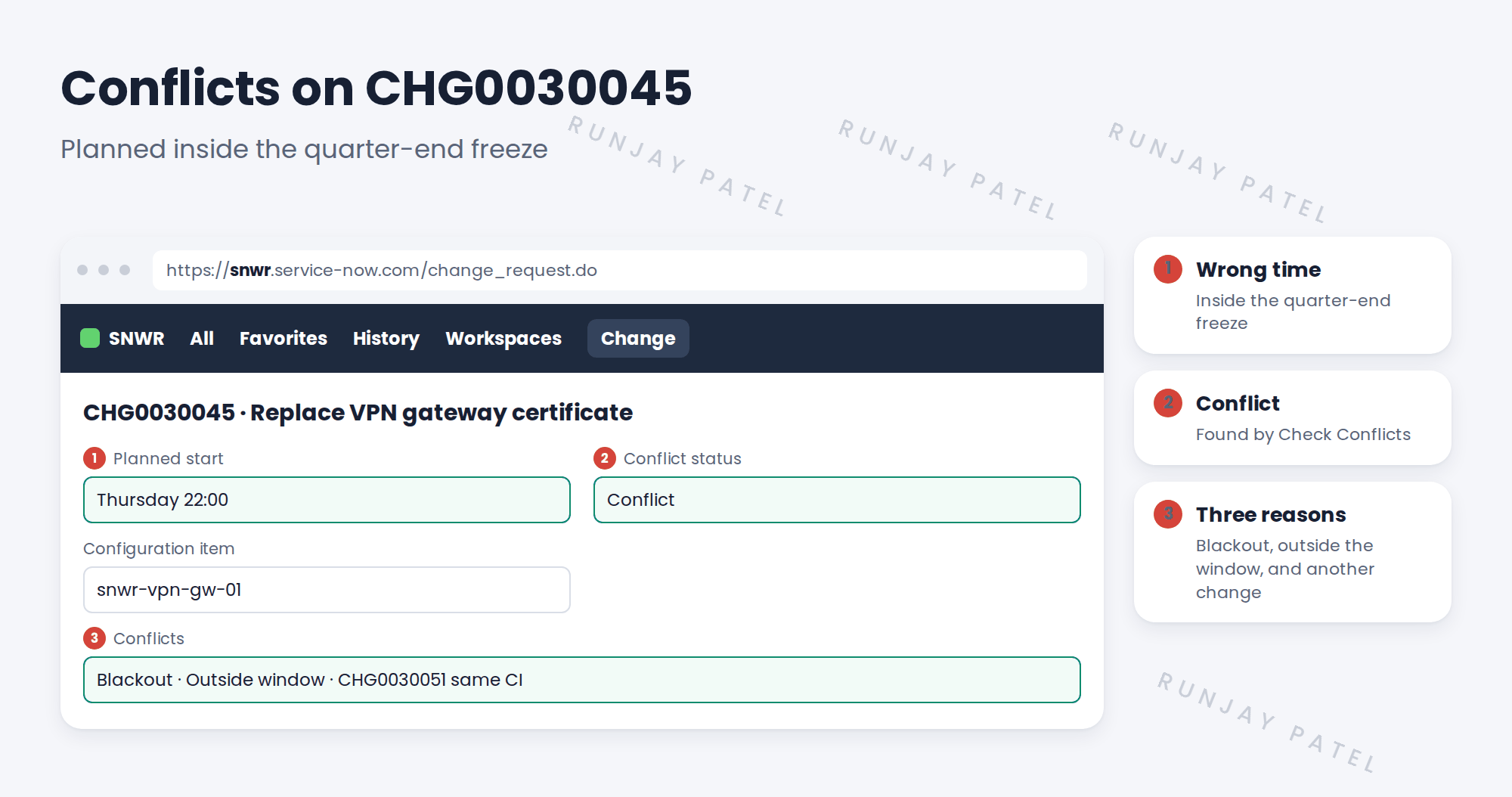
ServiceNow checks a change’s planned dates against blackouts, maintenance windows and other changes.
Key term: Conflict status
A field on the change: No conflict, or Conflict.
| Conflict | Means |
|---|---|
| Blackout | The change is planned during a blackout |
| Outside maintenance window | The change isn’t inside the CI’s maintenance window |
| Same CI already scheduled | Another change touches the same CI at the same time |
3 Fixing a conflict
- Read each conflict in the Conflicts list.
- Move the change to the next maintenance window after the freeze.
- Talk to the owner of the other change, and agree an order.
- Run the conflict check again. It should say No conflict.
💡 Good to know: Check conflicts before sending a change for approval. CAB doesn’t want to see changes with open conflicts.
4 Let’s try it: test a conflict
- Open a normal change on the CI with the Sunday maintenance window.
- Set the planned dates inside your quarter-end freeze. Save.
- Use Check Conflicts. Read the Conflicts related list.
- Move the dates to Sunday 02:00 to 04:00 after the freeze. Check again.
- Check the conflict status is now No conflict.
5 Quick recap
- Conflict detection checks dates against blackouts, windows and other changes
- Three conflicts: blackout, outside window, same CI
- Read the Conflicts list and fix each one
- Move to the next window and agree an order
- Check conflicts before approval
6 Check yourself
Think of your answer first. Then tap to check.
1 Name the three kinds of conflict. Show answer
Blackout, outside the maintenance window, and the same CI already scheduled.
2 Where do you see the reasons for a conflict? Show answer
In the Conflicts related list on the change.
3 How did SNWR fix CHG0030045’s conflicts? Show answer
Moved it to the next Sunday window after the freeze, and agreed an order with the other change.
4 When should conflicts be checked? Show answer
Before the change goes for approval.
Nice work! You tested conflict detection. 🎉
Next up: The Change Schedule
Was this lesson helpful?
Please log in to share lesson feedback.
Have a question or doubt?
Ask here and get help from instructors and fellow learners.
Only logged-in learners can post.





