


Running a CAB Meeting in CAB Workbench
On this page
In this lesson, you will learn:
- The parts of CAB Workbench
- How an agenda item is handled
- How decisions and notes are recorded
- How to test a CAB meeting
🔁 Quick look back: Last time: CAB Definitions and Meetings. You learned how a CAB definition sets the chair, members, schedule and agenda rules.
1 “We ran out of time again”
Last week’s CAB lasted two hours.
- The first change took 40 minutes.
- The last three were approved in a rush.
- Nobody wrote down why one change was rejected.
👉 The fix: run CAB in CAB Workbench: a timer for each item, and decisions saved on the change.
2 Inside CAB Workbench
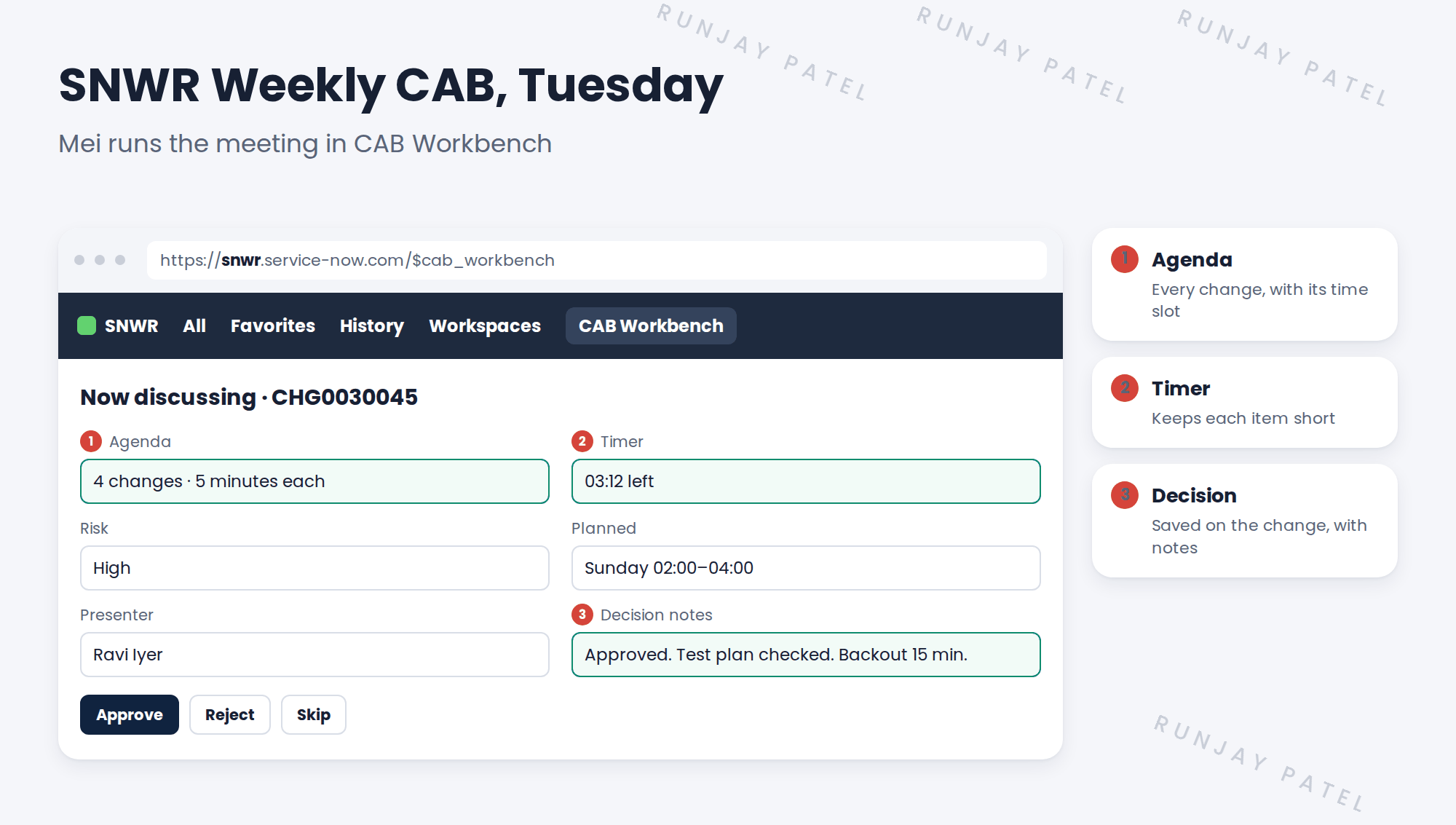
3 How each item runs
- Mei opens the item. The change details show for everyone.
- Ravi presents: what, why, risk and backout.
- Members ask questions. The timer runs.
- Mei records the decision: Approve, Reject or move to next week.
- The decision and notes are saved on the change.
💡 Good to know: Ask every presenter the same three questions: What if it fails? How do you undo it? Who is told?
⚠️ Heads up: Never approve a change with open conflicts. Send it back to be fixed first.
4 Let’s try it: run a test CAB
- Make sure a High risk normal change is in Authorize, so it’s on your CAB’s agenda.
- Impersonate Mei Chen. Open CAB Workbench and open the next SNWR Weekly CAB meeting.
- Start the meeting. Open the first agenda item.
- Add decision notes and approve the change.
- End the meeting. Open the change and check the approval and notes are on it.
5 Quick recap
- CAB Workbench shows the agenda, a timer and the change details
- Each item: present, discuss, decide
- Decisions and notes are saved on the change
- Ask: what if it fails, how do you undo it, who is told?
- Don’t approve changes with open conflicts
6 Check yourself
Think of your answer first. Then tap to check.
1 What keeps each CAB item short? Show answer
The timer, for example 5 minutes each.
2 Where is Mei’s decision saved? Show answer
On the change, with her notes.
3 A change has open conflicts. Approve it? Show answer
No. Send it back to be fixed first.
4 Name one question to ask every presenter. Show answer
What if it fails? How do you undo it? Who is told?
Nice work! You tested a CAB meeting. 🎉
Next up: Change Properties and Closure Rules
Was this lesson helpful?
Please log in to share lesson feedback.
Have a question or doubt?
Ask here and get help from instructors and fellow learners.
Only logged-in learners can post.





