


Creating Problems from Incidents and Linking Them
On this page
In this lesson, you will learn:
- How to create a problem from an incident
- What copies across
- How to link more incidents to the problem
- When to use Awaiting Problem
🔁 Quick look back: Last time: Scoping Problem Management: Reactive and Proactive. You learned the difference between reactive and proactive problems, and SNWR’s rules for opening them.
1 Twelve incidents, one cause
Grace finds 12 VPN incidents this month.
- Each one is separate.
- Each agent writes the same notes.
- Nobody can see they’re all the same thing.
👉 The fix: create one problem, and link every related incident to it.
2 From incident to problem
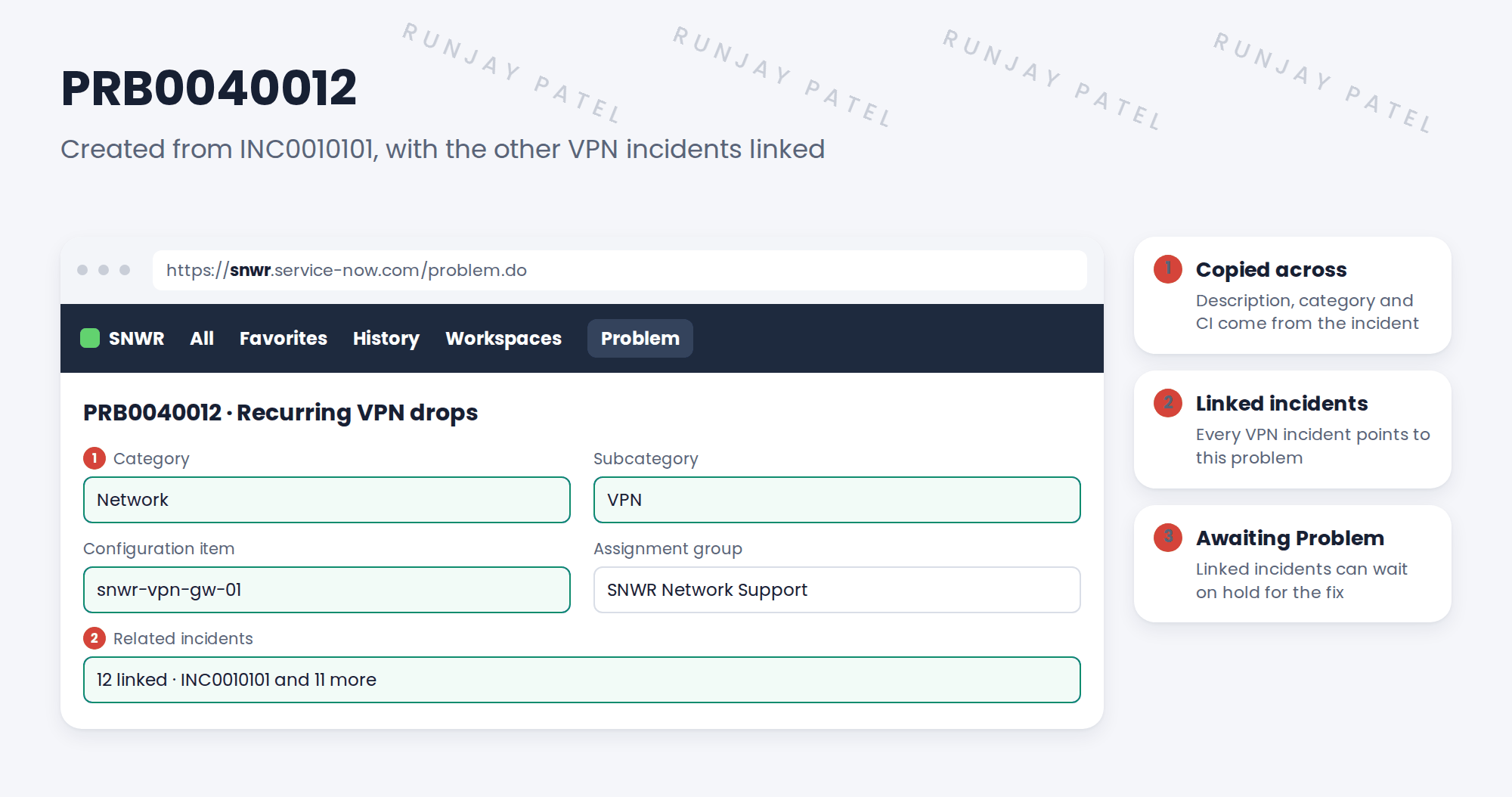
3 Awaiting Problem
Some linked incidents are still open, because the VPN still drops for those people. Abel sets them to On Hold with reason Awaiting Problem.
| Linked incident | What to do |
|---|---|
| Already resolved with a workaround | Leave it resolved. Just link it. |
| Still broken, no workaround | On Hold, Awaiting Problem |
| New one comes in | Apply the workaround, and link it |
💡 Good to know: When you set Awaiting Problem, add a comment for the caller: “We’re fixing the cause. We’ll update you.”
4 Let’s try it: create and link a problem
- Open a VPN incident on your PDI. Use Create Problem from the form menu (or the workspace).
- Check the new problem has the category, subcategory and CI from the incident.
- Create two more VPN incidents. In the problem’s Incidents related list, use Add to link them.
- Set one of them On Hold with reason Awaiting Problem.
- Open the problem and count the linked incidents.
5 Quick recap
- Create Problem from an incident copies key details across
- Link every related incident to the problem
- One problem gives the full picture
- Still-broken incidents wait with Awaiting Problem
- Tell callers why they’re waiting
6 Check yourself
Think of your answer first. Then tap to check.
1 How does Abel create a problem from his incident? Show answer
With Create Problem on the incident.
2 What copies across to the new problem? Show answer
Details like the short description, category, subcategory and CI.
3 An incident is still broken and has no workaround. Which hold reason? Show answer
Awaiting Problem.
4 Why link all 12 incidents? Show answer
So everyone sees they’re the same issue, and they’re fixed together.
Nice work! PRB0040012 is created and linked. 🎉
Next up: Problem Tasks: Root Cause Analysis
Was this lesson helpful?
Please log in to share lesson feedback.
Have a question or doubt?
Ask here and get help from instructors and fellow learners.
Only logged-in learners can post.





