


Legacy Catalog Tools
On this page
In this lesson, you will learn:
- The three older tools
- How to spot them on an item
- What replaces each
- What to do when you find one
🔁 Quick look back: Last time: Order Guides for New Joiners. You learned how the SNWR New joiner order guide orders several items at once, with rules.
1 “This item works differently”
SNWR’s sister company already uses ServiceNow.
- Their items were built years ago.
- Some have no flow, but still create tasks.
- The team doesn’t know where the steps are.
👉 The fix: learn to spot each older tool, and know what replaces it.
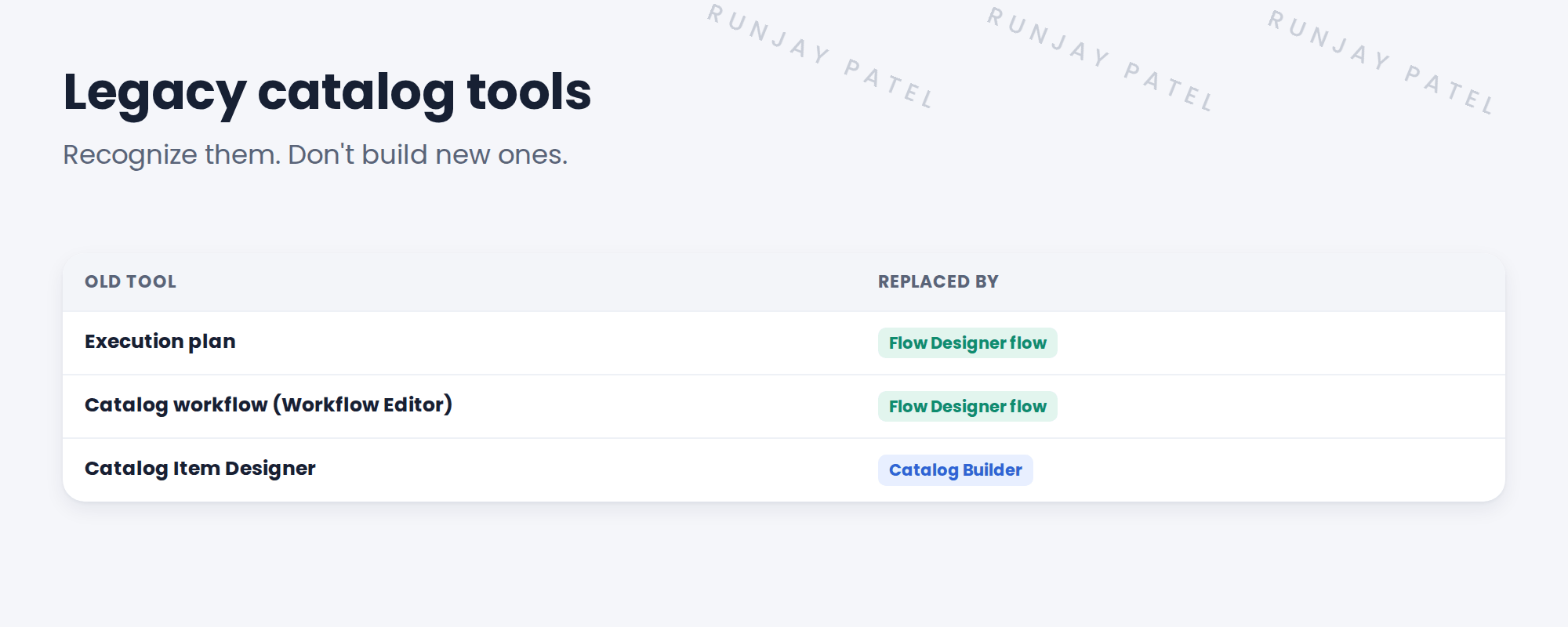
2 Old and new
3 How to spot them
| On the item, you see… | It uses |
|---|---|
| An Execution Plan field filled in | An execution plan |
| A Workflow field filled in | A catalog workflow |
| A Flow field filled in | A modern flow |
⭐ Remember: Don’t build new items with old tools. Move old items to flows when you next change them.
📝 Note: The Legacy tag means you only need to recognize these. SNWR builds everything new with flows and Catalog Builder.
4 Quick recap
- Execution plans and catalog workflows are older
- Both are replaced by Flow Designer flows
- Catalog Item Designer is replaced by Catalog Builder
- Check the item’s Flow, Workflow and Execution Plan fields
- Move old items to flows when you next change them
5 Check yourself
Think of your answer first. Then tap to check.
1 What replaces an execution plan? Show answer
A Flow Designer flow.
2 What replaces Catalog Item Designer? Show answer
Catalog Builder.
3 How do you tell which tool an item uses? Show answer
Check its Flow, Workflow and Execution Plan fields.
4 Should SNWR build new items with catalog workflows? Show answer
No. Use flows.
Nice work! You can spot older catalog tools. 🎉
Next up: Employee Center as the SNWR Front Door
Was this lesson helpful?
Please log in to share lesson feedback.
Have a question or doubt?
Ask here and get help from instructors and fellow learners.
Only logged-in learners can post.





