


What an ITSM Implementer Does
On this page
In this lesson, you will learn:
- The problem SNWR has today, and how ITSM implementation fixes it
- What an ITSM implementer does
- How an implementer’s job is different from an admin’s and a developer’s
- The phases of an ITSM rollout, and where each one happens
- The SNWR project you will follow in this course
🔁 Quick look back: In Fundamentals › ITSM Essentials, you learned what incidents, problems, changes and requests are. Now you’ll learn how to set them up for a real company.
1 A Monday morning at SNWR
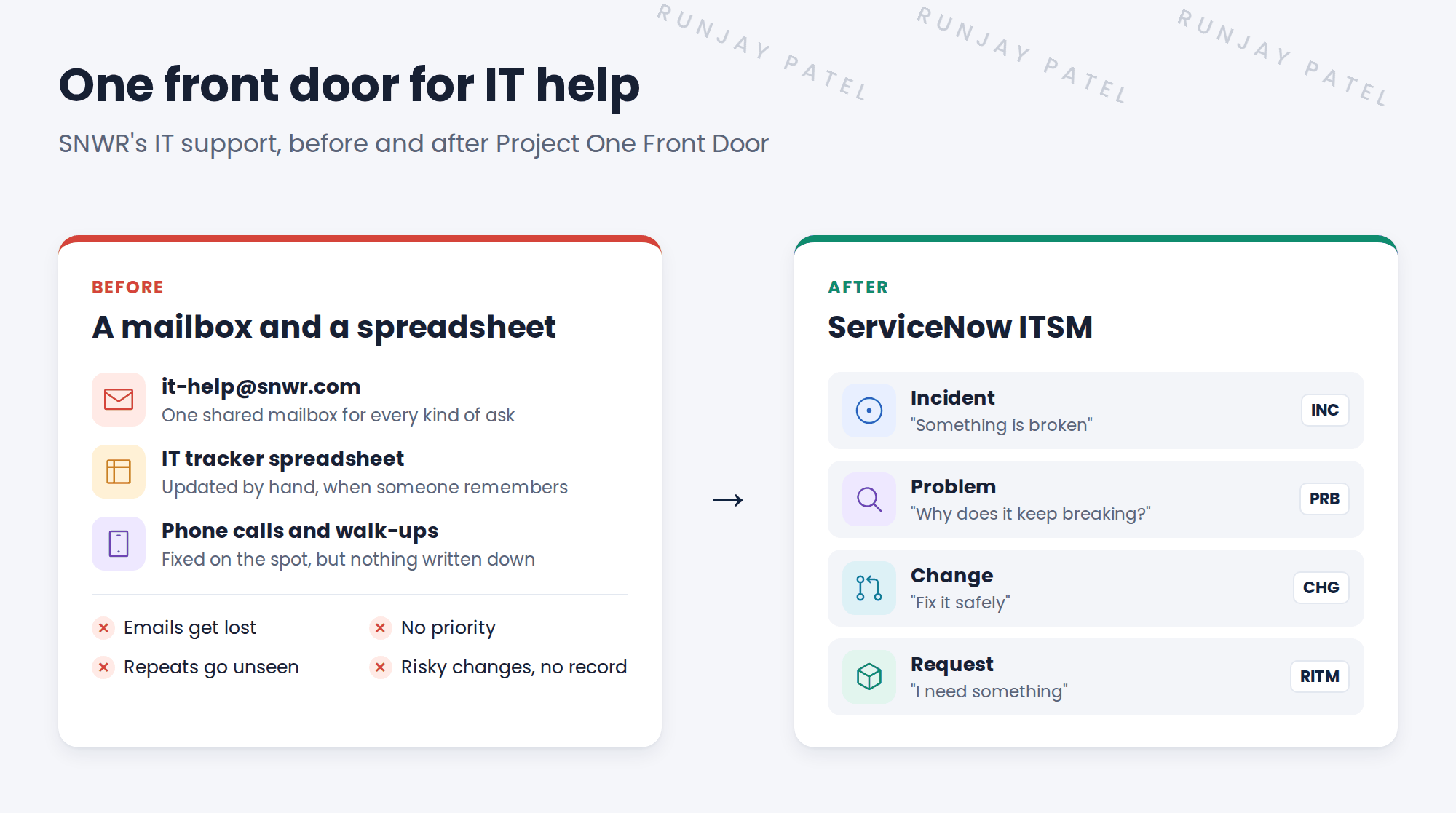
It’s 9:05 AM in Mumbai. Here’s what happens at SNWR on a normal Monday. 😩
- 9:05. Sam Lee’s VPN drops again. He emails [email protected]. His email lands under 200 others.
- 9:40. Company email stops working for the whole Mumbai office. Ten people email IT about it. Nobody knows who should fix it, so everyone waits.
- 11:30. Abel on the Service Desk finally finds Sam’s email and restarts his VPN. It works, for now.
- 2:00. A new joiner asks for a laptop. The request sits in the spreadsheet for a week.
- Friday, 10 PM. Someone changes a server to fix the email. Nobody wrote down who did it, or why. On Monday, something else breaks.
SNWR’s CIO, Anita Rao, has had enough. SNWR has bought ServiceNow ITSM, and she starts a project to set it up. It’s called Project One Front Door: one place where every employee goes for IT help.
2 How ITSM implementation fixes it
Buying ServiceNow doesn’t fix anything by itself. Someone has to set it up so it fits how SNWR works. Here’s how each pain goes away, and where in this course you’ll set it up:
| SNWR’s pain today | What you’ll set up, and where you’ll learn it |
|---|---|
| Emails get lost in the mailbox | Every ask becomes a record with its own number, from Employee Center, email, phone or chat. 📍 ITSM Experience |
| Nobody knows what’s urgent | Priority is worked out from impact and urgency, and SLAs start a clock. 📍 Incident Configuration, Incident Operations |
| Work waits because nobody knows who owns it | Assignment groups and rules send work to the right team. 📍 Foundation Data, Incident Configuration |
| A whole office is down, and chaos follows | A major incident process, with on-call engineers and regular updates. 📍 Major Incidents |
| The same VPN problem keeps coming back | Problem management finds the root cause and fixes it for good. 📍 Problem Management |
| Risky changes with no plan or record | Every change has a type, a risk, an approval and a slot on the change schedule. 📍 Change Types, Change Risk, Change Approvals |
| Requests sit in a spreadsheet for a week | A service catalog, with approvals and fulfillment tasks for each item. 📍 Catalog Design, Request Fulfillment |
| Managers can’t see how IT is doing | Dashboards and KPIs, reviewed every month. 📍 Continual Improvement |
⭐ The goal of One Front Door:
- Every IT ask gets a number, and nothing gets lost
- Urgent issues reach the right team in minutes
- Problems that keep coming back get fixed for good
- No change happens without a plan and an approval
- Anita can see how IT is doing, any time
👉 Someone has to turn SNWR’s messy way of working into a working ServiceNow setup. That person is the ITSM implementer. In this course, that’s you!
3 What is ITSM implementation?
Key term: ITSM
IT Service Management. How a company’s IT team handles problems, requests and changes, from start to finish.
Key term: Implementation
The project that sets up a ServiceNow product for one company: its teams, its rules and its data, until people can use it every day.
Key term: Go-live
The day people stop using the old way and start using ServiceNow for real.
You already know the ITSM processes, like incident, problem and change, from Fundamentals. This course is about setting them up for a real company.
💡 Good to know: Need a refresher on the processes? See Fundamentals › ITSM Essentials › ITIL & ITSM Basics.
4 Admin, developer or implementer?
All three work on ServiceNow. But each one asks a different question.
| Role | Main job, and the big question |
|---|---|
| Admin | Keeps the instance healthy: users, groups, roles, small fixes. “Is everything running well?” |
| Developer | Builds new apps, scripts and integrations. “What should we build?” |
| Implementer | Sets up an existing product, like ITSM, to fit how one company works. “How do we make this work for SNWR?” |
Implementers mostly configure what ServiceNow already has. They write code only when they really have to.
📝 Note: In real life, one person often wears two or three of these hats. Many implementers start out as admins.
5 What an implementer does all day
- 👂 ListenRun workshops. Find out how SNWR works today.
- 🛠️ ConfigureSet up ITSM to match. Start from the baseline.
- ✅ ProveTest it with the people who will use it.
On a normal day, an implementer might:
- Ask the Service Desk manager which incidents are most urgent
- Set up assignment groups, categories and SLAs
- Write down a design decision, and why it was made
- Show a process owner a demo, and fix what they don’t like
- Plan how to move the setup from one instance to the next
Key term: Baseline
How ServiceNow works “out of the box”, before anyone changes it.
Key term: Process owner
The person in charge of one process, like Incident or Change. They make the final call on how it should work.
⚠️ Golden rule: Stay close to the baseline. Every custom change makes future upgrades harder. In the “Stay close to baseline” lesson in Chapter 2, you’ll learn how to say “no” in a kind way.
6 How an ITSM rollout runs
One Front Door takes 12 weeks. It moves through six phases:
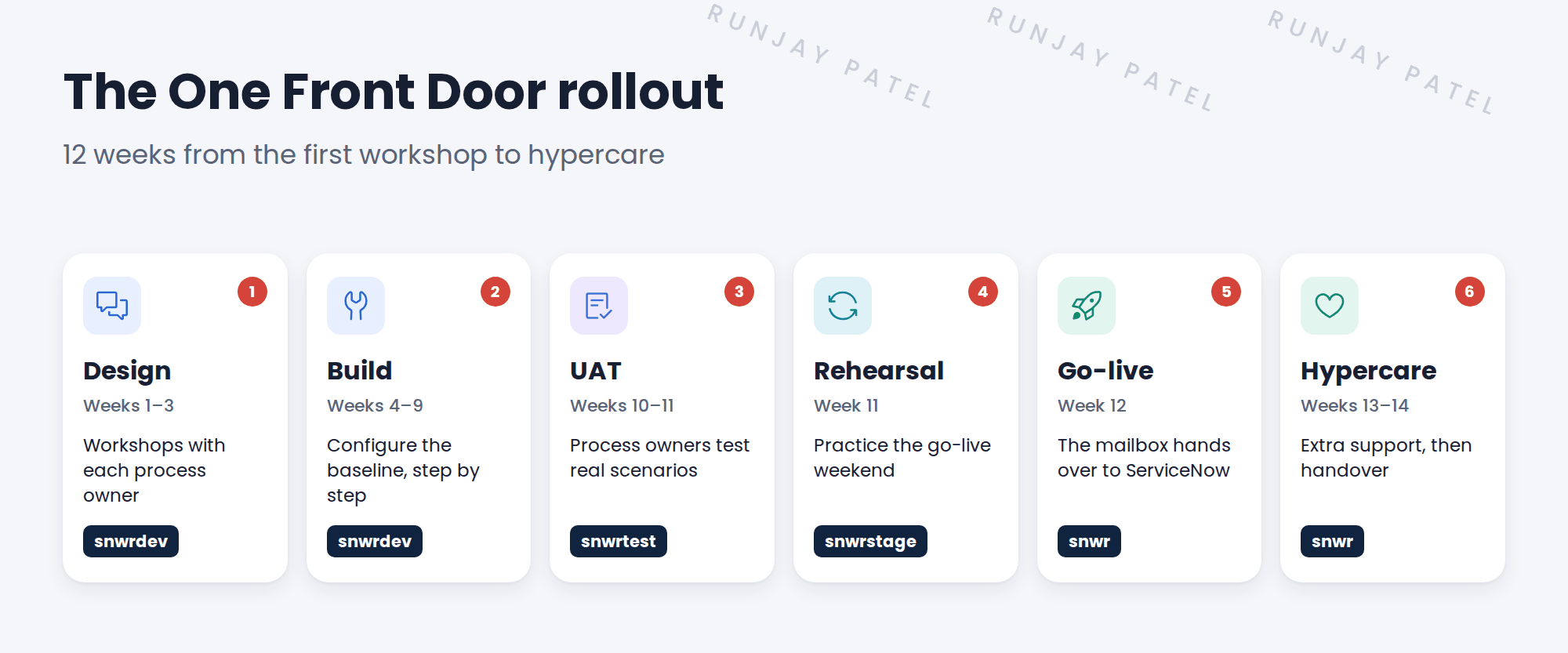
| Instance | Web address | What happens there |
|---|---|---|
| 🧪 Dev | snwrdev.service-now.com |
You design and build the ITSM setup |
| 🔍 Test | snwrtest.service-now.com |
Process owners test it (UAT) |
| 🎭 Stage | snwrstage.service-now.com |
The team rehearses the go-live weekend |
| 🏁 Prod | snwr.service-now.com |
Every SNWR employee uses it after go-live |
Key term: UAT
User acceptance testing. The people who will use ITSM try it and say “yes, this works for us”.
Key term: Hypercare
The first weeks after go-live, when the project team gives extra support and fixes problems fast.
📝 Note: In this course, you work on your own PDI. Think of it as your personal snwrdev. Need one? See Fundamentals › ServiceNow Instance › Getting Your PDI.
7 Meet the One Front Door team
These people come back again and again in this course:
- 👩💼 Anita Rao
CIO and project sponsor. She decides what matters most. - 🎧 Daniel Okafor
Service Desk manager. Owns Incident and major incidents. - 🔎 Grace Mensah
Problem manager. Finds out why things keep breaking. - 🗓️ Mei Chen
Change manager. Chairs the CAB, the change board. - 🛒 Lucas Ferreira
Service Catalog manager. Owns requests. - 🗄️ Hana Kim
Configuration manager. Owns the CMDB data. - ⚙️ Riya Sharma
Platform owner. Runs ServiceNow after go-live. - 🙋 Abel Tuter
Service Desk agent. Works tickets every day. - 🌐 Ravi Iyer
Network engineer. Fixes VPN and network issues. - ✍️ Beth Anglin
IT manager. Approves requests and changes. - 💻 Sam Lee
Employee in Marketing, Mumbai HQ. Needs IT help. - 🧭 You
ITSM implementer. You set it all up!
That’s you! 💪
8 The story you will follow
One problem runs through the whole course. Sam’s VPN keeps dropping. You will follow it from his first call to the final fix:
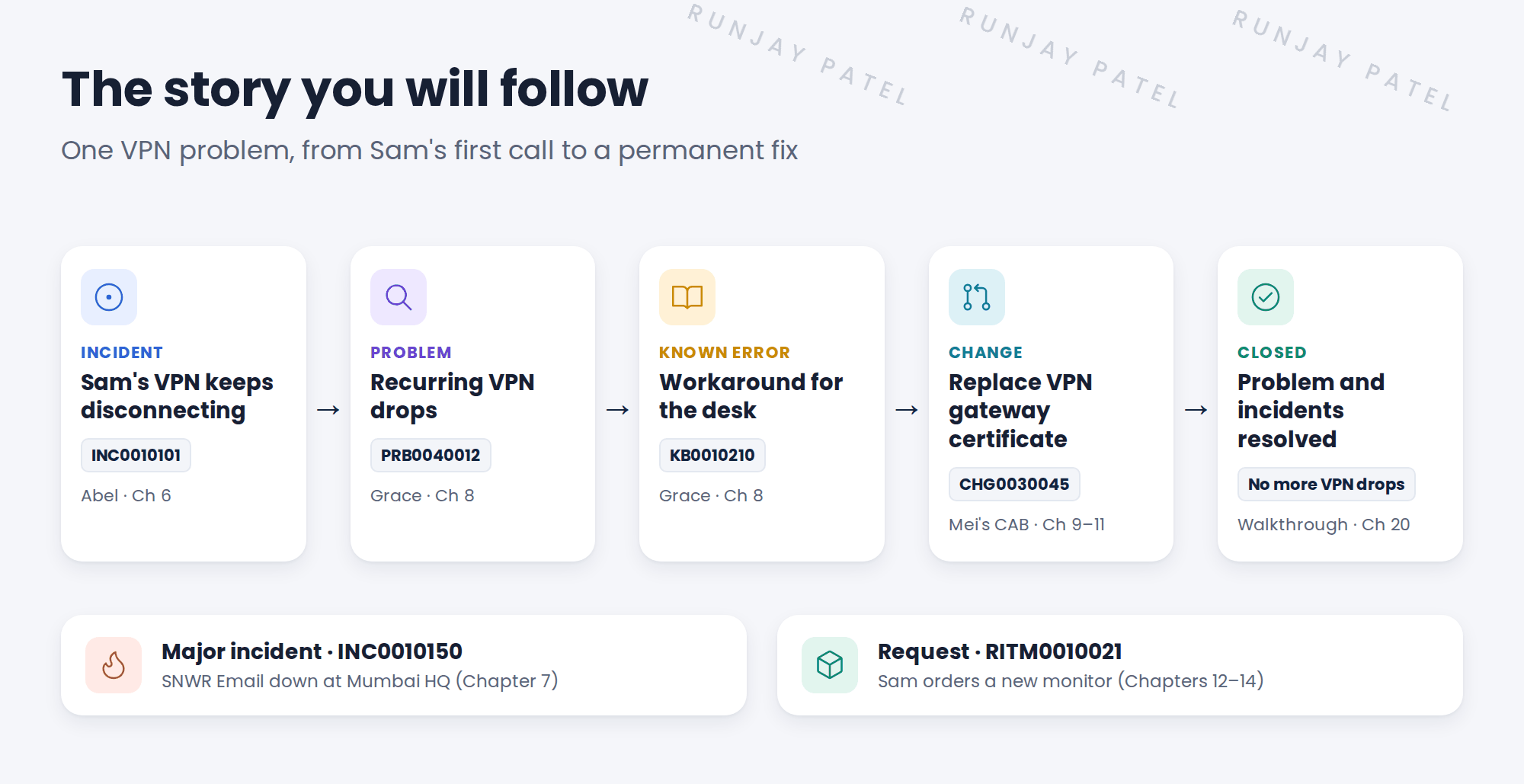
Along the way, SNWR Email goes down for a whole office, and Sam orders a new monitor. Each one teaches a different part of ITSM.
9 Before you start
This course starts where SNWR ServiceNow Fundamentals ends. You learn the platform there, and how to implement ITSM here. Make sure you have:
- Finished Fundamentals, both Basic and Advanced
- A PDI where you are an admin
- A good feel for incidents, problems and changes (Fundamentals › ITSM Essentials)
- A first look at the Service Catalog and SLAs (Fundamentals › Service Catalog and SLA Management)
💡 Good to know: SNWR bought the ITSM Advanced package. A few newer features need a higher package. When a lesson uses one, you’ll see a note. You’ll look at that feature, but you won’t build it.
⭐ Remember: An implementer listens, configures and proves. Code comes last.
10 Quick recap
- SNWR’s problem: IT help has no front door, so work is lost, slow and unplanned
- An ITSM implementer sets up ServiceNow ITSM to fit how one company works
- Admins keep ServiceNow running, developers build new apps, implementers set up products
- Implementers listen, configure and prove, and stay close to the baseline
- A rollout runs Design, Build, UAT, Rehearsal, Go-live and Hypercare
- Build on
snwrdev, test onsnwrtest, rehearse onsnwrstage, go live onsnwr - You will follow Project One Front Door through the whole course
11 Check yourself
Think of your answer first. Then tap to check.
1 What is the main job of an ITSM implementer? Show answer
To set up ServiceNow ITSM so it fits how one company works, and get people using it.
2 The same VPN problem keeps coming back at SNWR. Which ITSM process fixes it for good? Show answer
Problem management. It finds the root cause, so the incidents stop coming back.
3 What does “stay close to the baseline” mean? Show answer
Use what ServiceNow already offers wherever you can, and customize only when there is a real need. That keeps upgrades easy.
4 In which phase do process owners test the setup, and on which instance? Show answer
UAT, on snwrtest.
5 What is hypercare? Show answer
The first weeks after go-live, when the project team gives extra support and fixes problems fast.
6 Who makes the final call on how the Change process should work at SNWR? Show answer
Mei Chen, the Change process owner. The implementer advises, but the process owner decides.
Nice work! You finished your first ITSM lesson. 🎉
Next up: ITSM Packages, Entitlements and Feature Availability
Was this lesson helpful?
Please log in to share lesson feedback.
Have a question or doubt?
Ask here and get help from instructors and fellow learners.
Only logged-in learners can post.





