


What Is an Instance?
On this page
In this lesson, you will learn:
- What an instance really is and what’s inside it
- How to read an instance web address
- Why every company gets its own separate instance
- Where instances live and how they stay safe
1 Quick look back
In Lesson 1.1, you learned that an instance is a company’s own copy of ServiceNow. You also got your own free one, your PDI.
In this chapter, we look at instances more closely. First question: what exactly is inside one? 🤔
2 What is an instance?
Key term: Instance
One complete, running copy of ServiceNow for one company. It has its own web address, its own data, and its own settings.
Every instance has 4 main parts:
- ⚙️ Applicationthe ServiceNow software itself
- 🗄️ Databaseall the tables and records
- 🛠️ Settingsevery change the admins made
- 👥 Usersthe people who can log in
- 🌐 Web addresshow people reach it
- ☁️ Cloud homeServiceNow’s data centers
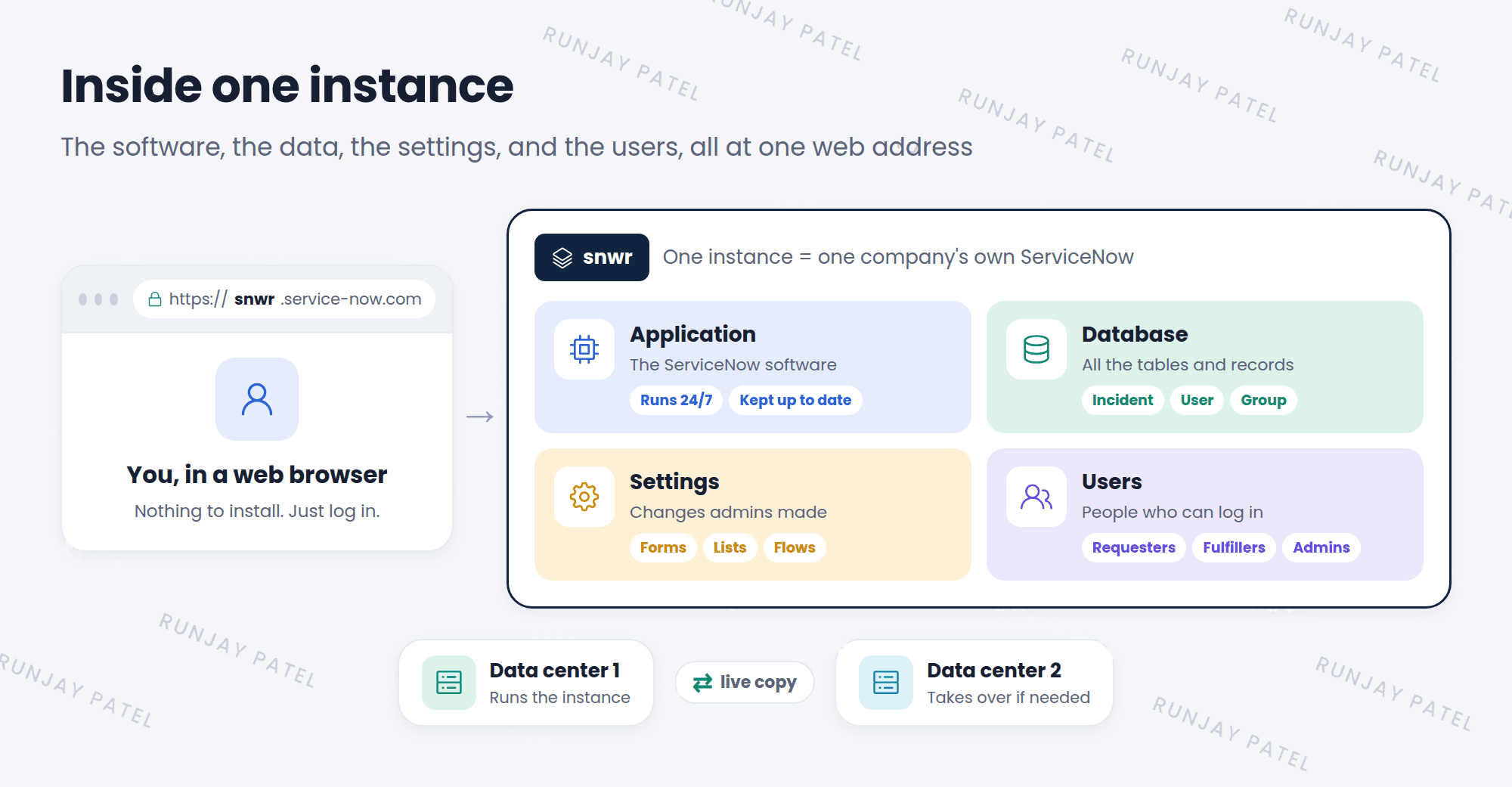
⭐ Remember: When an admin changes something, the change is saved in that instance only. Other instances don’t see it.
3 Reading an instance address
Every instance has a web address (URL). It always looks like this:
| Part | What it means |
|---|---|
https:// |
A safe, locked connection. Your data is scrambled while it travels. 🔒 |
snwr |
The instance name. This part is different for every instance. |
.service-now.com |
Shows that ServiceNow hosts it. This part is the same for everyone. |
Some examples:
https://snwr.service-now.comSNWR’s real instancehttps://snwrdev.service-now.comSNWR’s instance for building changeshttps://dev12345.service-now.coma PDI, like yours
📝 Note: Some companies also set up a friendly address, like help.snwr.com. It still opens the same instance behind the scenes.
4 Every company gets its own instance
Many online apps put all their customers in one shared system. ServiceNow does it differently. Let’s compare:
- 🏢 Apartment building (shared)
Everyone lives in one building. They share walls, pipes, and the lift. If the lift breaks, everyone waits. This is called multi-tenant. - 🏡 Row of houses (ServiceNow)
Each family has its own house. They can paint it, fix it, and change it without bothering the neighbours. This is called multi-instance.
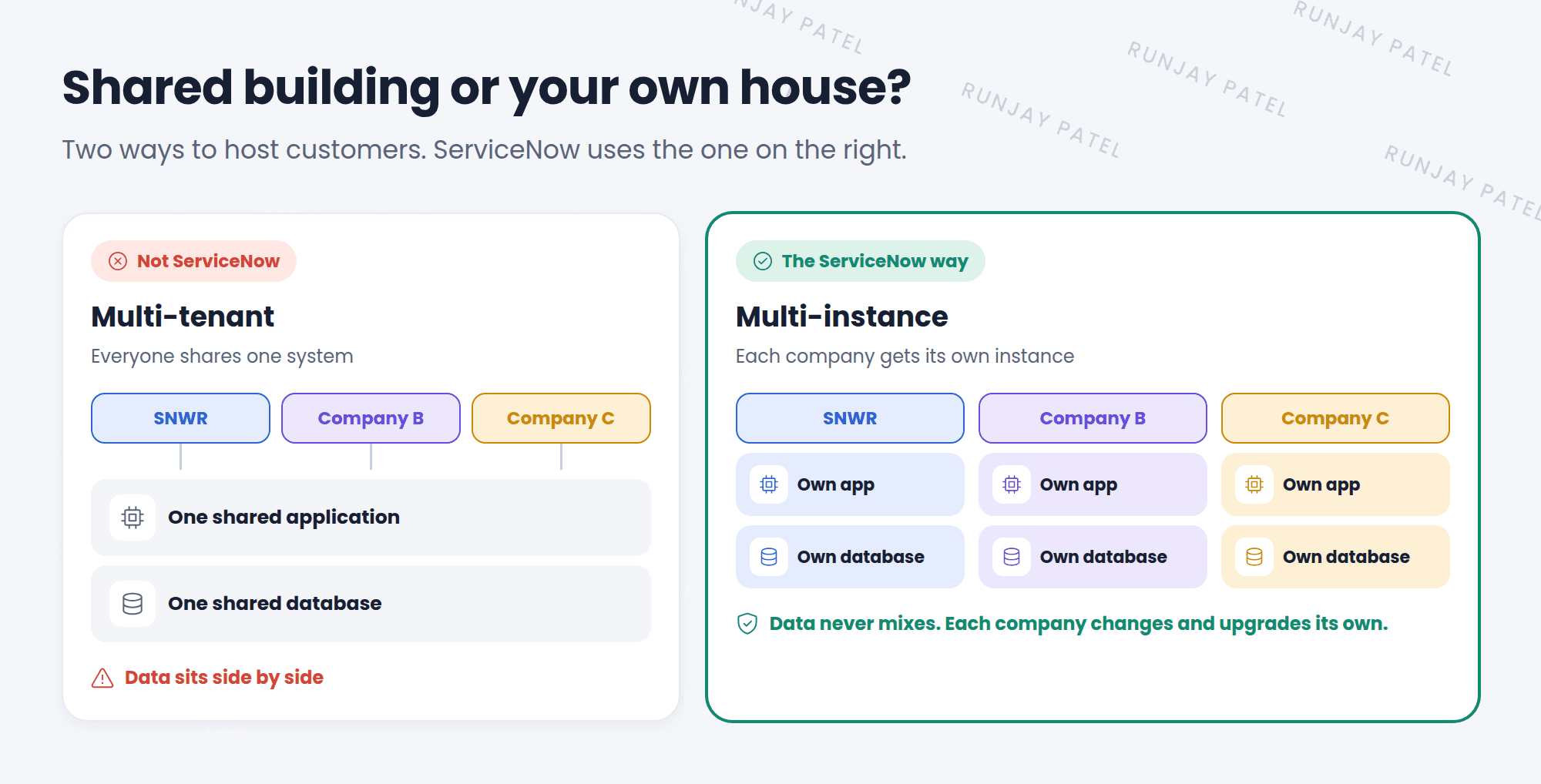
Key term: Multi-instance
Each customer gets its own instance with its own database. This is how ServiceNow works.
Key term: Multi-tenant
Many customers share one system and one database. ServiceNow does not work this way.
Why does ServiceNow do it this way?
- Your data stays yours. It is never mixed with another company’s data.
- You can change it. Your settings don’t affect anyone else.
- You pick when to upgrade. Each company upgrades its own instance on its own plan.
⚠️ Exam alert: A common trick question says “ServiceNow is a single-instance, multi-tenant platform.” That’s false. ServiceNow uses a multi-instance design.
5 Where does an instance live?
Your instance lives in the cloud. That means it runs on ServiceNow’s computers in big buildings called data centers, not on your laptop.
- ServiceNow runs data centers in many parts of the world.
- A company’s instance usually lives in a data center in its own part of the world.
- ServiceNow keeps a live copy of each production instance in a second data center.
- If one data center has a problem, the instance keeps running from the other one. ✅
💡 Good to know: Because ServiceNow runs the computers, admins don’t install software, buy servers, or apply security patches. ServiceNow does that part. Admins focus on setting up the instance for their company.
6 One company, many instances
Most companies have more than one instance. In Lesson 1.1, you met Dev, Test, and Prod. Each one is a separate instance with its own address and its own database.
📝 Note: Because they are separate, a change made in Dev does not show up in Prod by itself. Admins have to move it on purpose. You’ll learn how in the Advanced track (Update Sets). You’ll learn more about instance types in Lesson 2.3.
7 Let’s try it: look at your instance
- Log in to your PDI.
- Look at the address bar in your browser. Find your instance name (the part before
.service-now.com, likedev12345). Write it down. ✍️ - Now change the address to
https://your-instance-name.service-now.com/stats.doand press Enter. - A plain page opens with facts about your instance. Look for Build name. This is the ServiceNow version your instance runs.
- Press your browser’s back button to return to your instance.
📝 Note: The stats.do page is meant for admins. In your PDI, you’re the admin, so it opens. You’ll learn what the version names mean in Lesson 2.3.
8 Fun facts
- 🗄️ So many databases
Because every instance has its own database, ServiceNow looks after a huge number of databases for its customers. Many tens of thousands! - 🧪 Your PDI is a real instance
Your free PDI works just like a company’s instance. It has the same parts, only with fewer apps and no real company data.
9 Quick recap
- An instance is one complete copy of ServiceNow: the software, the database, the settings, and the users
- Its web address looks like
https://name.service-now.com. The middle part is the instance name - ServiceNow is multi-instance: every company gets its own instance and its own database
- Instances live in ServiceNow’s cloud data centers, with a live copy in a second data center
- A change in one instance doesn’t appear in another by itself
10 Check yourself
Think of your answer first. Then tap to check.
1 In https://snwrtest.service-now.com, what is the instance name? Show answer
snwrtest
2 True or false: ServiceNow puts all its customers into one shared database. Show answer
False. ServiceNow is multi-instance. Each customer has its own instance and its own database.
3 In the house example, which one is like ServiceNow: the apartment building or the row of houses? Show answer
The row of houses. Each company has its own instance.
4 You add a field to a form in Dev. Will users in Prod see it right away? Show answer
No. Dev and Prod are separate instances. The change must be moved to Prod on purpose.
5 What happens if the data center running a production instance has a problem? Show answer
The instance keeps running from the live copy in a second data center.
Nice work! You finished this lesson. 🎉
Was this lesson helpful?
Please log in to share lesson feedback.
Have a question or doubt?
Ask here and get help from instructors and fellow learners.
Only logged-in learners can post.





