


Creating Application Menus
On this page
In this lesson, you will learn:
- When to create your own application menu
- The fields on an application menu record
- How to create one, step by step
1 Your own menu
SNWR’s Facilities team has a few tables and lists they use every day. Instead of searching the All menu, they want one tidy group called SNWR Facilities. You can build it as an admin. 🏗️
Creating a new menu is configuring, not customizing, because you’re adding something new, not changing something ServiceNow made.
2 The fields
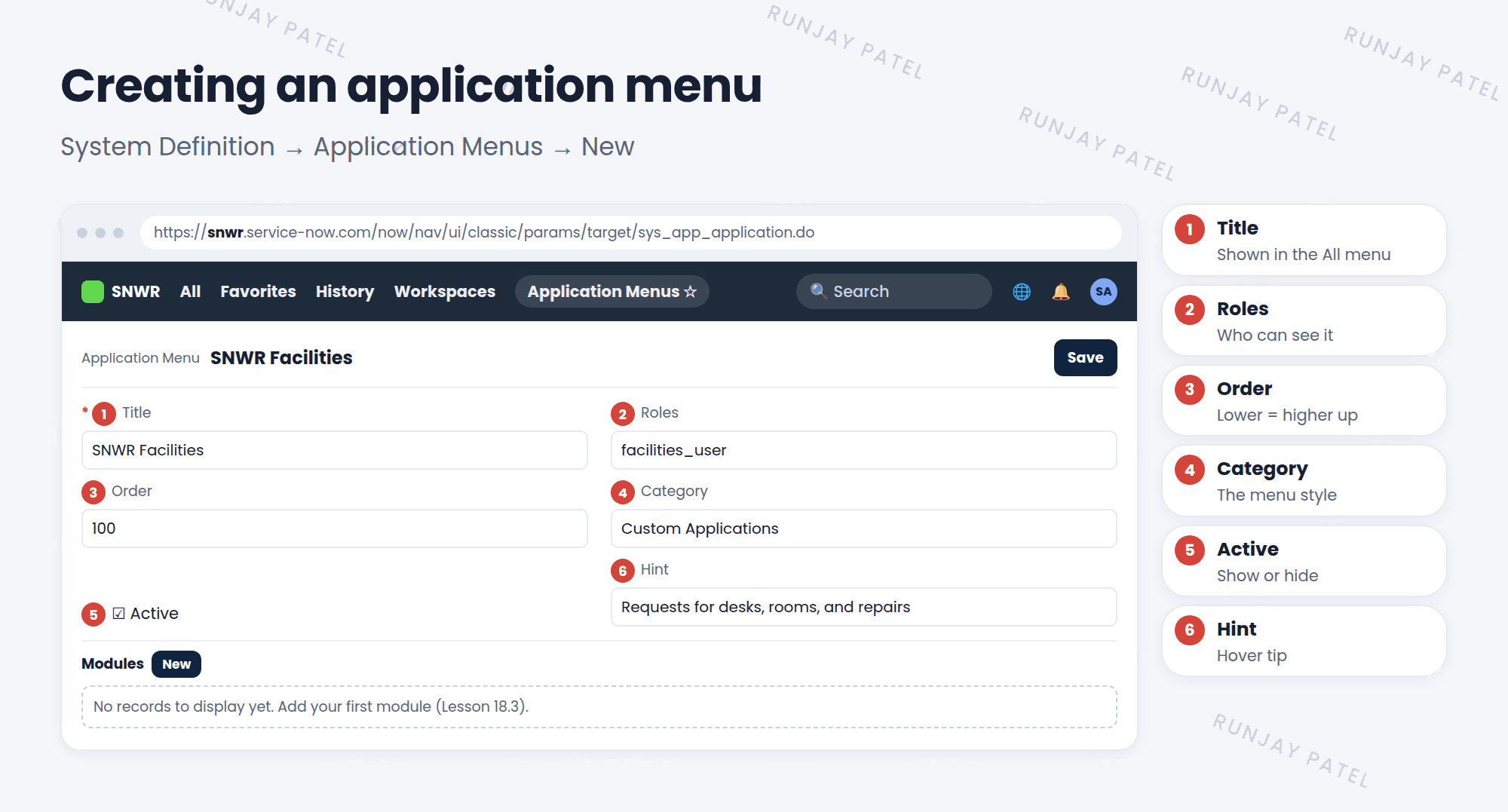
| Field | What it does |
|---|---|
| Title | The name people see in the All menu |
| Roles | Only users with one of these roles see the menu. Empty = everyone |
| Order | Where the menu appears. Lower numbers show higher up |
| Category | Sets the menu’s style |
| Active | Shows or hides the whole menu |
| Hint | A short tip shown when someone hovers over it |
3 Create an application menu
- Go to System Definition > Application Menus.
- Click New.
- Fill in the Title, like “SNWR Facilities”.
- Add Roles if only some people should see it.
- Set the Order and check Active.
- Right-click the header and choose Save, so you stay on the record.
- Scroll down. The Modules related list is ready for your first module (Lesson 18.3). ✅
⚠️ Heads up: An application menu with no modules is empty and confusing. Always add at least one module right after you create it.
💡 Good to know: Don’t see your new menu? Click the refresh icon in the All menu, or reload the page. Also check that you have one of its roles.
⭐ Remember: Empty Roles field = everyone who can log in sees the menu. Add roles to limit it.
4 Let’s try it: build SNWR Facilities
- Go to System Definition > Application Menus and click New.
- Title: SNWR Facilities. Roles:
itil. Order: 100. Active: checked. - Save and stay on the record.
- Refresh the All menu and type
snwr. Is your menu there? (It’s empty for now. You’ll add modules next.)
5 Quick recap
- Create menus in System Definition > Application Menus
- Key fields: Title, Roles, Order, Category, Active, Hint
- Empty Roles = everyone sees it
- Lower Order numbers show higher up
- Add modules right after creating the menu
6 Check yourself
Think of your answer first. Then tap to check.
1 Where do you create a new application menu? Show answer
System Definition > Application Menus > New.
2 You leave the Roles field empty. Who sees the menu? Show answer
Everyone who can log in.
3 Menu A has order 100 and Menu B has order 200. Which one shows higher? Show answer
Menu A. Lower numbers show higher up.
Nice work! You finished this lesson. 🎉
Was this lesson helpful?
Please log in to share lesson feedback.
Have a question or doubt?
Ask here and get help from instructors and fellow learners.
Only logged-in learners can post.





