


The Task Table
On this page
In this lesson, you will learn:
- What the Task table is
- How other tables extend Task
- The fields every task shares
- Why this matters for admins
1 Work = tasks
Incidents, problems, changes, requests, catalog tasks… they’re all different kinds of work. But they have a lot in common: a number, a state, someone assigned, and notes about the work. ✅
So ServiceNow puts these shared parts in one base table called Task.
Key term: Task table
A base table, called task, that holds the fields all kinds of work share. Many other tables are built on top of it.
Key term: Extend
When a table is built on top of another table, it extends it. It gets all the parent’s fields, plus its own.
2 The task family
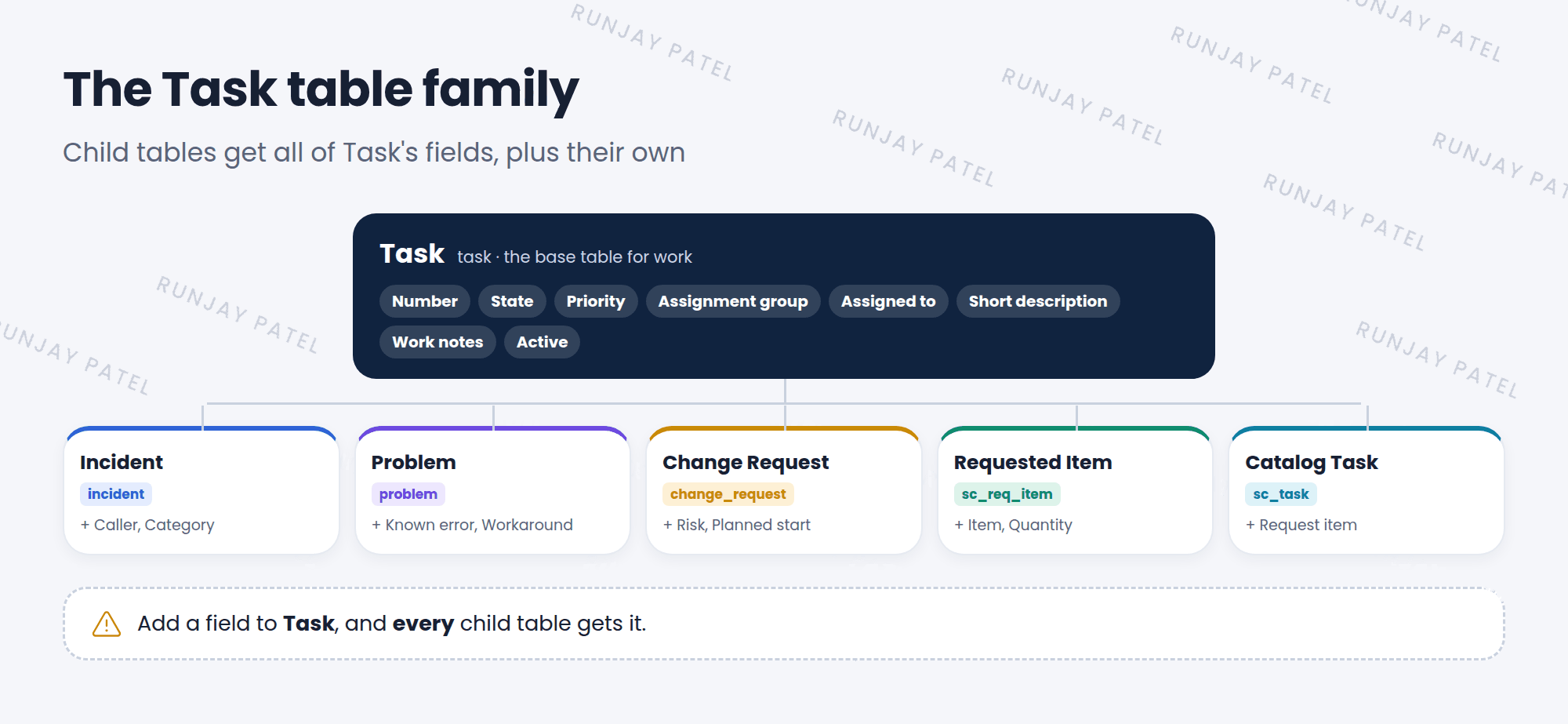
| Table | System name | Its own fields (examples) |
|---|---|---|
| Incident | incident |
Caller, Category |
| Problem | problem |
Known error, Workaround |
| Change Request | change_request |
Risk, Planned start date |
| Requested Item | sc_req_item |
Item, Quantity |
| Catalog Task | sc_task |
Request item |
3 Fields every task shares
- 🔢 Numberlike INC0010001
- 🚦 Statewhere the work is
- ⚡ Priorityhow urgent
- 👥 Assignment groupwhich team
- 👤 Assigned towhich person
- 📝 Work notesnotes about the work
⭐ Remember: An incident is a task. So is a problem, a change, and a catalog task. They all share Task’s fields.
4 Why admins care
- Change once, apply everywhere: a new field on Task shows up on every child table.
- One list for all work: the
task.listshows incidents, changes, and more, together. - Shared tools: features built for Task, like SLAs, assignment rules, and approvals, work for all its children.
⚠️ Heads up: Because every child gets Task’s fields, adding a field to Task affects many tables. Only add a field there if all kinds of work really need it.
📝 Note: You’ll learn much more about parent and child tables in Chapter 29 (Advanced track).
5 Let’s try it: see all tasks
- Type
task.listin the All menu filter and press Enter. - Personalize the list and add the Task type column (it may be called Class). What kinds of tasks do you see?
- Open an incident from this list. Notice it opens the Incident form, with Caller and Category.
6 Quick recap
- Task (
task) is a base table for all kinds of work - Incident, Problem, Change Request, Requested Item, and Catalog Task extend it
- Child tables get Task’s fields, plus their own
- Shared fields: Number, State, Priority, Assignment group, Assigned to, Work notes
- Changing Task affects every child table
7 Check yourself
Think of your answer first. Then tap to check.
1 Is an incident a task? Show answer
Yes. The Incident table extends the Task table.
2 Why does a change request have an Assignment group field? Show answer
It gets it from the Task table, which it extends.
3 What happens if you add a new field to the Task table? Show answer
Every table that extends Task gets that field too.
Nice work! You finished this lesson. 🎉
Was this lesson helpful?
Please log in to share lesson feedback.
Have a question or doubt?
Ask here and get help from instructors and fellow learners.
Only logged-in learners can post.





