


URL Navigation Shortcuts
On this page
In this lesson, you will learn:
- How to read a ServiceNow web address (URL)
- How to open a list, a record, or a new form by typing a URL
- How to share a link to an exact list or record
1 Why URLs matter
Every page in ServiceNow has its own web address, called a URL. Admins use URLs as shortcuts all the time. 🏎️
- Jump straight to a table without clicking through menus.
- Send a teammate a link to one exact record.
- Open a list that is already filtered, like “only Priority 1 incidents”.
2 Reading a Next Experience URL
Open the Incident list, then look at your browser’s address bar. You’ll see something like this:
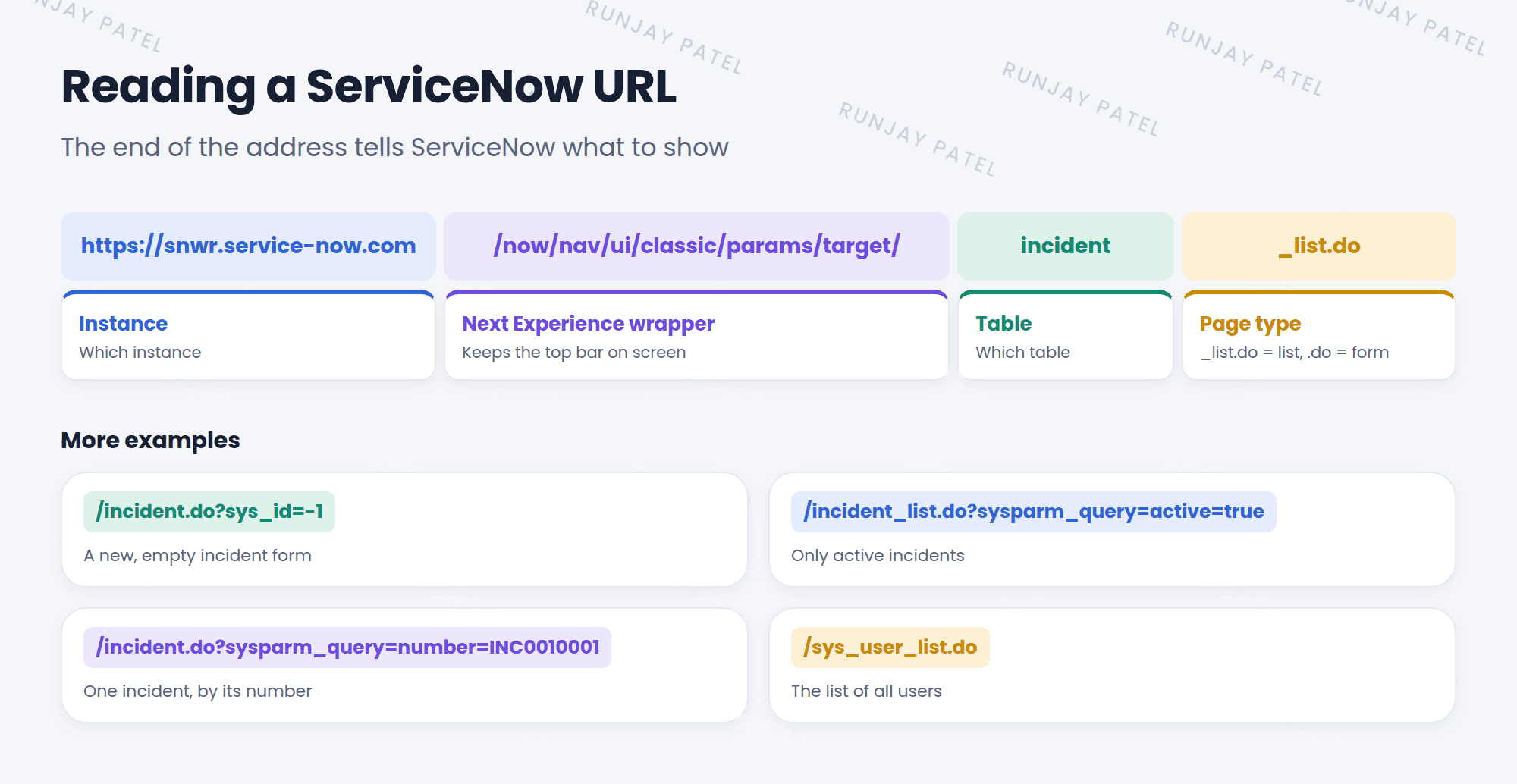
The last part is the important one. It follows a simple pattern:
Pattern: table_list.do
Shows a list of records from that table. Example: incident_list.do
Pattern: table.do
Shows a form for one record from that table. Example: incident.do
3 Handy URL shortcuts
You can type these right after your instance address. Replace snwr with your own instance name:
| Add this after .service-now.com | What opens |
|---|---|
/incident_list.do |
The Incident list, on its own, without the top bar |
/incident.do?sys_id=-1 |
A new, empty incident form |
/incident_list.do?sysparm_query=active=true |
A list of active incidents only |
/incident.do?sysparm_query=number=INC0010001 |
The incident with that number |
/sys_user_list.do |
The list of all users |
Key term: sys_id
A unique 32-character ID that every record has. No two records share one. sys_id=-1 is a special value that means “make a new record”.
Key term: sysparm_query
A filter written into the URL. It tells the list which records to show.
📝 Note: When you open a URL like /incident_list.do directly, the page opens without the Next Experience top bar. That’s normal. It’s the “classic” page on its own. Click your browser’s back button, or go to your instance’s home address, to get the top bar back.
4 Sharing a link
Want to send someone a link to a record? You don’t need to build the URL yourself:
- Open the record.
- Click the ☰ menu (or right-click the form header) to open the form’s context menu.
- Choose Copy URL.
- Paste the link into an email or chat. ✉️
⚠️ Heads up: A link doesn’t give people extra access. If someone isn’t allowed to see a record, the link won’t show it to them.
💡 Good to know: You’ll learn how to build filters with clicks (no typing) in Chapter 11. Many admins build the filter with clicks first, then copy the URL.
5 Let’s try it: type your way around
- In your browser, go to
https://your-instance.service-now.com/incident_list.do. The incident list opens on its own. - Now try
/incident_list.do?sysparm_query=active=true. Are there fewer incidents? - Try
/incident.do?sys_id=-1. A new incident form opens. Don’t save it. - Go back to your home page. Open any incident, and use Copy URL from the context menu. Paste it into a new browser tab. The same incident opens! 🎉
6 Quick recap
- Every ServiceNow page has its own URL
table_list.doshows a list.table.doshows a formsys_id=-1opens a new, empty formsysparm_query=adds a filter to a list- Use Copy URL in the form’s context menu to share a record
7 Check yourself
Think of your answer first. Then tap to check.
1 What does problem_list.do open? Show answer
The list of records in the Problem table.
2 What does sys_id=-1 mean in a URL? Show answer
Open a new, empty record.
3 What is a sys_id? Show answer
A unique 32-character ID that every record has.
4 You send a link to a record to someone who isn’t allowed to see it. What happens? Show answer
They still can’t see it. A link doesn’t give extra access.
Nice work! You finished this lesson. 🎉
Was this lesson helpful?
Please log in to share lesson feedback.
Have a question or doubt?
Ask here and get help from instructors and fellow learners.
Only logged-in learners can post.





