


Schedules & Task SLAs
On this page
In this lesson, you will learn:
- How schedules decide which hours count on an SLA
- What a task SLA is
- How to read a task SLA’s stage and progress
1 Which hours count?
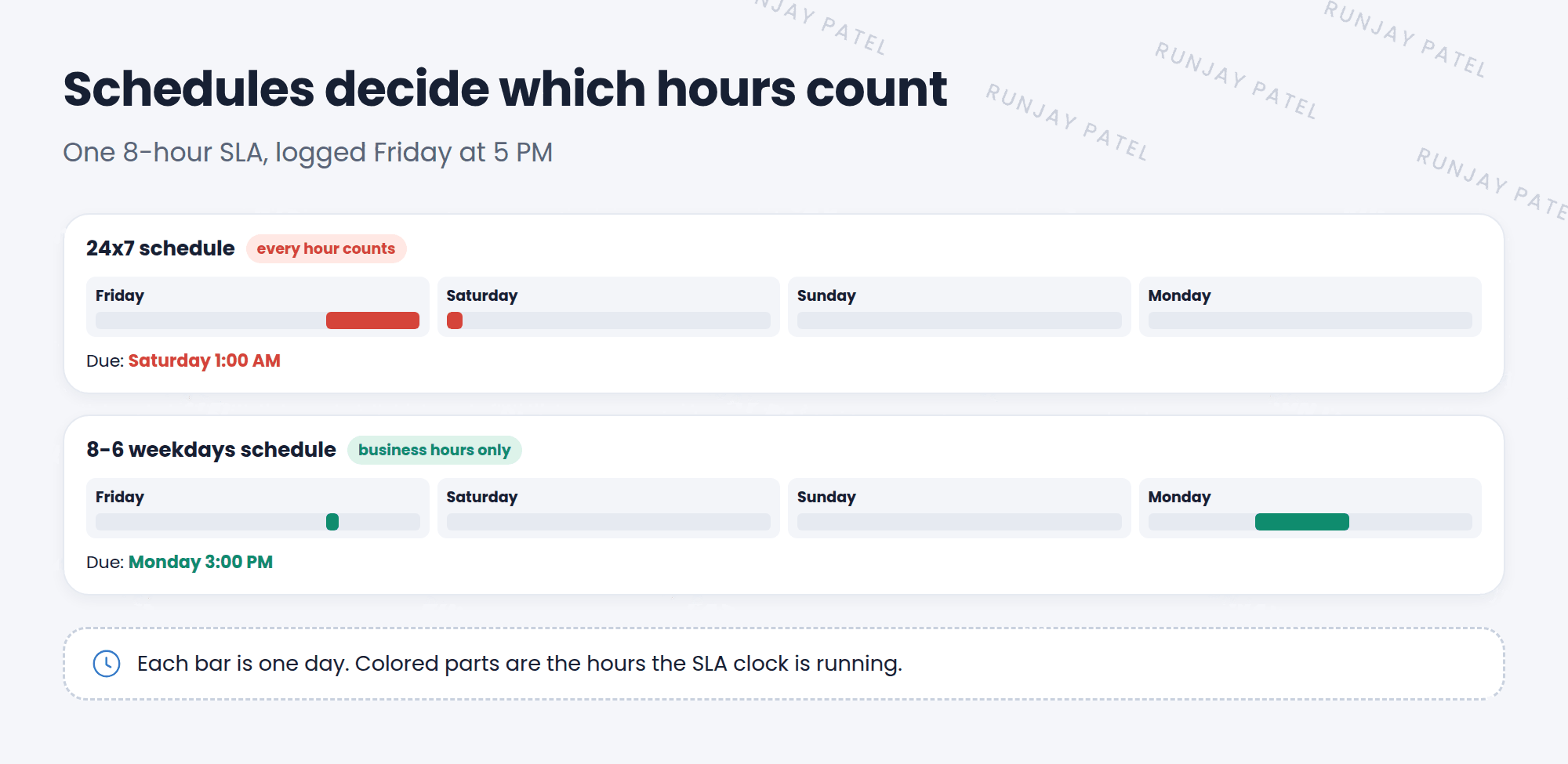
SNWR’s service desk works Monday to Friday, 8 AM to 6 PM. If a Priority 3 incident is logged at 5 PM on Friday, should the clock keep running all weekend? Probably not! 🌙
A schedule tells the SLA which hours count.
Key term: Schedule
A set of working hours, like “8-6 weekdays” or “24×7”. The SLA clock only runs during those hours.
| Schedule | Good for |
|---|---|
| 24×7 | Critical services that must always work, like P1 incidents |
| 8-5 or 8-6 weekdays | Normal requests and lower priorities |
📝 Note: Schedules can also skip holidays. Admins manage them in System Scheduler > Schedules.
2 Task SLAs
An SLA definition is the rule. When a task matches the rule, ServiceNow creates a task SLA: the actual running clock for that one task.
Key term: Task SLA
One SLA clock attached to one task. Stored in the task_sla table, and shown in the Task SLAs related list.
| Field | What it shows |
|---|---|
| Stage | In progress, Paused, Completed, Cancelled |
| Has breached | True if the time ran out |
| Business elapsed % | How much of the allowed time is used, counting only schedule hours |
| Breach time | When the SLA will breach if nothing changes |
💡 Good to know: The progress bar changes color as time runs out, often green, then yellow, then red. Agents use it to pick which ticket to work on next.
⭐ Remember: SLA definition = the rule. Task SLA = the running clock on one task.
3 Let’s try it: watch the clock
- Open the P1 incident you made in Lesson 21.2. Find the Task SLAs related list.
- Look at the Stage, Business elapsed %, and Breach time.
- Set the incident to On Hold. Refresh. Did the stage change to Paused?
- Open System Scheduler > Schedules. Find a weekday schedule and look at its hours.
4 Quick recap
- A schedule decides which hours count on an SLA
- 24×7 counts every hour. Business schedules skip nights and weekends
- A task SLA is the running clock on one task (
task_sla) - Key fields: Stage, Has breached, Business elapsed %, Breach time
5 Check yourself
Think of your answer first. Then tap to check.
1 Which schedule would you use for a P1 SLA on a service that must always run? Show answer
24×7.
2 What’s the difference between an SLA definition and a task SLA? Show answer
The definition is the rule. The task SLA is the running clock on one specific task.
3 An incident is On Hold. What stage is its task SLA in? Show answer
Paused (if On Hold is a pause condition).
Nice work! You finished this lesson. 🎉
Was this lesson helpful?
Please log in to share lesson feedback.
Have a question or doubt?
Ask here and get help from instructors and fellow learners.
Only logged-in learners can post.





