


Application Menus & Modules
On this page
In this lesson, you will learn:
- How the All menu is built from records
- The difference between an application menu and a module, from the admin side
- Where admins manage menus and modules
1 The menu is made of records
In Lesson 3.2, you used the All menu. You learned that application menus are groups and modules are the links inside them.
Here’s the secret: the All menu is built from records in tables, just like everything else in ServiceNow. Admins can change it by changing those records. 🧱
Key term: Application menu
A group heading in the All menu. Stored in the sys_app_application table.
Key term: Module
A link inside an application menu. Stored in the sys_app_module table.
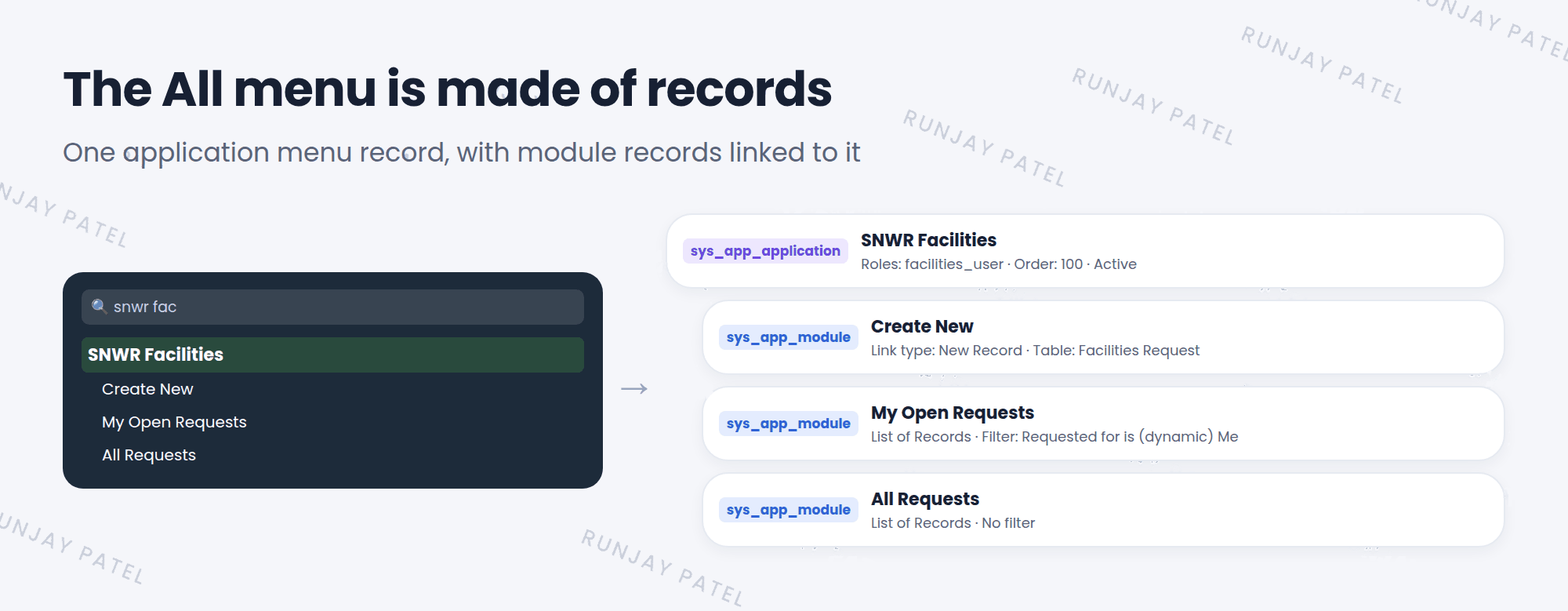
2 What each one controls
| Application menu | Module | |
|---|---|---|
| Shows as | A bold group heading | A link under the heading |
| Key settings | Title, roles, order, active | Title, link type, table, filter, roles, order |
| When clicked | Opens or closes the group | Opens a page, like a list or a form |
3 Where admins manage them
- System Definition > Application Menus: the list of all application menus.
- System Definition > Modules: the list of all modules.
- Open an application menu record, and its modules show in a Modules related list at the bottom.
💡 Good to know: In the All menu, hover over a module and look for an edit (pencil) option. It opens that module’s record directly, so you don’t have to search for it.
⚠️ Heads up: Menus and modules that come with ServiceNow are base records. Changing them is customizing (Lesson 9.1). It’s usually better to create your own menu or module, or to deactivate one you don’t need.
⭐ Remember: Application menu = sys_app_application. Module = sys_app_module.
4 Let’s try it: look behind the menu
- Go to System Definition > Application Menus. Find and open Incident.
- Look at its fields: Title, Roles, Order, and Active.
- Scroll down to the Modules related list. Do you recognize Create New, Open, and Resolved?
- Open the Open module. Look at its Table and Filter. That’s why it only shows open incidents!
5 Quick recap
- The All menu is built from records
- Application menus are stored in
sys_app_application - Modules are stored in
sys_app_module - Manage them in System Definition > Application Menus and Modules
- Prefer creating your own over changing base ones
6 Check yourself
Think of your answer first. Then tap to check.
1 Which table stores modules? Show answer
sys_app_module.
2 Why does the “Open” module show only open incidents? Show answer
Because the module record has a filter that shows only open (active) incidents.
3 Is changing a base module “configuring” or “customizing”? Show answer
Customizing. It’s usually better to create your own.
Nice work! You finished this lesson. 🎉
Was this lesson helpful?
Please log in to share lesson feedback.
Have a question or doubt?
Ask here and get help from instructors and fellow learners.
Only logged-in learners can post.





