


Instance Types & Release Names
On this page
In this lesson, you will learn:
- The types of instances a company uses, and what each one is for
- What production and sub-production mean
- How ServiceNow names its releases
- What family releases, patches, and upgrades are
1 Quick look back
In Lesson 2.1, you learned that each instance is separate, with its own address and its own database. In Lesson 2.2, you got your own PDI.
Now let’s answer two questions: what kinds of instances does a company have, and which version of ServiceNow is running on them?
2 Production vs sub-production
Every company instance falls into one of two groups:
Key term: Production (Prod)
The real, live instance. Everyone in the company uses it every day. It holds real data.
Key term: Sub-production
Any instance that is not Prod. Used to build and check changes safely. Also called non-production.
Think of a restaurant. 🍽️ The dining room is Prod: real customers eat there. The kitchen is sub-production: that’s where cooks try new dishes before anyone else tastes them.
⭐ Remember: A company usually has one production instance and one or more sub-production instances.
3 The common instance types
Here’s how our example company, SNWR, sets up its instances:
| Type | Example URL | What it’s for |
|---|---|---|
| 🧪 Dev | snwrdev |
Admins and developers build changes here |
| 🔍 Test | snwrtest |
Testers and users check the changes work |
| 🎭 Staging (optional) | snwrstage |
A final check that looks just like Prod. Big companies often have one |
| 🏁 Prod | snwr |
The live instance everyone uses |
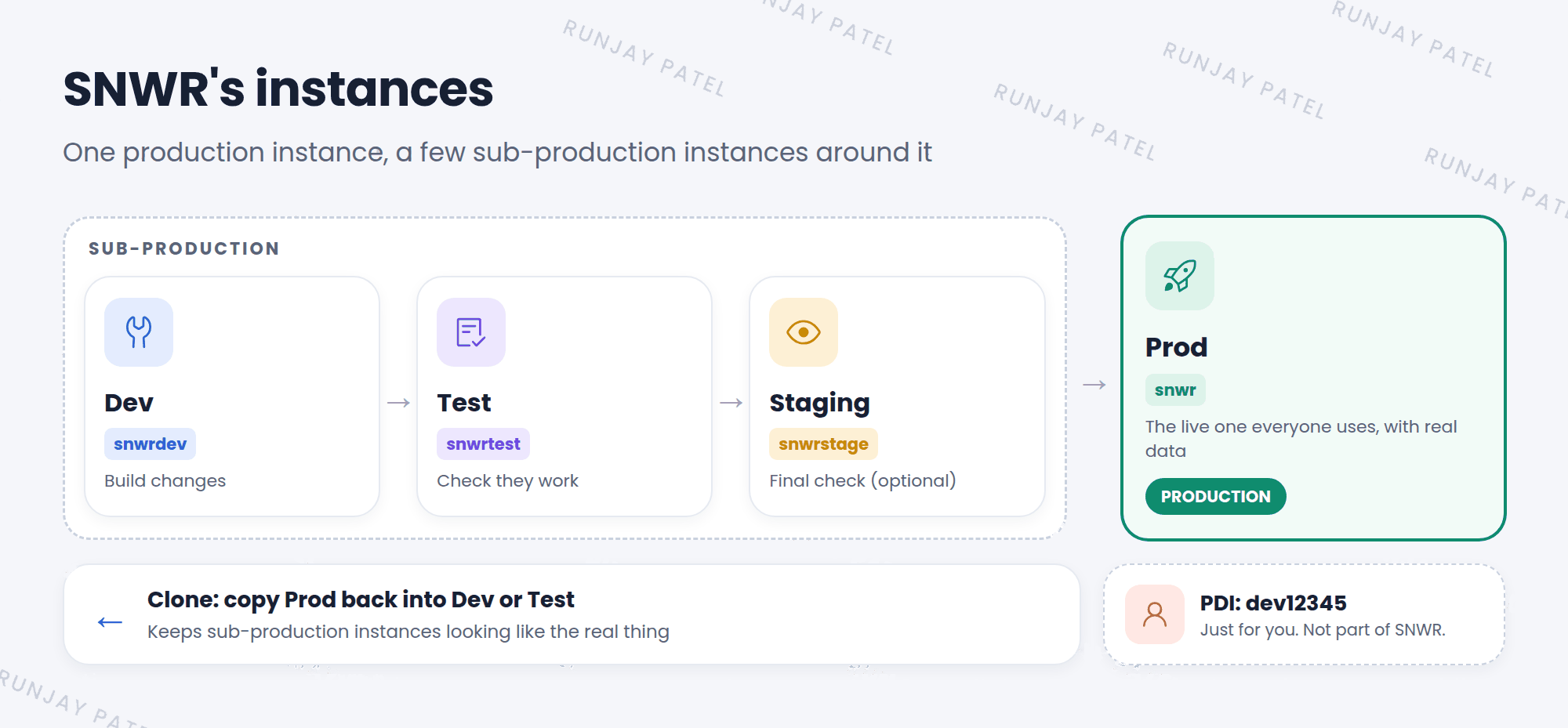
- Changes move forward: Dev → Test → (Staging) → Prod. You’ll learn how in the Advanced track (Update Sets).
- Clones move backward: Companies copy Prod into Dev or Test from time to time, so those instances look like the real thing. This is called cloning (Chapter 48).
📝 Note: Your PDI is not part of any company’s set of instances. It’s a single, personal instance for learning. Nothing moves between your PDI and a company’s instances.
4 ServiceNow release names
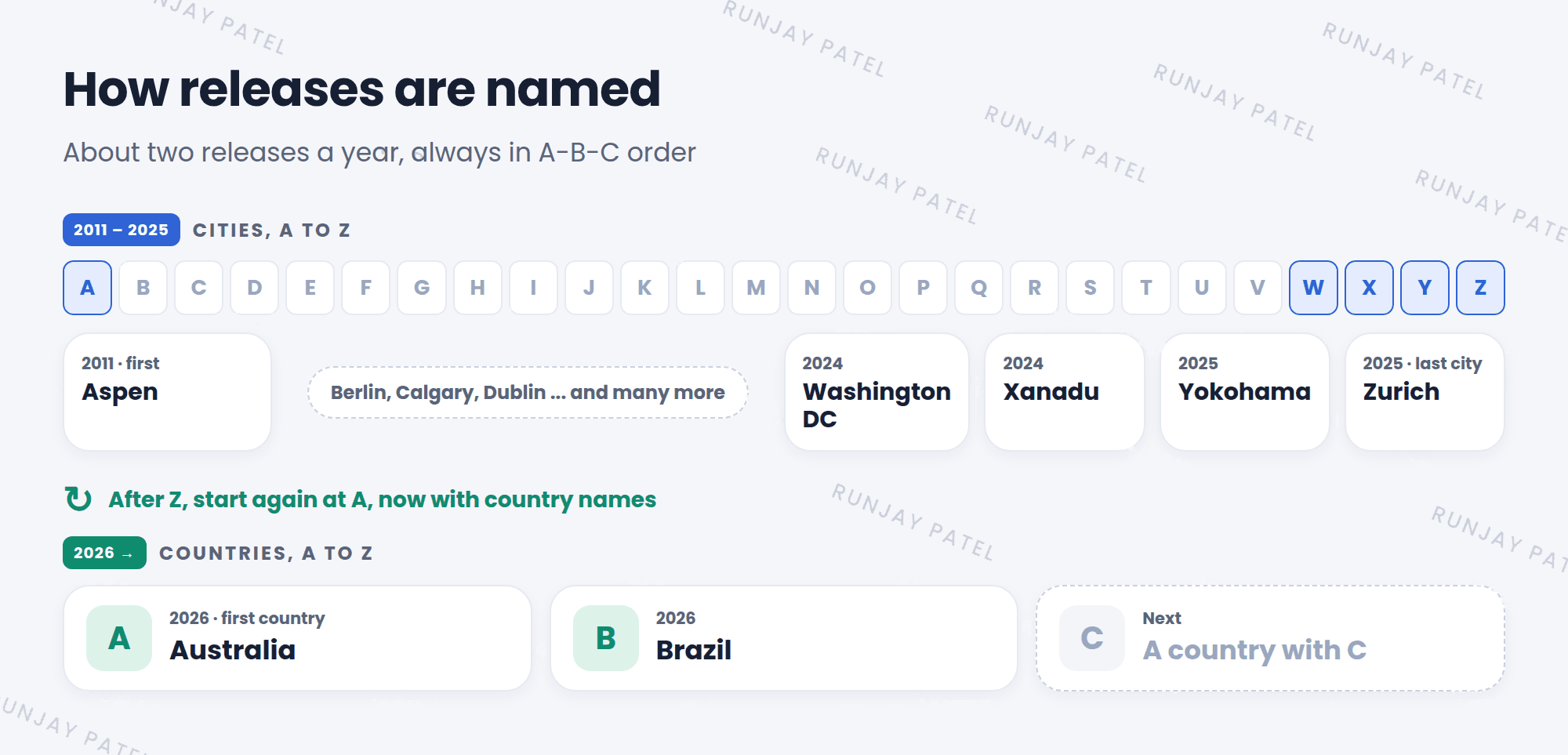
ServiceNow releases a big new version of the platform about twice a year. Each one gets a name, in A-B-C order. 🔤
- From 2011 to 2025, the names were cities: Aspen, Berlin, Calgary… all the way to Zurich.
- After Z, the alphabet started again. Now the names are countries: Australia, then Brazil.
| Release | Year | Name type |
|---|---|---|
| Washington DC | 2024 | City |
| Xanadu | 2024 | City |
| Yokohama | 2025 | City |
| Zurich | 2025 | City (the last one) |
| Australia | 2026 | Country (the first one) |
| Brazil | 2026 | Country |
💡 Good to know: Because the names go in A-B-C order, you can tell which release is newer just by the first letter. Zurich is newer than Yokohama, and Brazil is newer than Australia. Just remember that the country names came after all the cities.
5 Families, patches, and upgrades
Key term: Family release
A big named release, like Zurich or Australia. It brings new features.
Key term: Patch
A smaller update inside a family, like “Australia Patch 2”. It mostly fixes bugs.
Key term: Upgrade
Moving an instance to a newer family or patch. Always done in sub-production first.
- ServiceNow ships a new family release.
- The company upgrades Dev first and checks that nothing broke.
- Then it upgrades Test, and users test their daily work.
- Finally, it upgrades Prod, usually at a quiet time, like a weekend. ✅
⚠️ Why admins care: ServiceNow only supports the newest releases. Companies that stay on an old release too long stop getting fixes. That’s why most companies upgrade about once or twice a year. Keeping your instance simple (Chapter 9) makes upgrades much easier.
6 Let’s try it: find your release
- Sign in to
developer.servicenow.comand open Manage my Instance. Find the release of your PDI. Write it down. ✍️ - Log in to your PDI.
- Change the address to
https://your-instance-name.service-now.com/stats.do, like you did in Lesson 2.1. - Find Build name. It shows the family name, like Zurich or Australia. Does it match what you wrote down?
- Look at Build tag too. The long text there also includes the patch level.
📝 Note: Your PDI may show a different release from your friend’s PDI. That’s fine. It depends on which release each of you picked.
7 Fun facts
- 🏔️ It started with Aspen
The first named release, in 2011, was Aspen, a ski town in Colorado, USA. The names ran all the way to Zurich before starting over. - 🚀 Try it early
Some customers can use a new release a few weeks early. This is called Early Availability (EA). The release for everyone is called General Availability (GA).
8 Quick recap
- Production is the live instance. Sub-production is every other instance
- Common types: Dev (build), Test (check), Staging (final check, optional), Prod (live)
- Changes move forward to Prod. Clones copy Prod backward
- Releases come about twice a year, named in A-B-C order: cities up to Zurich, then countries from Australia
- A family release brings new features. A patch fixes bugs
- Upgrades go Dev → Test → Prod, never straight to Prod
9 Check yourself
Think of your answer first. Then tap to check.
1 Is a Test instance production or sub-production? Show answer
Sub-production. Only the live instance is production.
2 SNWR wants its Test instance to have fresh, real-looking data. What should it do? Show answer
Clone Prod into Test.
3 Which is newer: Xanadu or Yokohama? Show answer
Yokohama. Y comes after X.
4 What was the last city name, and what came next? Show answer
Zurich was the last city. Then the names started again at A with countries, starting with Australia.
5 What’s the difference between a family release and a patch? Show answer
A family release is a big named release with new features. A patch is a smaller update that mostly fixes bugs.
Nice work! You finished this lesson. 🎉
Was this lesson helpful?
Please log in to share lesson feedback.
Have a question or doubt?
Ask here and get help from instructors and fellow learners.
Only logged-in learners can post.





