


Flow Logic & Data Pills
On this page
In this lesson, you will learn:
- What flow logic is and the most common types
- What data pills are and how to use them
- How data moves from step to step in a flow
1 Making decisions
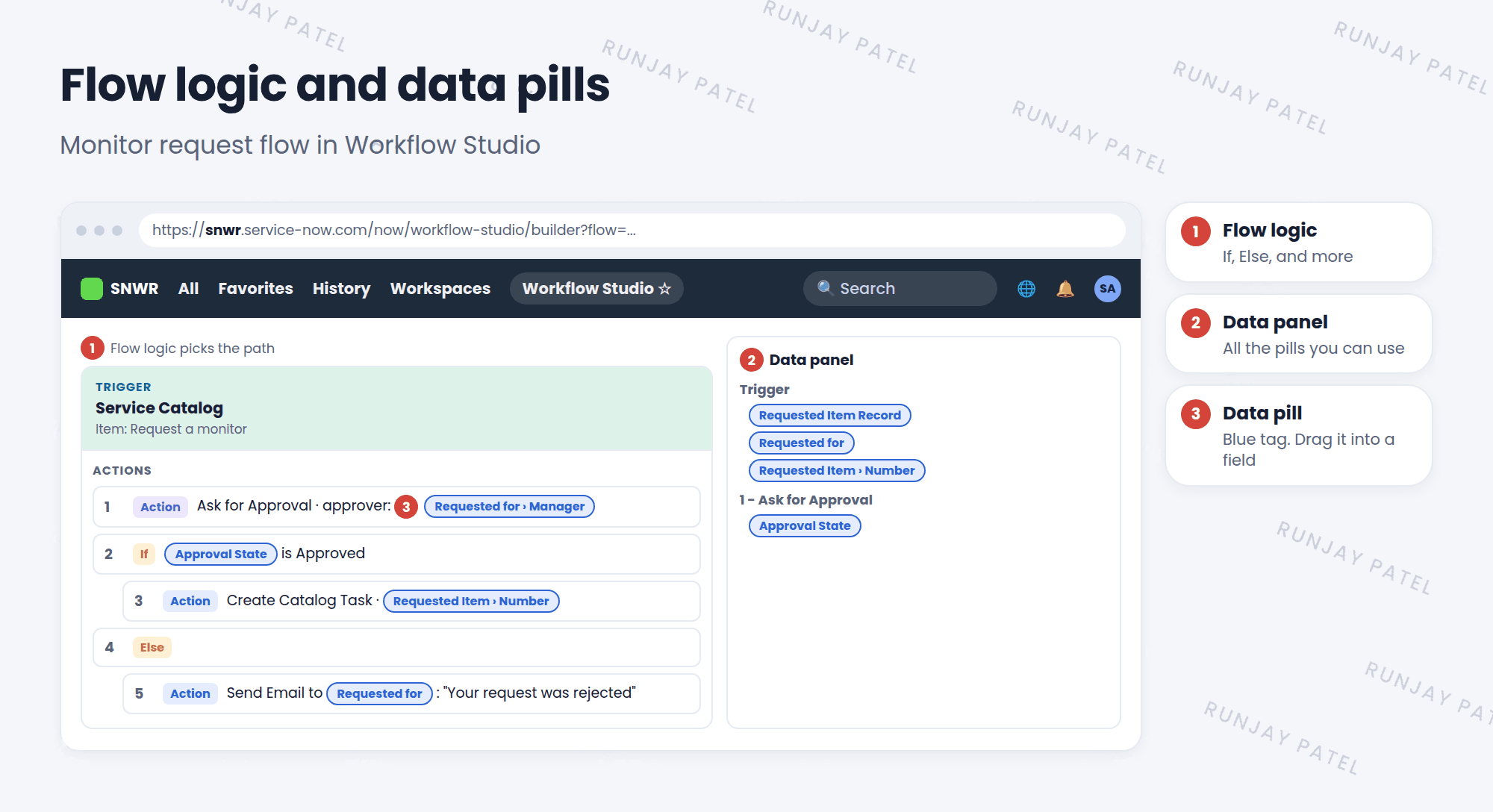
Real processes aren’t a straight line. “If the manager approves, create a task. Else, tell the requester no.” That’s flow logic. 🔀
| Flow logic | What it does |
|---|---|
| If / Else If / Else | Takes a different path depending on a condition |
| For Each | Repeats steps for every item in a list |
| Do the following in parallel | Runs several paths at the same time |
| Wait for a duration | Pauses for a set time, like 1 day |
| End Flow | Stops the flow |
2 Data pills
Each step can use data from earlier steps. That data shows up as colorful little tags called data pills. 💊
Key term: Data pill
A piece of data from the trigger or an earlier step, like the requester’s name. You drag it into a later step.
Key term: Data panel
The panel on the right of Workflow Studio that lists all the data pills you can use.
3 Using a data pill
- Open a step, like Send Email.
- Find the field you want to fill, like To.
- In the data panel, open the trigger’s data, like Requested Item Record.
- Drag the pill, like Requested for, into the field.
- You can also dot-walk through a pill, like Requested for > Manager > Email. ✅
💡 Good to know: Using pills instead of typing names makes the flow work for every record. “Requested for” is always the right person.
📝 Note: “Dot-walking” means following a reference field to another table, like from a user to their manager. You’ll learn more in Lesson 31.3.
⭐ Remember: Flow logic = which path. Data pills = which data.
4 Let’s try it: add a decision
- Open your “SNWR P1 alert” flow from Lesson 28.2.
- Add If: the trigger record’s Assignment group is empty.
- Inside the If, add Update Record: set Assignment group to SNWR Service Desk.
- Use a data pill to put the incident Number into the email subject.
- Save and activate. Test it with a new P1 incident.
5 Quick recap
- Flow logic: If/Else, For Each, parallel, wait, End Flow
- Data pills carry data from the trigger and earlier steps
- Drag pills from the data panel into fields
- Pills can be dot-walked, like Requested for > Manager
6 Check yourself
Think of your answer first. Then tap to check.
1 You want to repeat a step for every item in a list. Which flow logic? Show answer
For Each.
2 What is a data pill? Show answer
A piece of data from the trigger or an earlier step that you drag into a later step.
3 Why use a data pill instead of typing a person’s name? Show answer
So the flow uses the right person for every record, not just one fixed name.
Nice work! You finished this lesson. 🎉
Was this lesson helpful?
Please log in to share lesson feedback.
Have a question or doubt?
Ask here and get help from instructors and fellow learners.
Only logged-in learners can post.





