


Now Platform Capabilities
On this page
In this lesson, you will learn:
- What the Now Platform is
- The 6 big things the platform can do
- How these features work together on one ticket
- Where to find them in your own PDI
1 Quick look back
In the last lesson, you learned that ServiceNow is a platform: one base that many apps are built on.
Think about your phone again. 📱 Your phone gives every app the same built-in tools:
- The camera works in WhatsApp, Instagram, and your bank app.
- Notifications work the same way in every app.
- Maps and GPS can be used by any app that needs them.
The app makers don’t build a new camera each time. They just use the one the phone already has.
👉 ServiceNow works the same way. The platform gives every app a set of shared tools. In this lesson, we look at what those tools are.
2 What is the Now Platform?
Key term: Now Platform
The base of ServiceNow. It holds the data, the tools, and the rules that every ServiceNow app uses.
Key term: Capability
Something the platform can do. Example: send an email, run a report, or answer a question with AI.
You can think of it like a building with 3 floors:
| Floor | What’s there | Example |
|---|---|---|
| 🔝 Top: Apps | The apps that teams use every day | IT, HR, Customer Service |
| 🧰 Middle: Capabilities | Shared tools every app can use | Workflows, AI, reports |
| 🗄️ Bottom: Data | One set of tables that holds everything | Users, incidents, laptops |
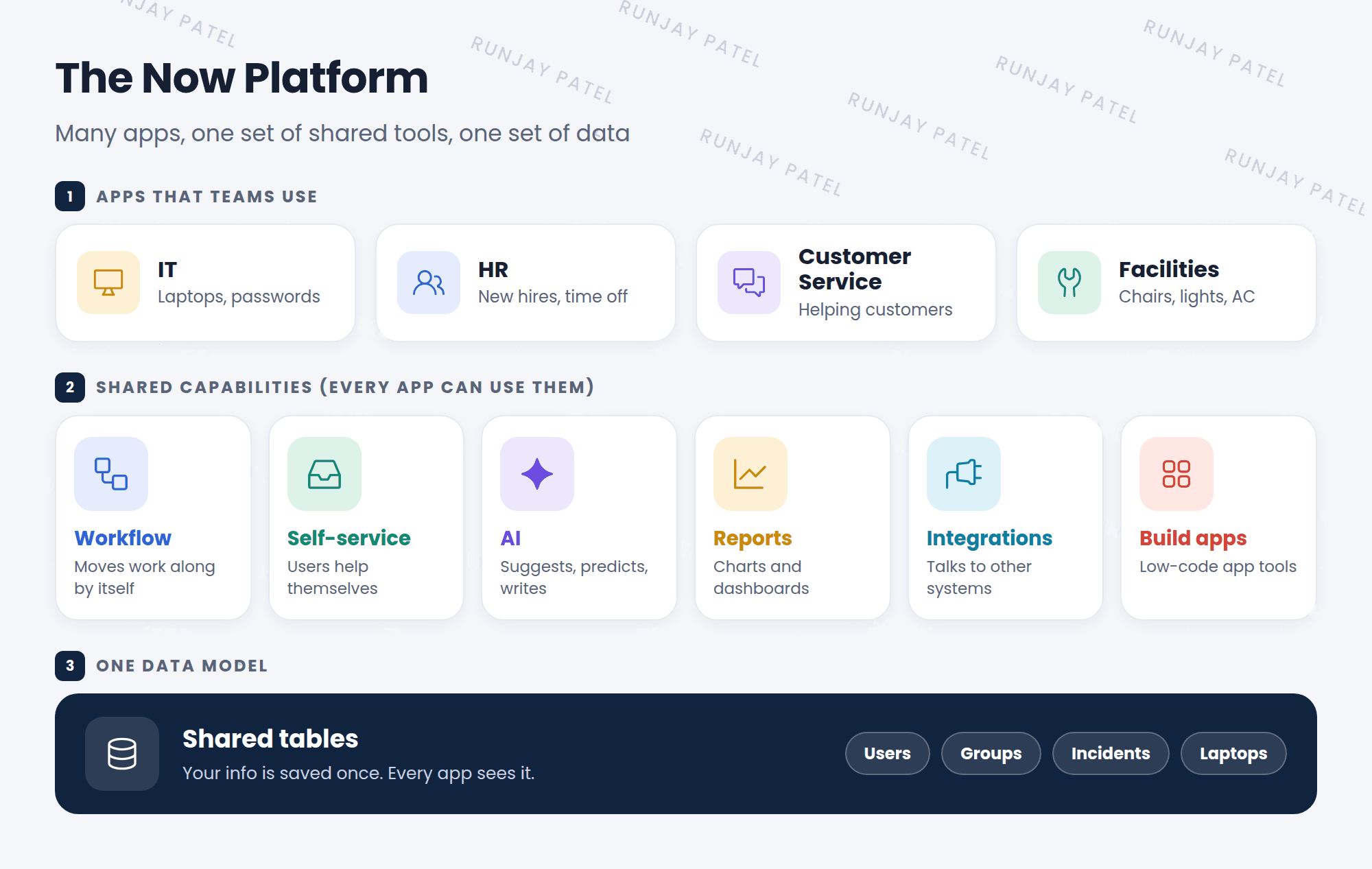
📝 Note: ServiceNow now calls it the ServiceNow AI Platform. Many older docs and the CSA exam still say Now Platform. They mean the same thing.
3 The 6 big capabilities
Capability 1 ⚙️ Workflow & automation
“When this happens, do that.” The platform moves work along by itself, with no one doing it by hand.
Tool: Workflow Studio (you may also hear Flow Designer)
Capability 2 🙋 Self-service
Users help themselves. They can order things, read help articles, or chat with a bot.
Tools: Service Catalog, Knowledge, Virtual Agent
Capability 3 ✨ AI
The platform can guess, suggest, and write. Example: it can pick the right team for a ticket, or sum up a long ticket in a few lines.
Tools: Predictive Intelligence, Now Assist
Capability 4 📊 Reports & dashboards
Turn your data into charts, so managers can see how work is going.
Tools: Reports, Platform Analytics
Capability 5 🔌 Integrations
Connect ServiceNow to other systems, like Microsoft Teams, Slack, or Workday.
Tools: IntegrationHub, REST API
Capability 6 🧱 Build your own apps
Make new apps with drag-and-drop tools, and add code only when you need to.
Tool: App Engine Studio
⭐ Remember: Workflow, Self-service, AI, Reports, Integrations, Build apps. Every ServiceNow app gets all 6 for free from the platform.
4 Built into everything
Some tools are so basic that they are part of every app. You don’t turn them on. They are just there:
- 🗄️ Tablesone place for all data
- 🔐 Securityroles decide who sees what
- 🔔 Notificationsemails and alerts
- 🔍 Searchfind any record fast
- 📱 Mobileworks on phones too
- 🕓 Historyevery change is saved
5 Putting it together: the broken laptop again
Let’s go back to the broken laptop from Lesson 1.1. This time, look at which capability does each step:
- 🙋 Self-service: You open the help page and chat with Virtual Agent. It asks a few questions and makes an incident for you.
- ✨ AI: The platform reads your words, “laptop won’t turn on,” and suggests the category Hardware.
- ⚙️ Workflow: A flow sends the ticket to the Hardware team. No one has to do it by hand.
- 🔌 Integration: The IT person gets a message in Microsoft Teams, and a new laptop is ordered from the supplier’s system.
- 🔔 Notification: ServiceNow emails you: “Your laptop is fixed!” ✅
- 📊 Reports: The IT manager sees on a dashboard how many laptop tickets came in this week.
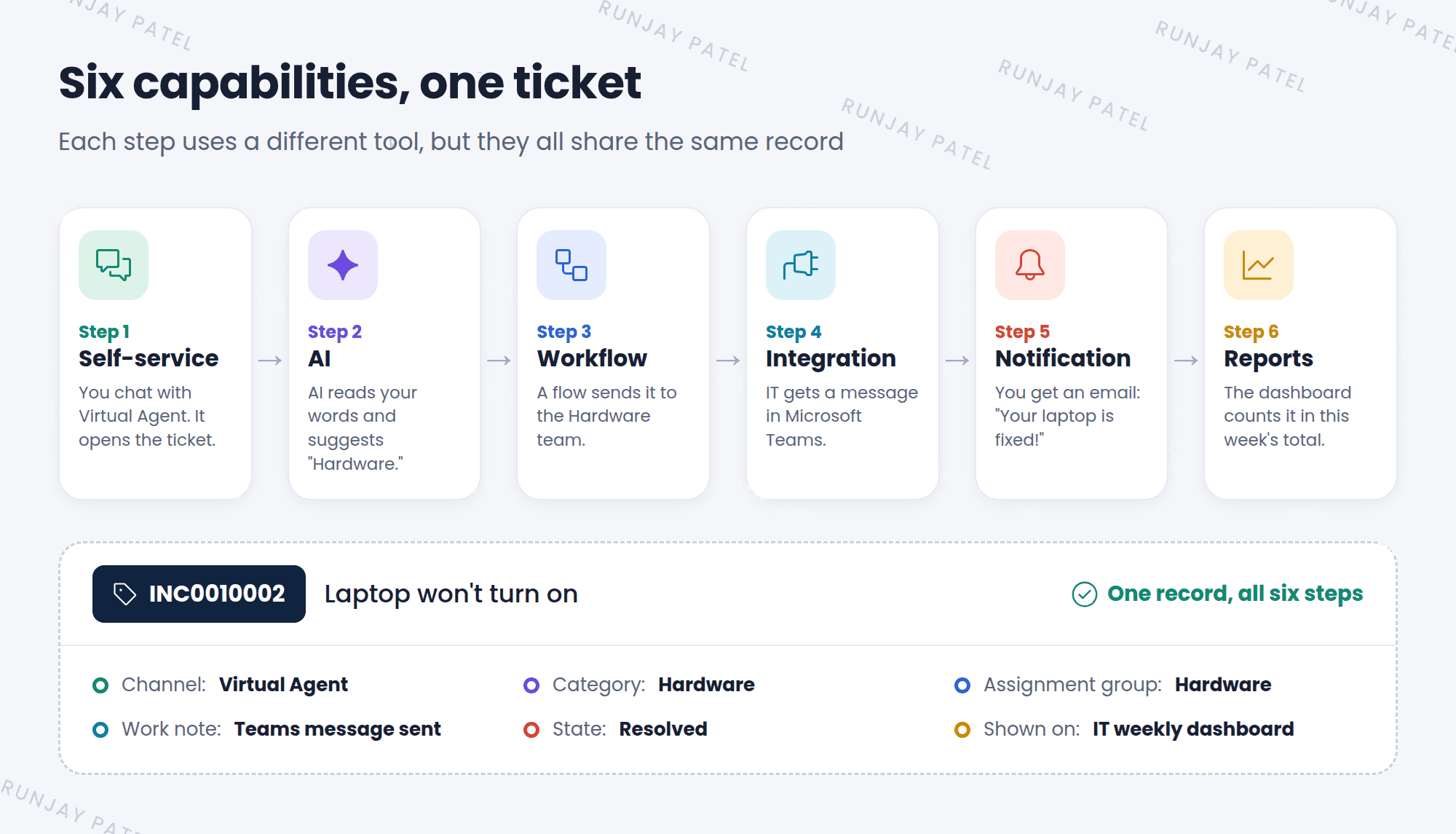
💡 Why does this matter? All 6 steps used the same record in the same table. No copying, no retyping. That’s the power of one platform with one set of data.
6 Low-code vs pro-code
When people build things on the platform, they work in one of two ways:
Key term: Low-code
Build by clicking, picking from menus, and dragging boxes. Little or no coding needed.
Key term: Pro-code
Build by writing code (JavaScript). Used when the click tools can’t do the job.
💡 Good to know: As an admin, try low-code first. It is faster, easier to fix, and safer during upgrades. The Basic track uses no code at all. You will learn scripting in the Advanced track.
7 Let’s try it: find the capabilities in your PDI
Log in to the PDI you set up in Lesson 1.1. Then:
- Click All at the top left of the screen. A menu opens.
- In the filter box at the top of the menu, type
Service Catalog. Click it. This is self-service. 🙋 - Open All again and type
Knowledge. These help articles are also self-service. - Open All and type
Workflow Studio. This is where workflows are built. It may open in a new tab. ⚙️ - Open All and type
Reports. Then click View / Run to see some ready-made reports. 📊
⚠️ Heads up: Some capabilities, like Now Assist (generative AI), need an extra license. They may not show up in your PDI. That’s okay! You only need to know what they do for now.
📝 Note: Don’t worry about using these tools yet. Today, just find them and look around. We cover the All menu in Chapter 3, and each tool gets its own chapter later.
8 Fun facts
- 🏗️ One codebase
Every ServiceNow app runs on the same code underneath. So when ServiceNow adds a new feature to the platform, all apps can use it at once. - 🎤 A conference called “Knowledge”
ServiceNow’s biggest yearly event is named Knowledge. It’s where many new platform features are shown for the first time.
9 Quick recap
- The Now Platform is the base that every ServiceNow app is built on
- It has 3 layers: apps on top, capabilities in the middle, data at the bottom
- The 6 big capabilities: Workflow, Self-service, AI, Reports, Integrations, Build apps
- Tables, security, notifications, search, mobile, and history are built into every app
- All capabilities share the same records, so nothing is copied or retyped
- Admins should try low-code first and use code only when needed
10 Check yourself
Think of your answer first. Then tap to check.
1 In the phone example, what is like the Now Platform? Show answer
The phone itself. It gives every app the same built-in tools, like the camera and notifications.
2 A user orders a new keyboard from a list of items on the help page. Which capability is this? Show answer
Self-service (the Service Catalog).
3 A ticket is sent to the right team with no one doing it by hand. Which capability is this? Show answer
Workflow and automation.
4 What is the difference between low-code and pro-code? Show answer
Low-code means building by clicking and dragging. Pro-code means writing code (JavaScript).
5 Why don’t the HR app and the IT app need two copies of your name and email? Show answer
Because all apps share one set of tables on the platform, so your info is saved only once.
Nice work! You finished this lesson. 🎉
Was this lesson helpful?
Please log in to share lesson feedback.
Have a question or doubt?
Ask here and get help from instructors and fellow learners.
Only logged-in learners can post.





