


Workspaces
On this page
In this lesson, you will learn:
- What a workspace is and who uses one
- The main parts of a workspace screen
- Some common workspaces you’ll see
- How workspaces differ from classic lists and forms
1 A screen built for one job
In Lesson 3.3, you saw the Workspaces menu. Now let’s look inside one.
Think of a chef’s kitchen station. 👩🍳 Everything the chef needs is within reach: knives, pans, and the list of orders. A workspace does the same for people who work on tickets all day.
Key term: Workspace
A modern screen made for a specific kind of worker, like an IT agent. It shows their work, their records, and helpful tools in one place.
2 Parts of a workspace
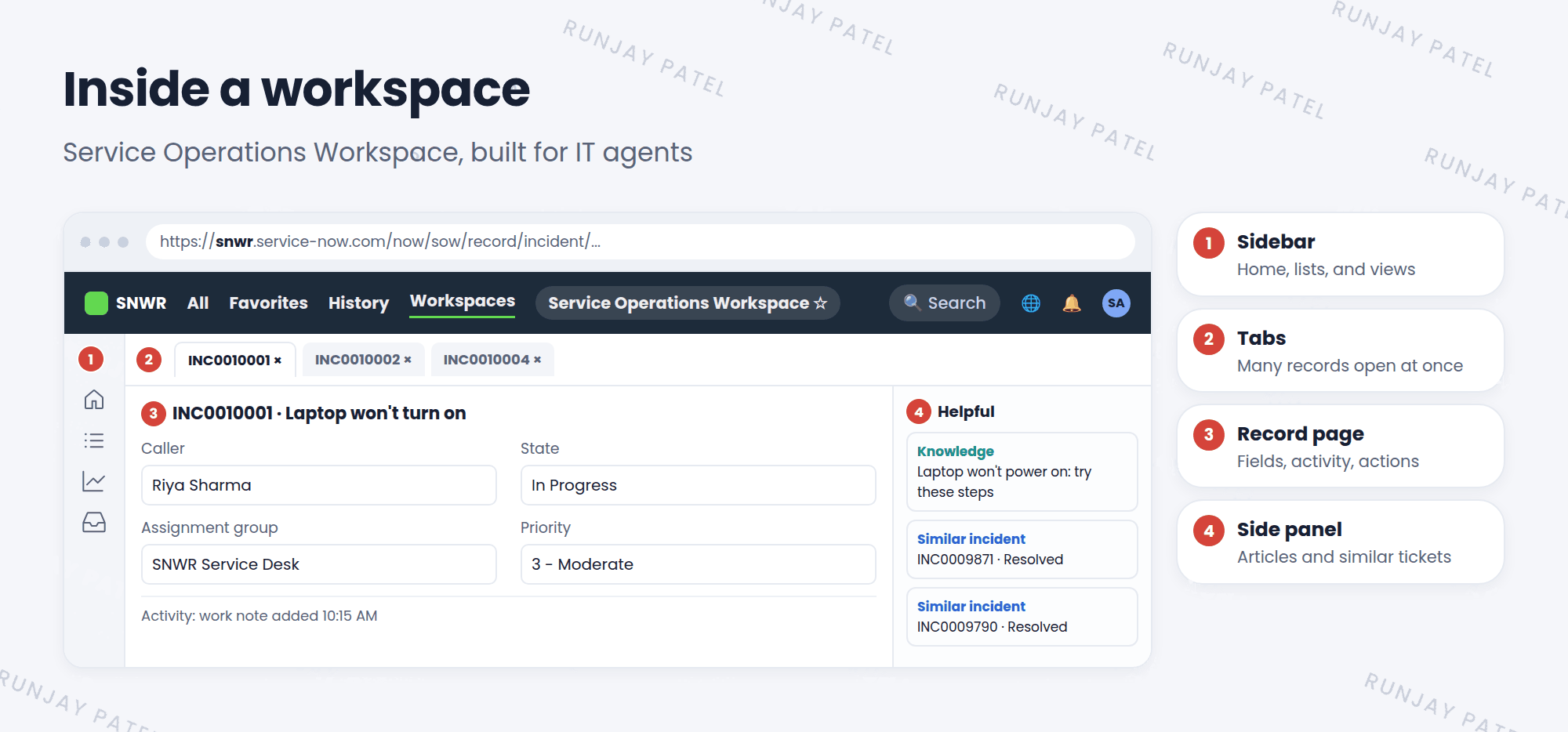
| # | Part | What it does |
|---|---|---|
| 1 | Sidebar | Jump between the home page, lists, and other views |
| 2 | Tabs | Keep several records open at once, like browser tabs |
| 3 | Record page | The record’s fields, activity, and actions |
| 4 | Side panel | Helpful extras, like matching articles and similar tickets |
3 Common workspaces
| Workspace | Who uses it |
|---|---|
| Service Operations Workspace | IT agents working on incidents, problems, and changes |
| CSM Configurable Workspace | Customer service agents |
| HR Agent Workspace | HR agents working on HR cases |
📝 Note: Which workspaces you see depends on the apps your company installed and on your roles. Many workspaces are store apps (Lesson 7.1).
4 Workspace vs classic list and form
- Classic: one list or one form at a time. Great for admins who set things up.
- Workspace: many records in tabs, with helpful suggestions. Great for agents who work on tickets all day.
- Both use the same records in the same tables.
⭐ Remember: Workspaces are for fulfillers (agents). Admins often use classic lists and forms to set things up, then test in the workspace.
💡 Good to know: Workspaces are built with a tool called UI Builder. That’s a more advanced topic, but it’s good to know the name.
5 Let’s try it: open a workspace
- Click Workspaces in the top bar. Is Service Operations Workspace there? If not, you can install it from the Application Manager.
- Open it. Look at the home page. What cards or charts do you see?
- Use the sidebar to open a list of incidents. Open two incidents. Do they open in tabs?
- Look at the side panel on a record. What helpful items does it show?
6 Quick recap
- A workspace is a modern screen made for one kind of worker
- Parts: sidebar, tabs, record page, and side panel
- Examples: Service Operations Workspace, CSM Configurable Workspace, HR Agent Workspace
- Workspaces and classic forms share the same data
7 Check yourself
Think of your answer first. Then tap to check.
1 Which workspace would an IT agent use for incidents? Show answer
Service Operations Workspace.
2 An agent wants three incidents open at once. Which part of the workspace helps? Show answer
The tabs across the top.
3 Does a workspace use different data from the classic incident form? Show answer
No. Both use the same records in the same tables.
Nice work! You finished this lesson. 🎉
Was this lesson helpful?
Please log in to share lesson feedback.
Have a question or doubt?
Ask here and get help from instructors and fellow learners.
Only logged-in learners can post.





