


All Menu & Navigation Filter
On this page
In this lesson, you will learn:
- What the All menu is
- The difference between an application menu and a module
- How to use the filter box to find anything fast
- Shortcuts that open a table’s list or a new form
1 The All menu
In Lesson 3.1, you saw All in the top bar. Click it, and a long list opens. This list is how you get to almost every part of ServiceNow.
Think of it like the table of contents in a big book. 📖 Chapters are listed in bold, and under each chapter are its pages.
Key term: Application menu
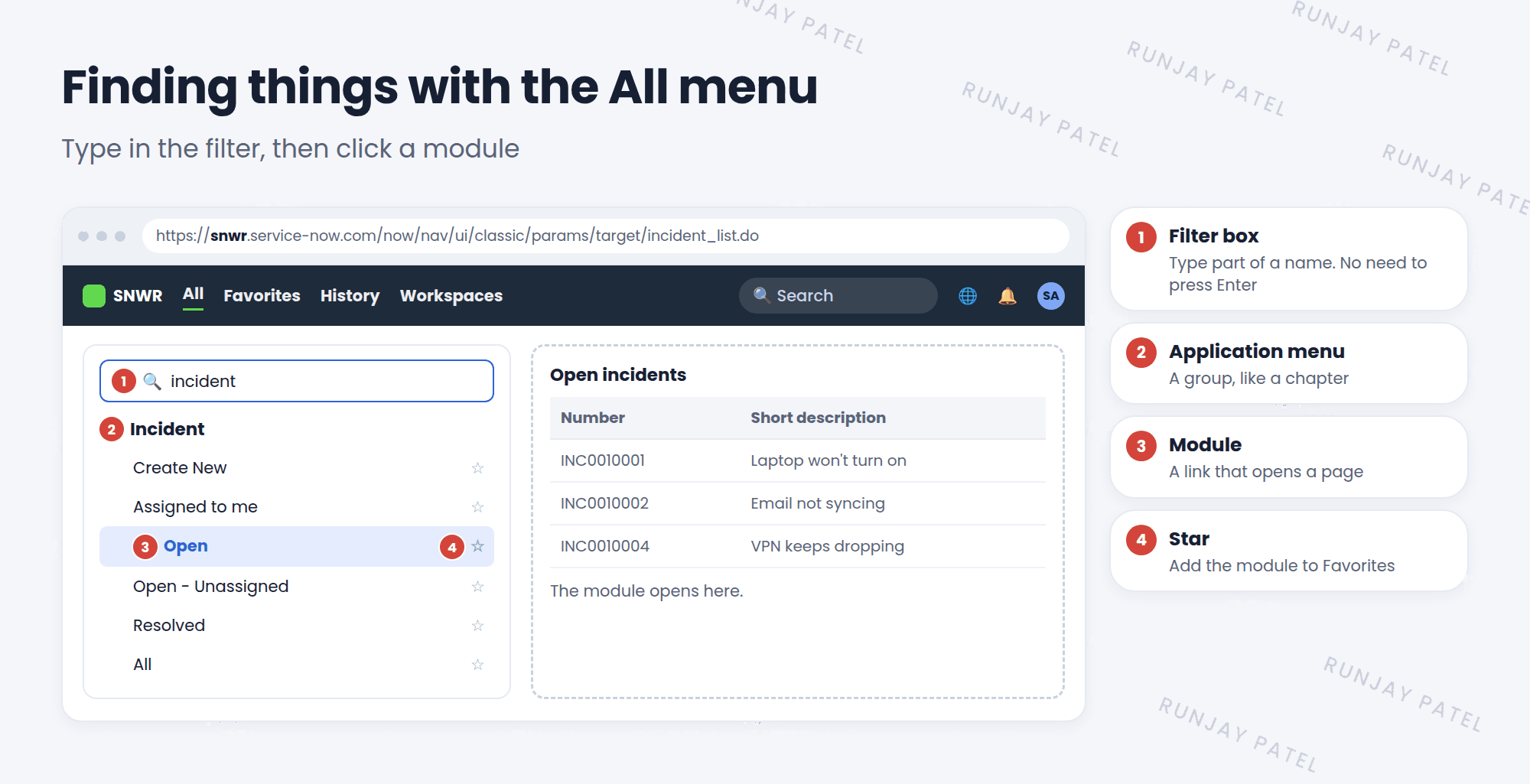
A group heading in the All menu, like Incident or Service Catalog. It’s like a chapter.
Key term: Module
A link under an application menu, like Create New or Open. Click it to open a page. It’s like a page in the chapter.
2 The filter box
The All menu is very long. Nobody scrolls through all of it! Instead, you use the filter box at the top.
- Click All.
- Type a word, like
incident. You don’t need to press Enter. - The menu shrinks to show only application menus and modules that match.
- Click the module you want. It opens in the main work area.
💡 Good to know: The filter looks at both application menu names and module names. Typing open shows every module called “Open”, in many different apps.
3 Table shortcuts in the filter
Every list in ServiceNow comes from a table, and every table has a short system name. For example, the Incident table is called incident, and the User table is called sys_user.
Admins can type a table name with an ending to jump straight to it:
| Type this | What opens |
|---|---|
incident.list |
The list of all records in the Incident table |
incident.do |
A new, empty Incident form |
sys_user.list |
The list of all users |
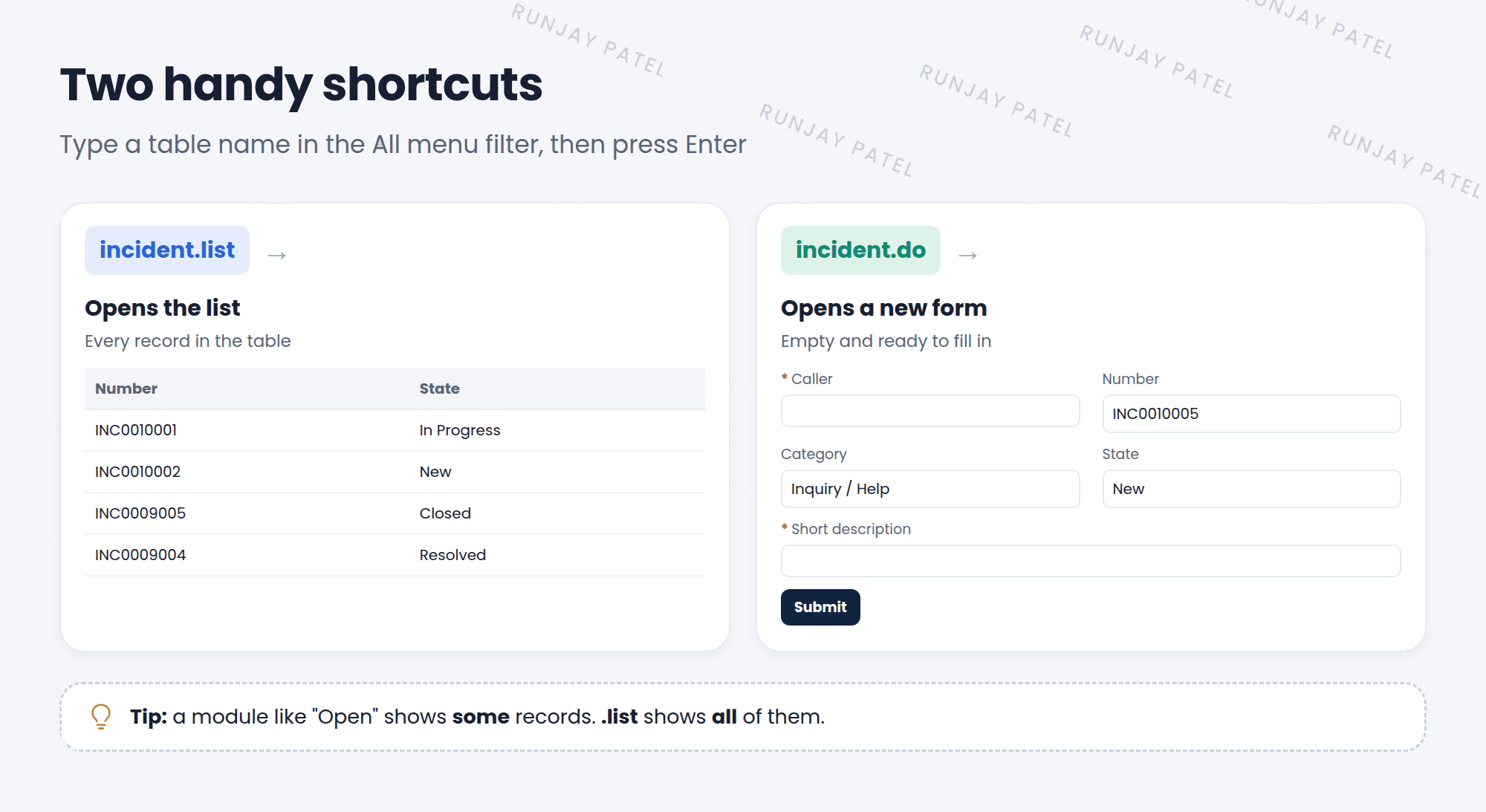
.list opens a list. .do opens a new form.⚠️ Heads up: A module might show only some records (for example, “Open” shows only open incidents). The .list shortcut shows every record in the table. Keep that in mind when you count things.
4 Why the menu looks different for different people
The All menu only shows what you are allowed to see. It depends on your roles.
- An admin sees almost everything.
- A fulfiller with the
itilrole sees apps like Incident, Problem, and Change. - A requester with no roles sees very little, because they mostly use the portal.
⭐ Remember: If someone says “I can’t find that menu,” check their roles first. You’ll learn more in Chapter 6.
📝 Note: Admins build and change application menus and modules too. You’ll learn how in Chapter 18.
5 Let’s try it: use the filter
- Click All and type
incident. Click Open under Incident. How many open incidents are there? - Open All again and type
incident.list. Press Enter. Is the count bigger? Why? - Open All and type
incident.do, then press Enter. A new, empty incident form opens. Don’t save it. Just look! - Open All, type
users, and find the Users module under User Administration.
6 Quick recap
- The All menu lists every app you can use
- An application menu is a group. A module is a link inside it
- Use the filter box to find things fast
table.listopens all records.table.doopens a new form- What you see in the menu depends on your roles
7 Check yourself
Think of your answer first. Then tap to check.
1 Is “Incident” in the All menu an application menu or a module? Show answer
An application menu. The links under it, like Open, are modules.
2 What opens if you type sys_user.list in the filter? Show answer
The list of all records in the User table.
3 You want a new, empty incident form. What do you type? Show answer
incident.do
4 A new user says the Change menu is missing. What should you check first? Show answer
Their roles. The All menu only shows what their roles allow.
Nice work! You finished this lesson. 🎉
Was this lesson helpful?
Please log in to share lesson feedback.
Have a question or doubt?
Ask here and get help from instructors and fellow learners.
Only logged-in learners can post.





