


Getting Your PDI
On this page
In this lesson, you will learn:
- What you get with a free PDI
- How to sign up and request your PDI, step by step
- How a PDI sleeps, wakes up, and can be taken back
- How to manage your PDI: passwords, upgrades, and resets
1 Quick look back
In Lesson 1.1, you saw the quick steps to get a PDI. In Lesson 2.1, you learned that an instance is a full copy of ServiceNow. Your PDI is exactly that: a real instance, just for you.
In this lesson, we go through it properly, so you can get your PDI, keep it, and fix it when something goes wrong. 🛠️
2 What is a PDI?
Key term: PDI (Personal Developer Instance)
A free ServiceNow instance that ServiceNow gives you to learn and practice on. You are the admin.
Key term: Developer site
ServiceNow’s website for learners and builders, at developer.servicenow.com. This is where you get and manage your PDI.
With a PDI, you get:
- 🆓 Freeno payment needed
- ⚙️ Admin accessyou can change anything
- 🧪 Demo datasample users and tickets
- 🧩 Pluginsturn on extra features
- 🗓️ Pick a releasechoose the version
- 🔒 Your own URLlike dev12345
⚠️ Never put real company data in a PDI. No real names, emails, passwords, or customer details. It’s a practice space only.
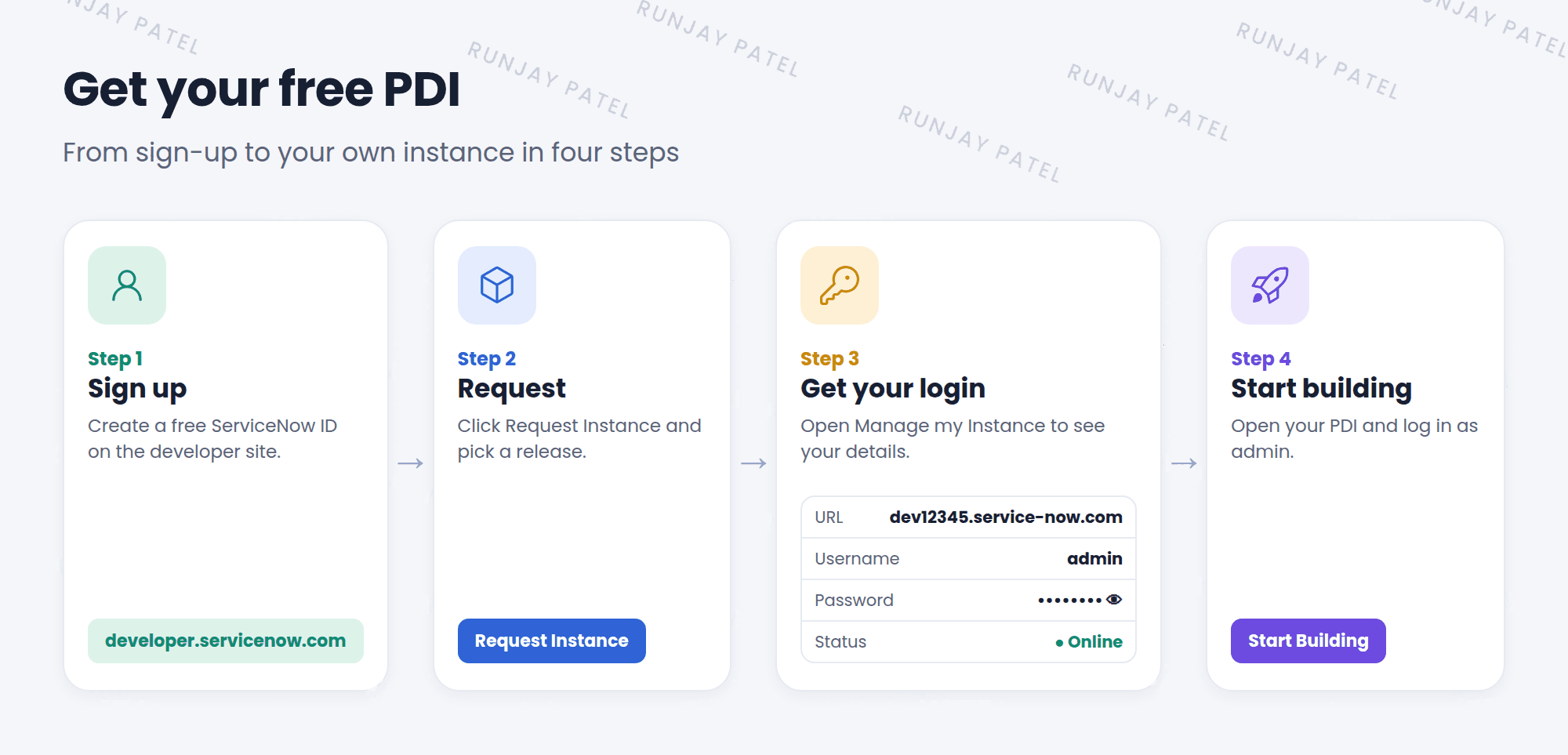
3 Step 1: Create your account
- Go to
developer.servicenow.com. - Click Sign up and fill in your details.
- Check your email and confirm your account.
- Sign in to the developer site with your new account.
📝 Note: This account is your ServiceNow ID. It’s the same login you use for other ServiceNow sites, like the Community and learning sites. It is not the same as the login for your PDI.
4 Step 2: Request your instance
- On the developer site, click Request Instance at the top of the page.
- Pick a release. Choose the newest one, unless your course or job needs a certain version.
- Click Request. Wait a few minutes while ServiceNow builds your instance. ⏳
- Go to Manage my Instance. You’ll see your instance URL, the username
admin, and a hidden password. - Click the eye icon to show the password. Copy it and keep it somewhere safe.
- Click Start Building to open your PDI. 🎉
💡 Good to know: If many people want PDIs at the same time, your release may not be available. You can pick another release or click Join Waitlist.
5 Your PDI sleeps and wakes up
ServiceNow gives out lots of free PDIs, so it saves power by putting unused ones to sleep. This is called hibernating.
Key term: Hibernating
Your PDI is asleep because nobody used it for a while. Your work is still safe inside.
Key term: Reclaimed
ServiceNow takes the PDI back, wipes it, and gives it to someone else. Your work is gone.
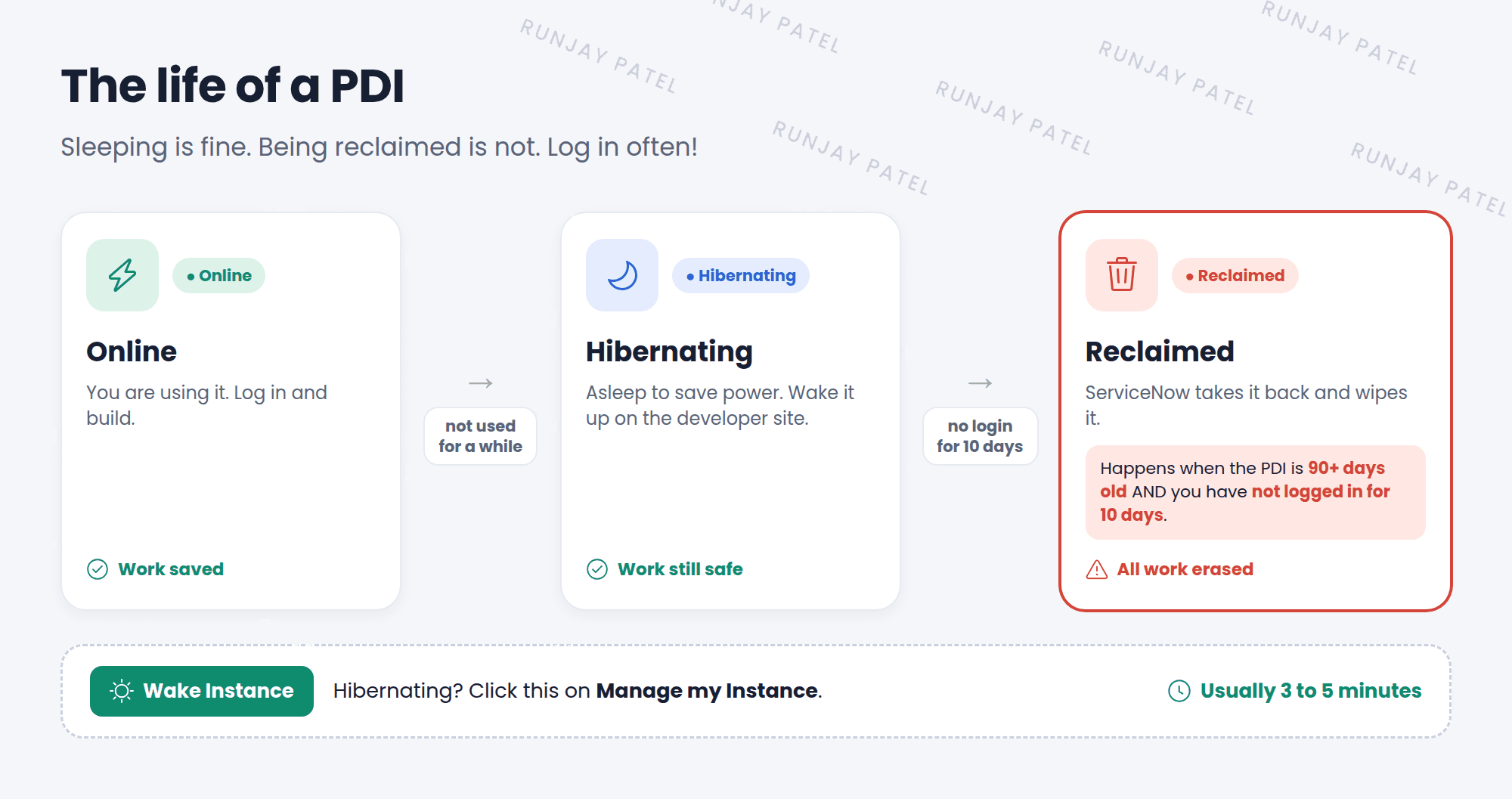
To wake up your PDI:
- Sign in to
developer.servicenow.com. - Go to Manage my Instance.
- Click Wake Instance.
- Wait. It usually takes 3 to 5 minutes, and should not take more than 20. ☕
⚠️ Don’t lose your PDI! ServiceNow can reclaim a PDI that is 90 days old or more if you have not logged in to it for 10 days. Only logging in to the PDI itself counts. Just visiting the developer site does not count. ServiceNow sends warning emails first, so check your inbox and spam folder.
6 Managing your PDI
Everything below is on the Manage my Instance page of the developer site:
| You want to… | Do this | Watch out |
|---|---|---|
| 👁️ See your password | Click the eye icon | Keep it private |
| 🔑 Get a new password | Gear icon → Reset instance password | The old one stops working |
| 📧 Email your login details | Gear icon → Email login credentials | Sent to your account email |
| ⬆️ Move to a newer release | Upgrade release (when shown) | Takes 2+ hours and can’t be stopped |
| 🧹 Start fresh | Actions → Reset and wipe instance | Erases everything. Takes a few hours |
| 👋 Give it back | Actions → Release instance | You lose the PDI and all your work |
📝 Note: You can’t move a PDI back to an older release. If you need an older version, release your PDI and request a new one.
7 Golden rules for your PDI
- Log in to your PDI at least once a week. That keeps you far away from the 10-day limit.
- Don’t change the
adminuser or its roles. This is the most common way people lock themselves out. If you want to practice, create a new user instead (Chapter 6). - Save your work outside the PDI. In the Advanced track, you’ll learn to export your changes with update sets.
- Keep your password safe. Anyone with it can log in as admin.
8 Let’s try it: check your PDI
- Sign in to
developer.servicenow.comand open Manage my Instance. - Write down 3 things: your instance URL, your release name, and your status (online or hibernating). ✍️
- If it’s hibernating, click Wake Instance and wait.
- Click the gear icon and choose Email login credentials. Now you have a backup copy in your email.
- Click Start Building and log in. Click your profile picture in the top-right corner. Your name shows as System Administrator.
📝 Note: Don’t click Reset and wipe instance or Release instance today. You don’t need them yet!
9 Fun facts
- 🎁 Free to keep
A PDI costs nothing. As long as you keep logging in, you can keep it for as long as you’re learning. - 🏗️ Same as the real thing
A PDI is a real instance, like the ones companies use. Many people build and test their first apps on a PDI.
10 Quick recap
- A PDI is a free instance for learning, and you are its admin
- You get it from
developer.servicenow.com: sign up, click Request Instance, pick a release - Your URL, username (
admin), and password are on Manage my Instance - An unused PDI hibernates. Click Wake Instance to bring it back
- A PDI 90+ days old can be reclaimed after 10 days with no login, so log in often
- Never change the
adminuser, and never add real company data
11 Check yourself
Think of your answer first. Then tap to check.
1 Where do you go to request and manage your PDI? Show answer
The ServiceNow developer site, developer.servicenow.com, on the Manage my Instance page.
2 Your PDI says it’s hibernating. Is your work lost? Show answer
No. It’s only asleep. Click Wake Instance and wait a few minutes.
3 You visit the developer site every day but never log in to your PDI. Is your PDI safe? Show answer
No. Only logging in to the PDI itself counts. After 90 days, 10 days without a PDI login can get it reclaimed.
4 What is the most common way people lock themselves out of their PDI? Show answer
Changing the admin user or removing its admin role.
5 You want a clean PDI with none of your old changes. Which action do you use? Show answer
Actions → Reset and wipe instance. It erases everything and takes a few hours.
Nice work! You finished this lesson. 🎉
Was this lesson helpful?
Please log in to share lesson feedback.
Have a question or doubt?
Ask here and get help from instructors and fellow learners.
Only logged-in learners can post.





