


Variables & Variable Sets
On this page
In this lesson, you will learn:
- What catalog variables are
- The most common variable types
- How variable sets let you reuse questions
1 Asking the right questions
When Sam orders a monitor, SNWR needs to know: What size? Where should we deliver it? Why do you need it? These questions on the order form are variables. ❓
Key term: Variable
A question on a catalog item’s order form. The answer is saved with the request.
Key term: Variable set
A group of variables you can reuse on many catalog items.
2 Common variable types
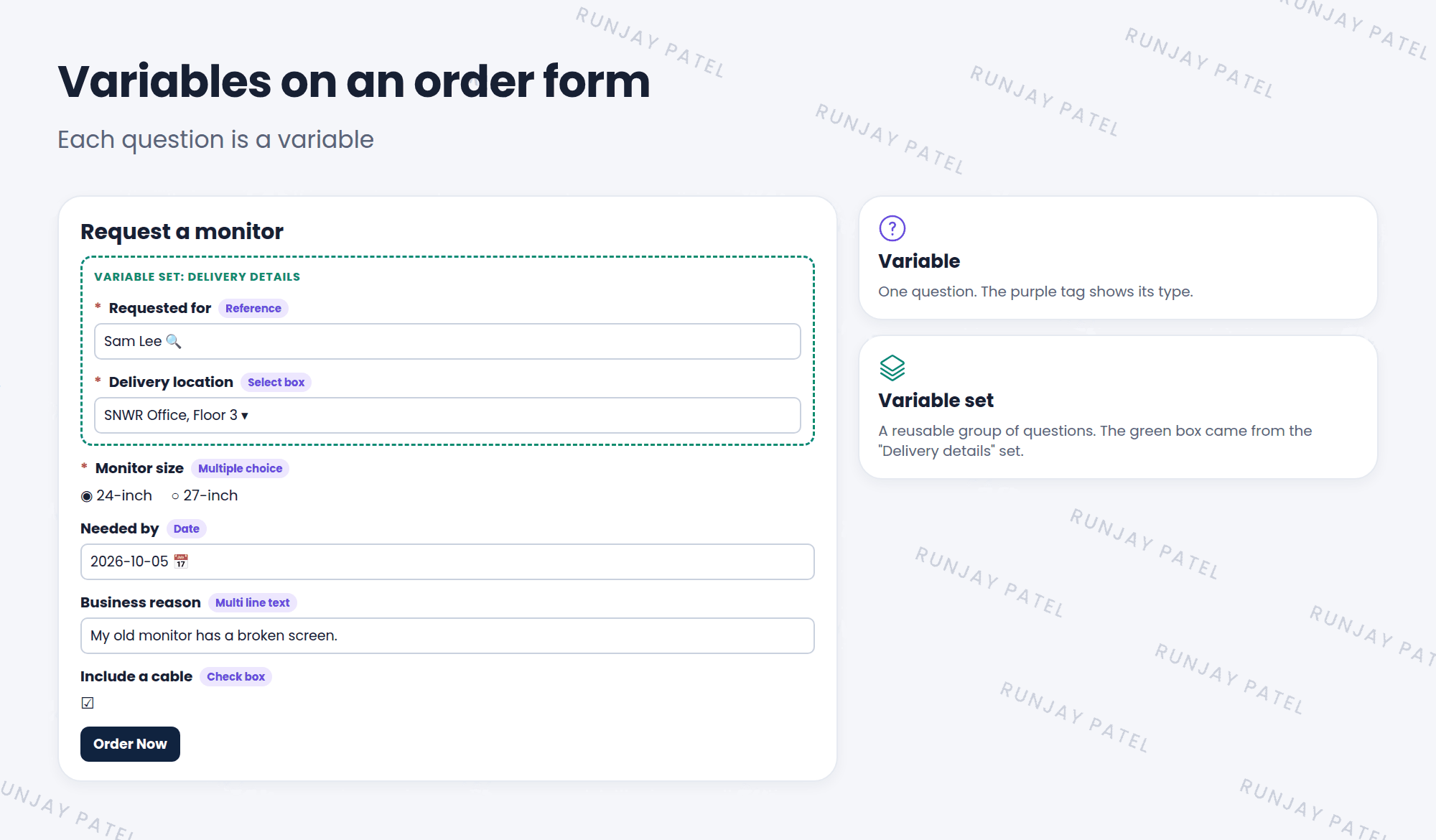
| Type | Looks like | Example |
|---|---|---|
| Single line text | A short text box | Asset tag |
| Multi line text | A big text box | Business reason |
| Select box | A drop-down list | Delivery location |
| Multiple choice | Round buttons, pick one | Monitor size |
| Check box | Tick yes or no | Include a cable |
| Reference | Pick a record from a table | Requested for (a user) |
| Date | A calendar | Needed by |
3 Add a variable
- Open your catalog item and scroll to the Variables related list.
- Click New.
- Pick a Type, type the Question, and give it a Name (the system name, like
monitor_size). - Set the Order and tick Mandatory if needed.
- For choice types, add the choices. Save, then Try It. ✅
4 Variable sets
Many items ask the same things, like “Requested for” and “Delivery location”. Instead of adding them to every item, build them once as a variable set, and attach the set to each item.
- Change the set once, and every item using it changes.
- Add sets from the item’s Variable Sets related list.
💡 Good to know: Keep order forms short. Every extra question makes people less likely to finish. Only ask what the fulfiller really needs.
⭐ Remember: Variable = one question. Variable set = reusable group of questions.
5 Let’s try it: ask about the monitor
- Open SNWR Request a monitor. Add a Multiple choice variable: “Monitor size”, with choices 24-inch and 27-inch. Make it mandatory.
- Add a Multi line text variable: “Business reason”.
- Click Try It. Do the questions show in the right order?
6 Quick recap
- Variables are the questions on an order form
- Types include text, select box, multiple choice, check box, reference, and date
- Add them in the item’s Variables related list
- Variable sets reuse questions across items
7 Check yourself
Think of your answer first. Then tap to check.
1 You want users to pick one of three sizes with round buttons. Which type? Show answer
Multiple choice.
2 Ten items all ask for a delivery location. What’s the best approach? Show answer
Put it in a variable set and attach the set to all ten items.
3 Which variable type lets users pick a user from the User table? Show answer
Reference.
Nice work! You finished this lesson. 🎉
Was this lesson helpful?
Please log in to share lesson feedback.
Have a question or doubt?
Ask here and get help from instructors and fellow learners.
Only logged-in learners can post.





