


What Are System Properties?
On this page
In this lesson, you will learn:
- What a system property is
- How properties are different from user preferences
- The parts of a property record
- A few real examples
1 Switches for the whole instance
In Lesson 5.2, you changed preferences. Those changed ServiceNow for you only.
Now meet system properties. These are settings that change ServiceNow for everyone. Only admins can change them. 🎛️
Think of the light switches in a school. Each student has a desk lamp they can turn on or off (preferences). But the main switch in the office turns off the lights for the whole building (a system property).
Key term: System property
An instance-wide setting that controls how something works. Stored in the System Property table, sys_properties.
2 Preference vs property
| User preference | System property | |
|---|---|---|
| Affects | One user | Everyone |
| Who changes it | The user | An admin |
| Table | sys_user_preference |
sys_properties |
| Example | My theme is dark | Log everyone out after 30 minutes of doing nothing |
3 Inside a property record
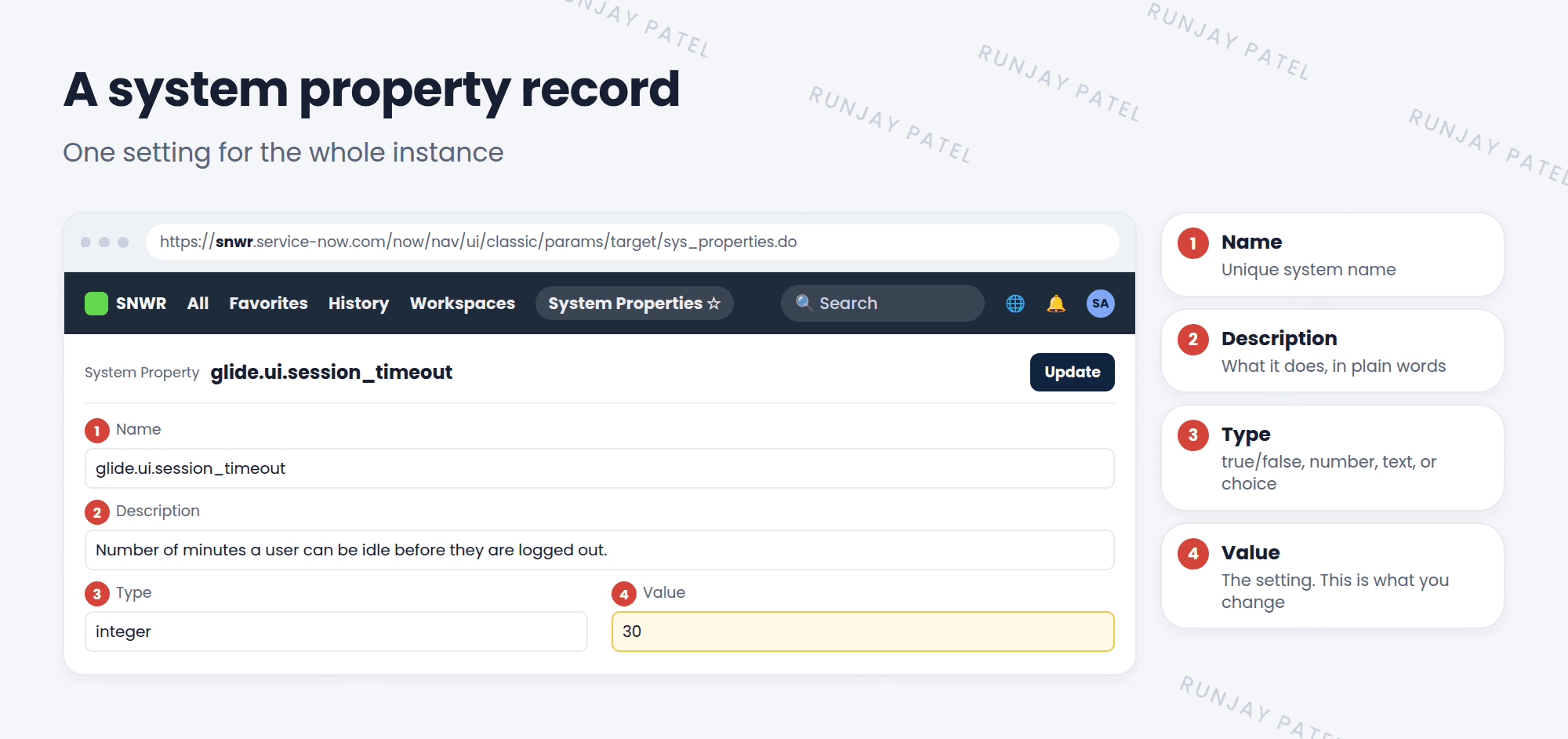
| Field | What it means |
|---|---|
| Name | The unique system name. Most start with glide. |
| Description | Plain words about what it does |
| Type | What kind of value: true/false, a number, text, or a choice |
| Value | The setting itself. This is what you change |
4 Some real examples
| Property | What it controls |
|---|---|
glide.ui.session_timeout |
Minutes of doing nothing before a user is logged out |
glide.email.smtp.active |
Whether the instance sends emails at all |
glide.sys.date_format |
The default date format for the instance |
📝 Note: There are thousands of properties. Nobody remembers them all! Admins search for the one they need, read its description, and check ServiceNow’s docs.
⭐ Remember: Preference = one user. Property = the whole instance.
5 Let’s try it: find a property
- Click All and type
sys_properties.list, then press Enter. - Look at how long the list is!
- In the list’s Search box, choose Name and search for
glide.ui.session_timeout. - Open it. Read the Description and look at the Value. Don’t change it yet.
- Now search for
glide.email.smtp.active. Is email sending on in your PDI?
6 Quick recap
- A system property is a setting for the whole instance
- Properties are stored in
sys_properties - Each property has a Name, Description, Type, and Value
- Only admins should change them
- Preferences are for one user. Properties are for everyone
7 Check yourself
Think of your answer first. Then tap to check.
1 Which table stores system properties? Show answer
sys_properties.
2 SNWR wants everyone logged out after 60 idle minutes. Preference or property? Show answer
A system property, because it affects everyone.
3 Which field on a property record do you change to change the setting? Show answer
The Value field.
Nice work! You finished this lesson. 🎉
Was this lesson helpful?
Please log in to share lesson feedback.
Have a question or doubt?
Ask here and get help from instructors and fellow learners.
Only logged-in learners can post.





