


Incident Management
On this page
In this lesson, you will learn:
- What an incident is, and what it isn’t
- The states an incident moves through
- How priority and major incidents work
1 What is an incident?
Key term: Incident
An unplanned interruption to a service, or a drop in its quality. Something that should work doesn’t.
The goal of incident management is simple: get people working again as fast as possible. 🚑 Finding the deep cause comes later, in problem management.
- ✅ Incident: “My laptop won’t turn on.” “Email is down.”
- ❌ Not an incident: “I need a new monitor.” That’s a request.
2 The life of an incident
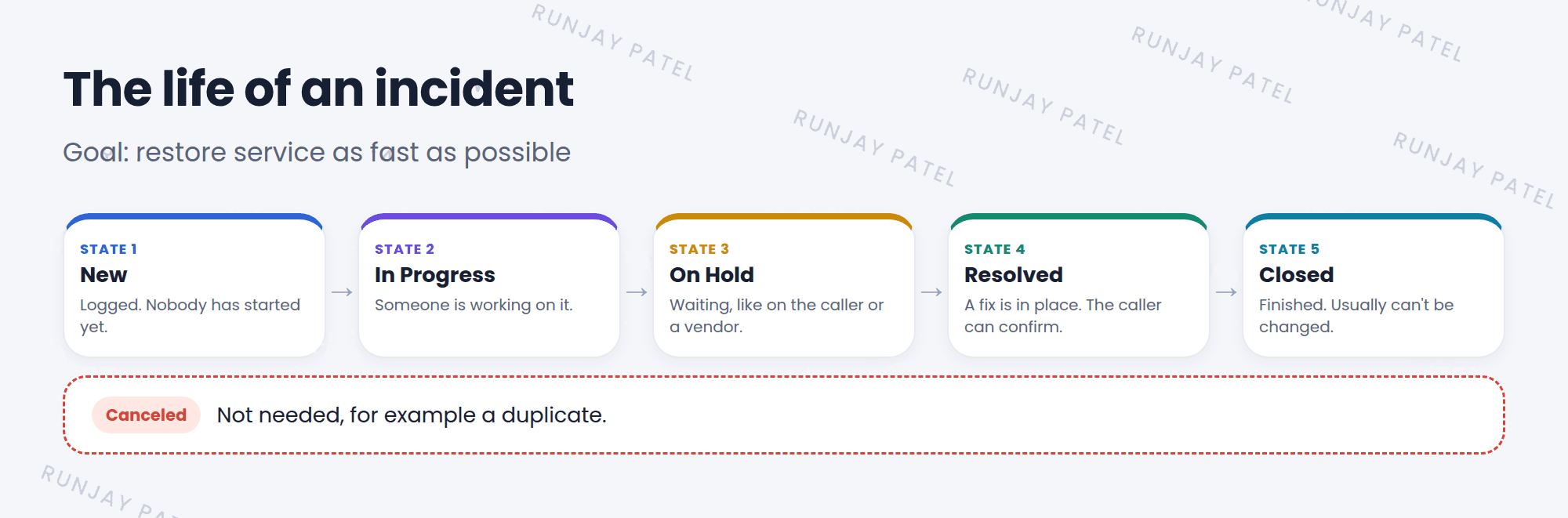
| State | What it means |
|---|---|
| New | Logged, but nobody has started yet |
| In Progress | Someone is working on it |
| On Hold | Waiting, for example on the caller or a vendor |
| Resolved | A fix is in place. The caller can confirm or reopen |
| Closed | Finished. It usually can’t be changed anymore |
| Canceled | Not needed, for example a duplicate |
📝 Note: When you move an incident to Resolved, ServiceNow asks for a resolution code and resolution notes. Those fields become mandatory (remember Lesson 13.3).
3 Priority
Priority decides which incident to work on first. It’s calculated from Impact and Urgency, using the priority matrix from Lesson 19.2.
- 1 – Critical: many people can’t work. Drop everything!
- 3 – Moderate: one person has a problem, but can partly work.
- 5 – Planning: small issue, can wait.
4 Major incidents
When something big breaks, like email for the whole company, it becomes a major incident. A special team takes charge, sends updates, and links all the related incidents to one parent. 🚨
💡 Good to know: When many people report the same outage, link their incidents as child incidents of one parent. Fix the parent, and the children can be resolved together.
⭐ Remember: Incident = restore service fast. Resolved ≠ Closed: Resolved still gives the caller a chance to say “it’s not fixed”.
5 Let’s try it: work an incident
- Create a new incident. Caller: Riya Sharma. Short description: “Can’t connect to Wi-Fi”. Impact 2, Urgency 2. Submit.
- Open it. Set State to In Progress and add a work note. Update.
- Set State to On Hold. What extra field appears?
- Set State to Resolved. Fill in the resolution fields. Update.
- Look at the activity stream. Can you follow the whole story?
6 Quick recap
- An incident is an unplanned interruption. The goal is to restore service fast
- States: New, In Progress, On Hold, Resolved, Closed (and Canceled)
- Resolved needs a resolution code and notes
- Priority comes from Impact and Urgency
- Big outages become major incidents, with child incidents linked
7 Check yourself
Think of your answer first. Then tap to check.
1 What’s the main goal of incident management? Show answer
To restore normal service as fast as possible.
2 What’s the difference between Resolved and Closed? Show answer
Resolved means a fix is in place, but the caller can still reopen it. Closed means it’s finished.
3 You’re waiting for the caller to reply. Which state do you use? Show answer
On Hold.
Nice work! You finished this lesson. 🎉
Was this lesson helpful?
Please log in to share lesson feedback.
Have a question or doubt?
Ask here and get help from instructors and fellow learners.
Only logged-in learners can post.





