


Admin Best Practices
On this page
In this lesson, you will learn:
- The habits that make a great ServiceNow admin
- Rules for changes, access, and data
- How to keep your instance clean and easy to upgrade
1 Good habits beat clever tricks
You’ve already learned a lot of rules in this course. This lesson puts the most important ones in one place. Think of it as your admin checklist. ✅
2 Rules for making changes
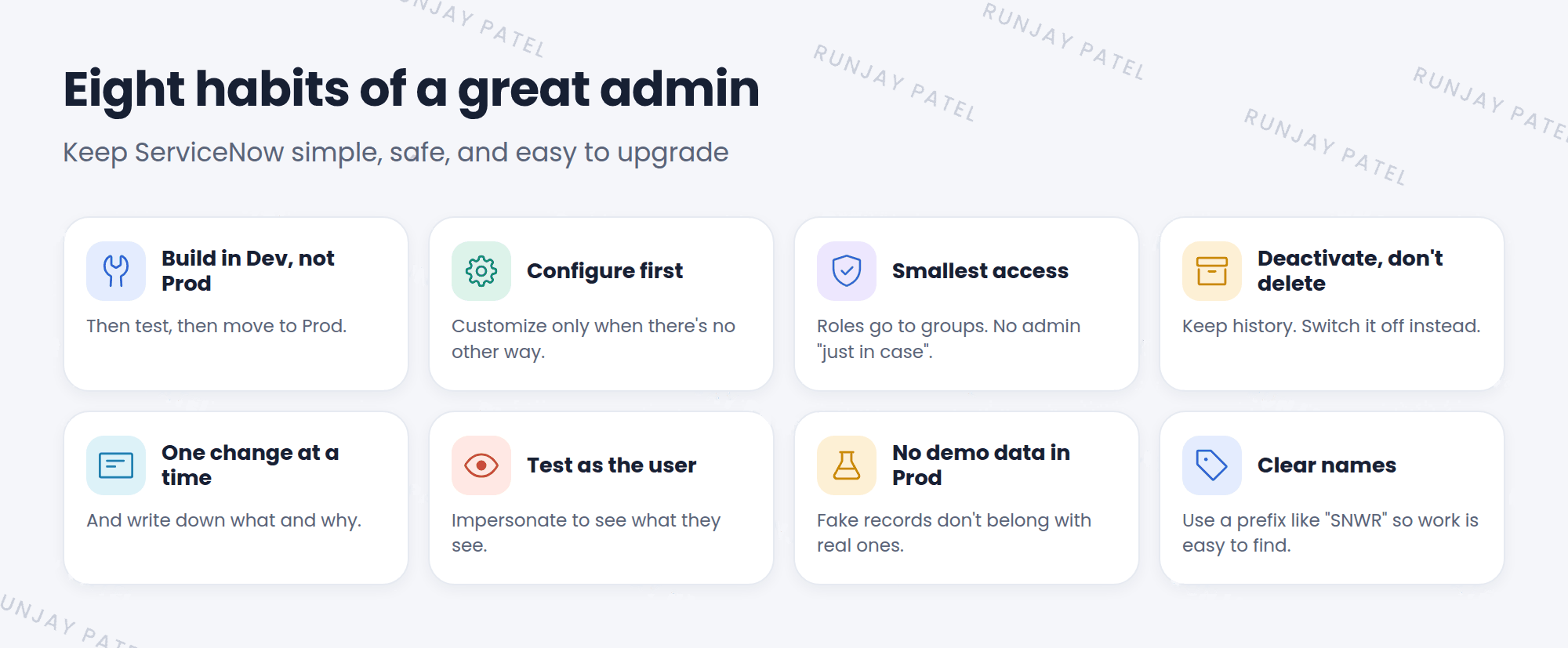
- Never build in Prod. Build in Dev, test in Test, then move to Prod.
- Configure before you customize. Use built-in tools first (Lesson 9.1).
- One change at a time. If something breaks, you’ll know why.
- Write it down. Note what you changed, when, and why.
- Test as the user. Impersonate a real user to check your change works for them (Lesson 6.4).
3 Rules for access
- Roles go to groups, not single users (Lesson 6.3).
- Smallest access needed. Don’t give
adminto make a problem “go away”. - Review access from time to time. People change teams.
- Deactivate, don’t delete users who leave (Lesson 6.1).
4 Rules for a clean instance
- Name things clearly. Use a prefix like “SNWR” so your work is easy to find.
- Deactivate instead of deleting rules and records you might need later.
- No demo data in Prod (Lesson 7.3).
- Remove what you don’t use. Old test records and unused items make the instance messy.
- Keep up with upgrades. Review skipped records every time (Lesson 9.2).
💡 Good to know: ServiceNow has a tool called Instance Scan. It checks your instance against best practices and lists things to fix. It’s like a health check-up for your instance. 🩺
5 When someone asks for a change
Most admin work starts with a request. Before you change anything, ask:
- What’s the real problem? The request might not be the best fix.
- Is there a built-in way? Check the docs and existing features.
- Who else is affected? A change for one team can affect others.
- How will we test it? Plan the test before you build.
- How do we undo it? Always have a way back.
⭐ Remember: A great admin keeps ServiceNow simple, safe, and easy to upgrade.
6 Let’s try it: score yourself
Look back at what you’ve done in your PDI so far:
- Did you change any property? Did you set it back?
- Is Riya in a group, getting roles from the group (not directly)?
- Did you name your group with an “SNWR” prefix?
- Did you leave any test records you don’t need? Clean them up. 🧹
7 Quick recap
- Build in Dev, configure first, one change at a time, and write it down
- Roles to groups, smallest access, deactivate don’t delete
- Clear names, no demo data in Prod, clean up what you don’t use
- Before any change: problem, built-in way, impact, test, undo
8 Check yourself
Think of your answer first. Then tap to check.
1 A user can’t see a menu. A teammate says, “Just give them admin.” What do you say? Show answer
No. Find the right role and give it through their group. Give the smallest access needed.
2 Why change only one thing at a time? Show answer
So if something breaks, you know exactly which change caused it.
3 What does Instance Scan do? Show answer
It checks the instance against best practices and lists things to fix.
Nice work! You finished this lesson. 🎉
Was this lesson helpful?
Please log in to share lesson feedback.
Have a question or doubt?
Ask here and get help from instructors and fellow learners.
Only logged-in learners can post.





