


SLA Definitions (Start, Pause, Stop)
On this page
In this lesson, you will learn:
- What an SLA definition is
- How start, pause, and stop conditions control the clock
- The other key fields on an SLA definition
1 The rulebook for the clock
An SLA is like a stopwatch. ⏱️ But when does it start? When does it pause? When does it stop? An SLA definition answers these questions.
Key term: SLA definition
The rules for one SLA: which table, how long, and the conditions that start, pause, and stop the clock. Stored in the contract_sla table.
2 Start, pause, stop
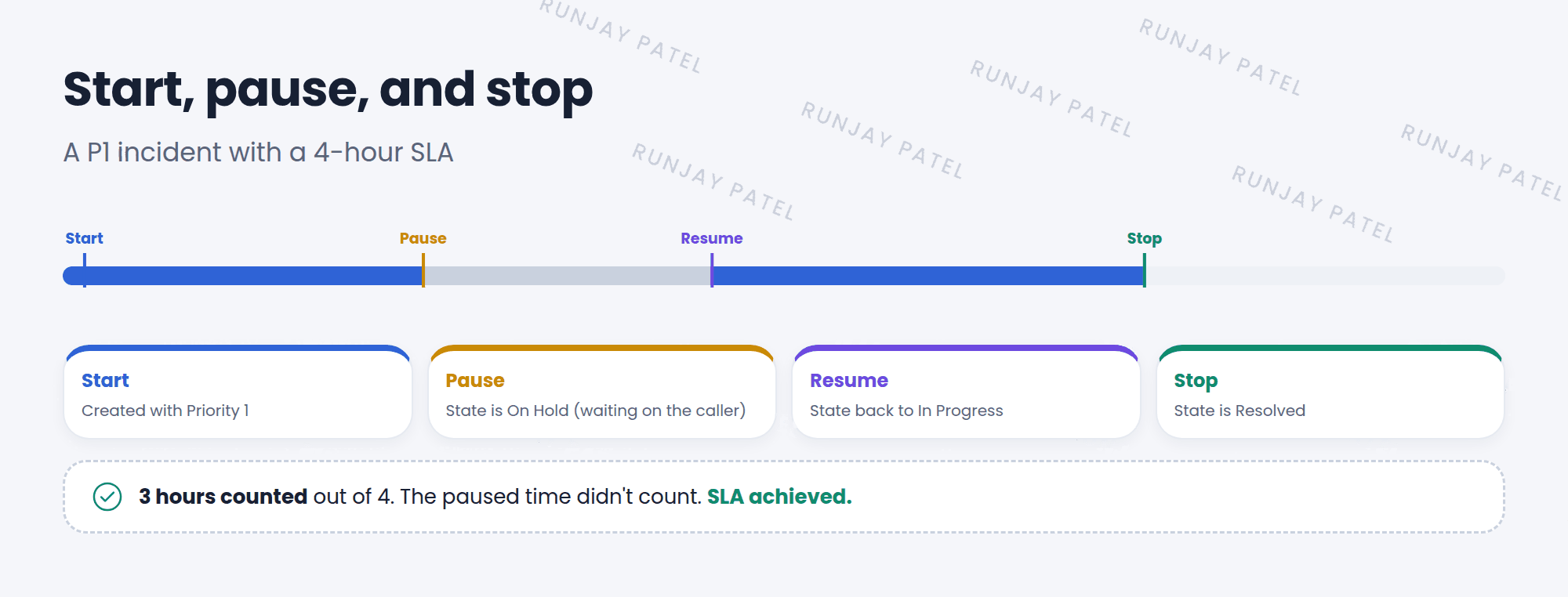
| Condition | What it does | Example |
|---|---|---|
| Start | Starts the clock | Priority is 1 – Critical |
| Pause | Pauses the clock while true | State is On Hold |
| Stop | Stops the clock. The SLA is done | State is Resolved |
| Cancel | Cancels the SLA if it no longer applies | Priority is no longer 1 |
💡 Good to know: Pausing is fair to the team. If you’re waiting on the caller to reply, that time shouldn’t count against IT.
3 Other key fields
| Field | What it does |
|---|---|
| Name | A clear name, like “P1 resolution (4 hours)” |
| Type | SLA, OLA, or Underpinning contract |
| Target | Response (first reply) or Resolution (fixed) |
| Table | Which table it applies to, like Incident |
| Duration | How much time is allowed, like 4 hours |
| Schedule | Which hours count, like 24×7 or business hours (Lesson 21.3) |
⭐ Remember: Start → Pause → Stop. And choose the right Target: response or resolution.
4 Let’s try it: build an SLA
- Go to Service Level Management > SLA Definitions and click New.
- Name: SNWR P1 resolution. Type: SLA. Target: Resolution. Table: Incident. Duration: 4 hours.
- Start condition: Priority is 1 – Critical.
- Pause condition: State is On Hold. Stop condition: State is Resolved. Submit.
- Create a new P1 incident. Check its Task SLAs related list. Is your SLA running?
5 Quick recap
- An SLA definition holds the rules for one SLA
- Start, pause, stop, and cancel conditions control the clock
- Paused time doesn’t count
- Key fields: Type, Target, Table, Duration, Schedule
6 Check yourself
Think of your answer first. Then tap to check.
1 You’re waiting for the caller to reply. What should happen to the SLA clock? Show answer
It should pause, using a pause condition like State is On Hold.
2 Which Target measures how fast IT first replies? Show answer
Response.
3 Which table stores SLA definitions? Show answer
contract_sla.
Nice work! You finished this lesson. 🎉
Was this lesson helpful?
Please log in to share lesson feedback.
Have a question or doubt?
Ask here and get help from instructors and fellow learners.
Only logged-in learners can post.





