


Workflow Studio Overview
On this page
In this lesson, you will learn:
- What Workflow Studio is
- What flows, subflows, and actions are
- How a flow is built from a trigger and steps
1 Automation without code
In Lesson 1.2, you learned that workflow and automation is one of the platform’s big capabilities. The tool for it is Workflow Studio. You build automations by picking steps from menus, with no code. ⚙️
Key term: Workflow Studio
ServiceNow’s low-code tool for building automations. It includes what used to be called Flow Designer.
Key term: Flow
An automation that starts with a trigger and then runs steps, one after another.
📝 Note: You’ll still hear “Flow Designer” a lot, including on the CSA exam. It’s the same flow-building tool, now inside Workflow Studio.
2 The building blocks
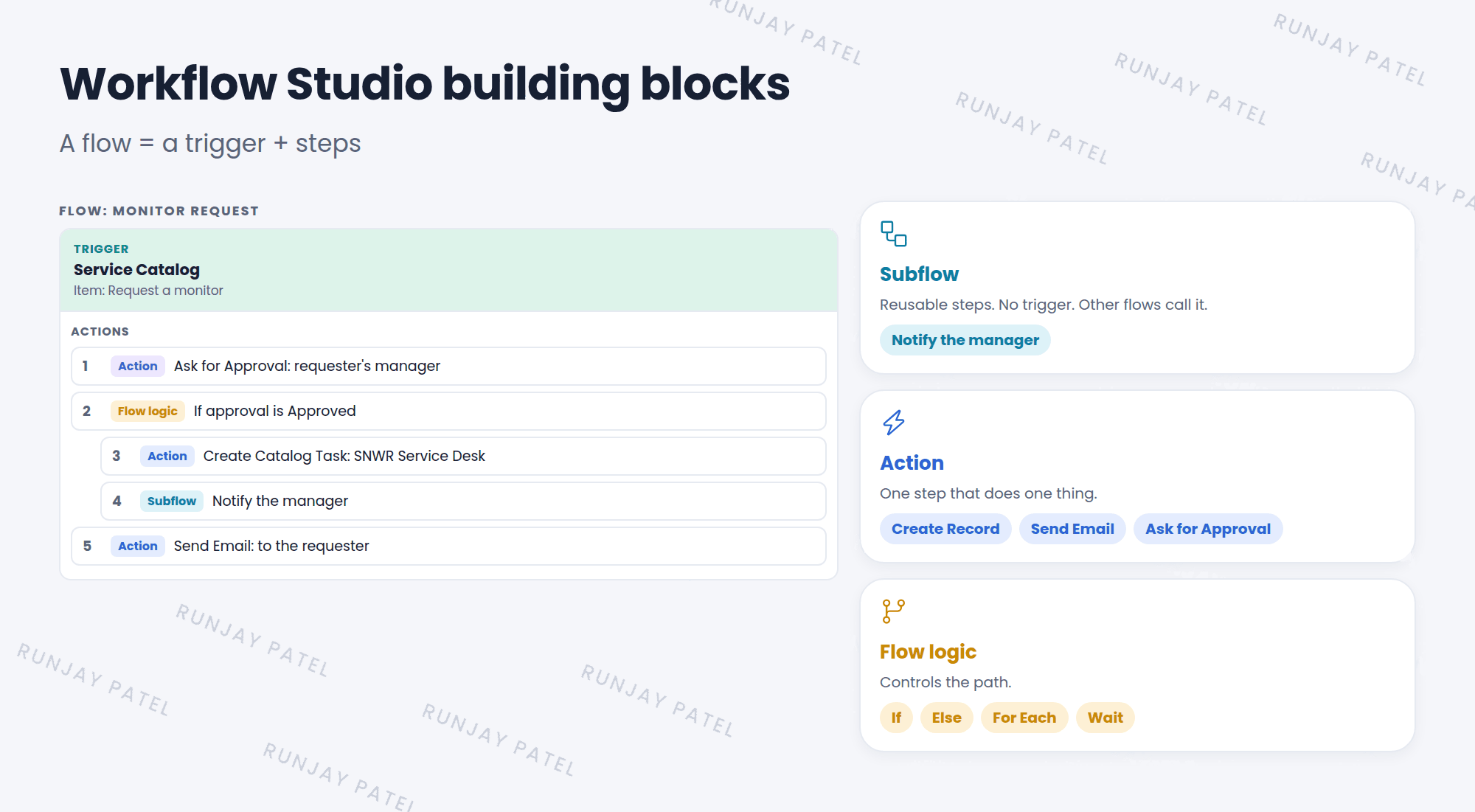
| Block | What it is | Example |
|---|---|---|
| Flow | Starts by itself when its trigger happens | When a monitor is requested, get approval and create a task |
| Subflow | A reusable set of steps. Other flows call it. No trigger of its own | “Notify the manager” |
| Action | One step that does one thing | Create Record, Send Email, Ask for Approval |
| Flow logic | Controls the path: if, else, repeat, wait | If approved, then… |
⭐ Remember: Flow = trigger + steps. Subflow = reusable steps. Action = one step.
3 Why flows?
- No code: admins and process owners can read and build them.
- Easy to follow: the steps read like a sentence.
- Testable: you can test a flow and see exactly what each step did (Lesson 28.4).
- Upgrade-friendly: it’s configuration, not customization.
💡 Good to know: ServiceNow recommends flows over the older “legacy workflow” editor for new automations.
4 Let’s try it: open Workflow Studio
- Click All and type
workflow studio. Open it (it may open in a new tab). - Look at the lists of flows, subflows, and actions.
- Open a ready-made flow, like a Service Catalog item flow. Read its trigger and steps.
5 Quick recap
- Workflow Studio is the low-code automation tool (it includes Flow Designer)
- A flow = a trigger + steps
- A subflow is reusable and has no trigger
- An action is one step
- Flows are the recommended way to automate
6 Check yourself
Think of your answer first. Then tap to check.
1 What’s the difference between a flow and a subflow? Show answer
A flow has a trigger and starts by itself. A subflow has no trigger and is called by other flows.
2 “Send Email” is a flow, a subflow, or an action? Show answer
An action.
3 What was Workflow Studio’s flow builder called before? Show answer
Flow Designer.
Nice work! You finished this lesson. 🎉
Was this lesson helpful?
Please log in to share lesson feedback.
Have a question or doubt?
Ask here and get help from instructors and fellow learners.
Only logged-in learners can post.





