


Role of a System Administrator
On this page
In this lesson, you will learn:
- What a ServiceNow System Administrator does
- What a normal day looks like for an admin
- How an admin is different from a fulfiller, a developer, and a process owner
- The golden rules every good admin follows
1 Meet the admin
In Lesson 1.1, you met the 3 main kinds of users: the requester, the fulfiller, and the admin. This whole course is about becoming the admin. So let’s look at that job up close.
Think of a big apartment building. 🏢 People live there (users). Repair workers fix things (fulfillers). And there is one building manager who:
- gives out keys to new people,
- decides who can go into which rooms,
- keeps the lifts, lights, and pipes working,
- and makes small changes when people need them.
👉 A ServiceNow System Administrator is the building manager of an instance.
Key term: System Administrator
The person who sets up ServiceNow, looks after it, and keeps it safe and working for everyone.
Key term: admin role
The role in ServiceNow that gives a user admin powers. Its name is simply admin.
2 What does an admin do?
An admin’s work fits into a few big buckets. You will learn each one in this course:
| Job | Example | Chapter |
|---|---|---|
| 👥 Users & access | Add a new worker, put them in a group, give them the right roles | 6 |
| 📝 Lists & forms | Add a field to the incident form, change which columns a list shows | 11–18 |
| 🛒 Self-service | Build a “Request a new laptop” item in the Service Catalog | 25–27 |
| ⚙️ Automation | Make a flow that sends approvals to a manager | 28 |
| 📊 Reports & alerts | Build a dashboard and set up email notifications | 22–24 |
| 🩺 Instance health | Install plugins, check logs, and prepare for upgrades | 7–9 |
⭐ Remember: An admin mostly configures ServiceNow. That means changing settings with clicks, not writing code.
3 A day in the life
No two days are the same, but here’s what a normal day might look like:
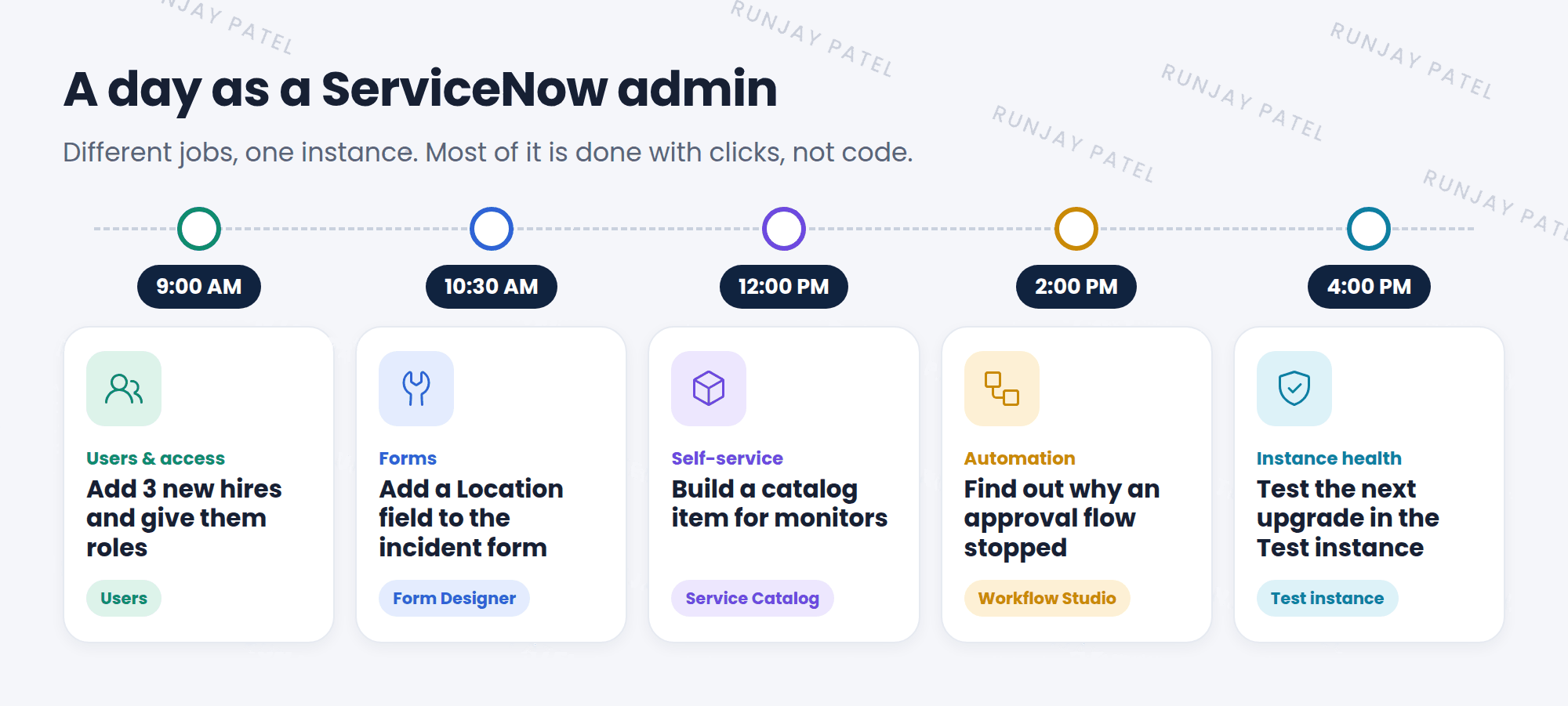
💡 Good to know: Much of an admin’s work starts as a request from someone else: “Can you add a field?”, “Why can’t I see this?”, “Can we automate this?” A big part of the job is asking good questions before you change anything.
4 Admin vs other roles
Admins work with many people. Here’s how the jobs differ:
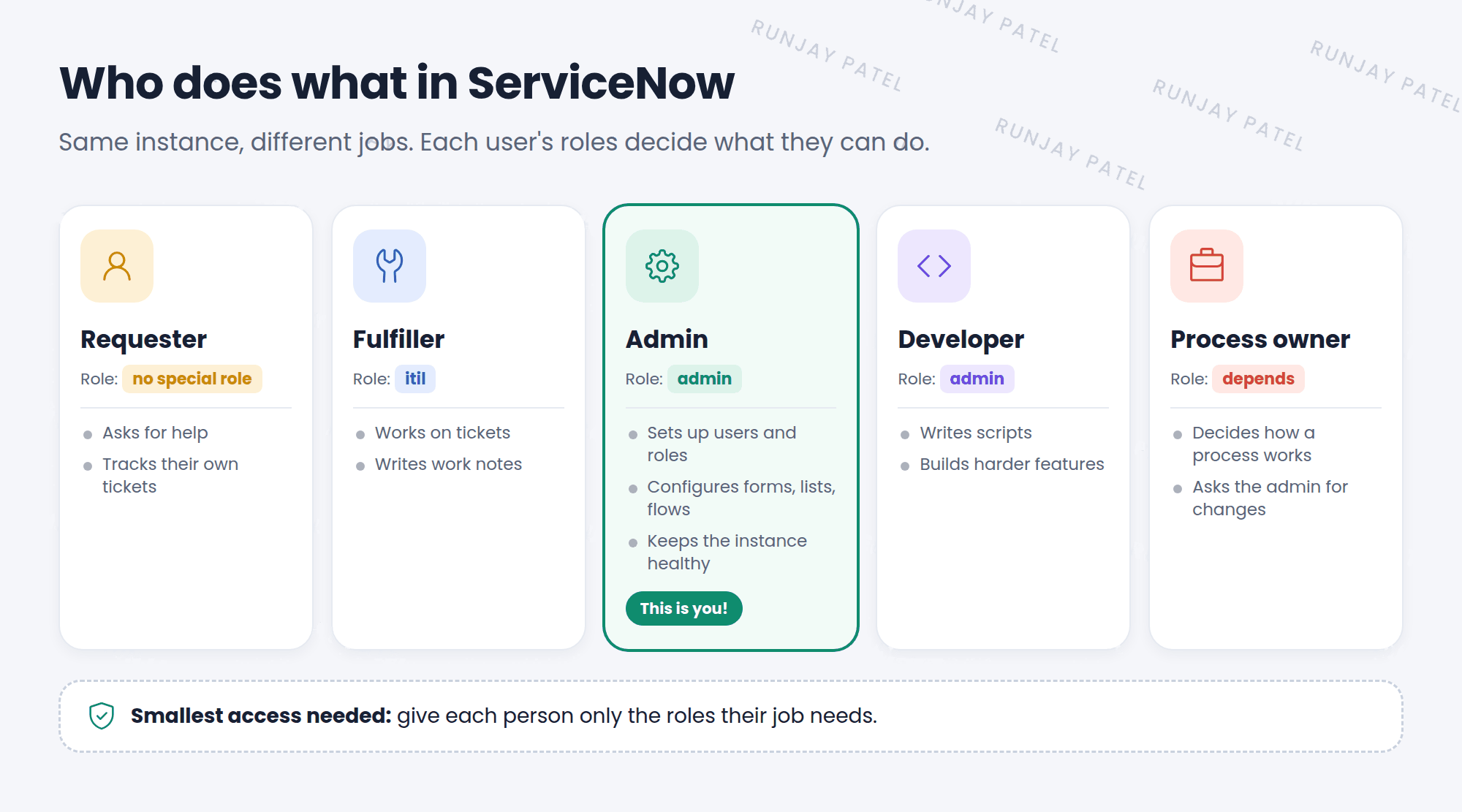
Key term: Fulfiller
Works on tickets, like an IT support agent. Usually has the itil role.
Key term: Developer
Writes scripts and builds apps when clicks aren’t enough. You’ll learn scripting in the Advanced track.
Key term: Process owner
Decides how a process should work. Example: the Incident manager decides what “Priority 1” means. The admin then sets it up.
📝 Note: In a small company, one person may do all these jobs. In a big company, each job can be a whole team.
5 How strong is the admin role?
The admin role is very powerful. An admin can see and change almost everything in the instance.
- It includes most other roles, so an admin can do what a fulfiller can do, and more.
- A few extra-risky powers, like changing security rules, need a special role called
security_admin. An admin must turn it on for a short time first. You’ll learn about this in the Advanced track.
⚠️ With great power… One wrong click as an admin can affect every user. That’s why only a few trusted people get the admin role in real companies.
6 Golden rules for admins
- Never build in Prod. Make changes in Dev, check them in Test, then move them to Prod.
- Configure before you customize. Use the built-in settings first. Write code only when you must.
- Ask “why?” first. Understand the real problem before you change anything.
- Give the smallest access needed. Don’t give people
adminjust because it’s easier. - Write it down. Keep notes on what you changed and why. Future you will say thanks!
⭐ Remember: A good admin keeps ServiceNow simple, safe, and easy to upgrade. You’ll learn more about this in Chapter 9.
7 Let’s try it: see your admin role
In your PDI, you are the admin. Let’s prove it:
- Log in to your PDI with the admin user.
- Click All and type
Usersin the filter box. - Under System Security (or User Administration), click Users. A list of all users opens.
- Find the user with the User ID admin and open it.
- Scroll down to the Roles tab at the bottom. You’ll see
adminin the list. 🎉
📝 Note: Just look for now. Don’t remove any roles from the admin user, or you could lock yourself out! You’ll manage users and roles properly in Chapter 6.
8 Fun facts
- 🎓 CSA
The exam this course prepares you for is the Certified System Administrator (CSA) exam. It’s often the first ServiceNow exam people take. - 🧭 A great first job
Many ServiceNow developers, architects, and consultants started out as admins. It’s a common first step into the ServiceNow world.
9 Quick recap
- A System Administrator sets up ServiceNow, looks after it, and keeps it safe
- The role that gives admin powers is called
admin - Admin jobs: users and access, lists and forms, self-service, automation, reports, and instance health
- Admins mostly configure with clicks. Developers write code
- Fulfillers work on tickets (
itilrole). Process owners decide how a process works - Golden rules: never build in Prod, configure before you customize, give the smallest access needed
10 Check yourself
Think of your answer first. Then tap to check.
1 In the apartment example, who is like the ServiceNow admin? Show answer
The building manager.
2 What is the name of the role that gives a user admin powers? Show answer
admin
3 An IT agent works on incident tickets all day. Which role do they usually have? Show answer
The itil role. They are a fulfiller.
4 Someone asks for the admin role “to make things easier.” What should you do? Show answer
Give only the smallest access they need to do their job, not admin.
5 Where should you build and try out a new change first? Show answer
In Dev. Then check it in Test, and only then move it to Prod.
Nice work! You finished this lesson. 🎉
Was this lesson helpful?
Please log in to share lesson feedback.
Have a question or doubt?
Ask here and get help from instructors and fellow learners.
Only logged-in learners can post.





