


Problem Management
On this page
In this lesson, you will learn:
- What a problem is and how it’s different from an incident
- What root cause, workaround, and known error mean
- The states a problem moves through
1 Stop fighting the same fire
Every Monday, the printer on floor 3 jams. Every Monday, someone logs an incident, and IT clears the jam. The incident is fixed… until next Monday. 🔁
Problem management asks a different question: why does it keep happening, and how do we make it stop for good?
Key term: Problem
The cause of one or more incidents, often not known yet. A problem record is used to find and remove that cause.
| Incident | Problem | |
|---|---|---|
| Goal | Get people working again, fast | Find the cause and stop it happening again |
| Speed | Minutes or hours | Days or weeks |
| Example | “Printer jammed. Cleared it.” | “Why does it jam every Monday?” |
2 Key words
Key term: Root cause
The real reason behind the incidents. Example: the weekend cleaning crew unplugs the printer, and it jams when it restarts.
Key term: Workaround
A way to get people working while the real fix is on the way. Example: “Turn the printer off and on before printing on Mondays.”
Key term: Known error
A problem whose root cause is known and has a documented workaround, but isn’t fixed yet.
3 The life of a problem
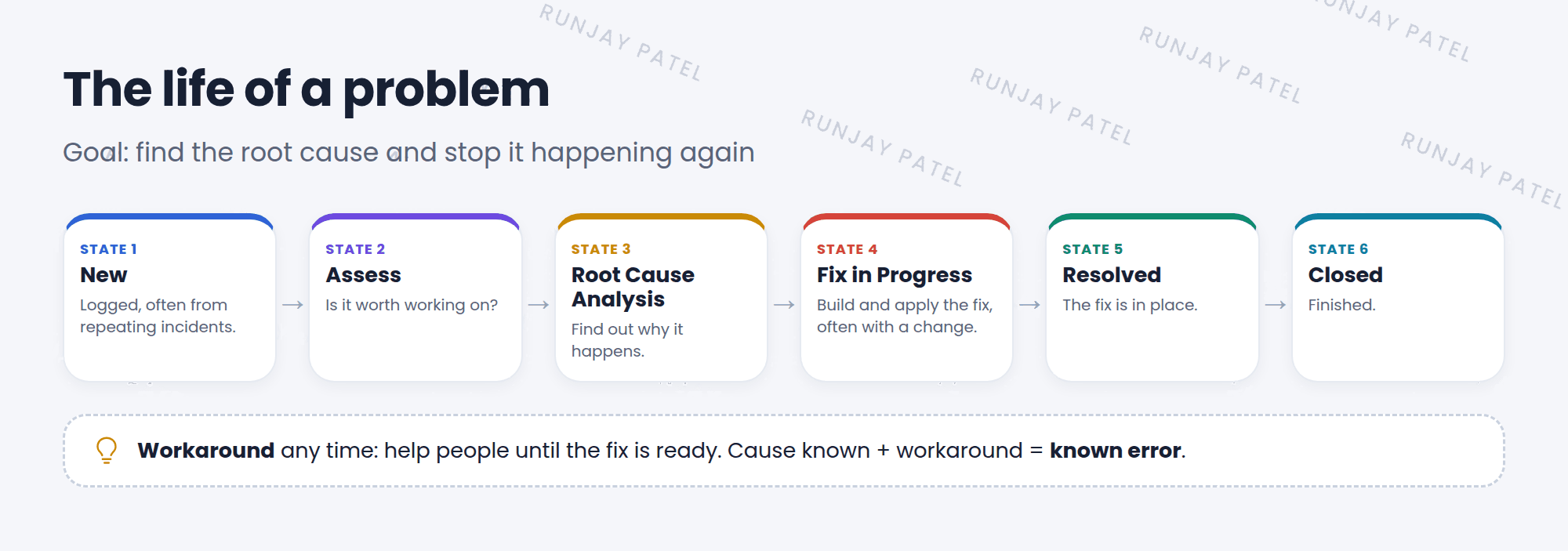
| State | What happens |
|---|---|
| New | The problem is logged |
| Assess | Someone checks it and decides if it’s worth working on |
| Root Cause Analysis | The team finds out why |
| Fix in Progress | The permanent fix is built and applied, often with a change |
| Resolved / Closed | The fix works, and the problem is finished |
💡 Good to know: On a problem record, the Incidents related list shows every incident caused by it. Link new incidents there, so the team sees how big the problem is.
⭐ Remember: Incident = fix the symptom now. Problem = remove the cause for good.
4 Let’s try it: from incident to problem
- Open the Wi-Fi incident you made in Lesson 20.2.
- Open its context menu and look for a way to create a problem from it (for example, “Create Problem”). If you don’t see it, go to Problem > Create New.
- Fill in a short description: “Wi-Fi drops on floor 3”. Save.
- Link your incident in the problem’s Incidents related list.
- Move the problem to Assess, then add a workaround.
5 Quick recap
- A problem is the cause of one or more incidents
- Problem management finds the root cause and fixes it for good
- A workaround helps people until the fix is ready
- A known error has a known cause and a workaround
- States: New, Assess, Root Cause Analysis, Fix in Progress, Resolved, Closed
6 Check yourself
Think of your answer first. Then tap to check.
1 Which goal belongs to problem management: fix it fast, or stop it happening again? Show answer
Stop it happening again.
2 “Restart the printer before printing on Mondays.” Root cause or workaround? Show answer
A workaround.
3 In which state does the team find out why the issue happens? Show answer
Root Cause Analysis.
Nice work! You finished this lesson. 🎉
Was this lesson helpful?
Please log in to share lesson feedback.
Have a question or doubt?
Ask here and get help from instructors and fellow learners.
Only logged-in learners can post.





