


Module Roles, Order & Visibility
On this page
In this lesson, you will learn:
- How roles decide who sees a menu and its modules
- How order numbers arrange modules
- How to hide a menu or module without deleting it
1 Who sees what?
Both application menus and modules have a Roles field. Together, they decide who sees each link in the All menu. 👀
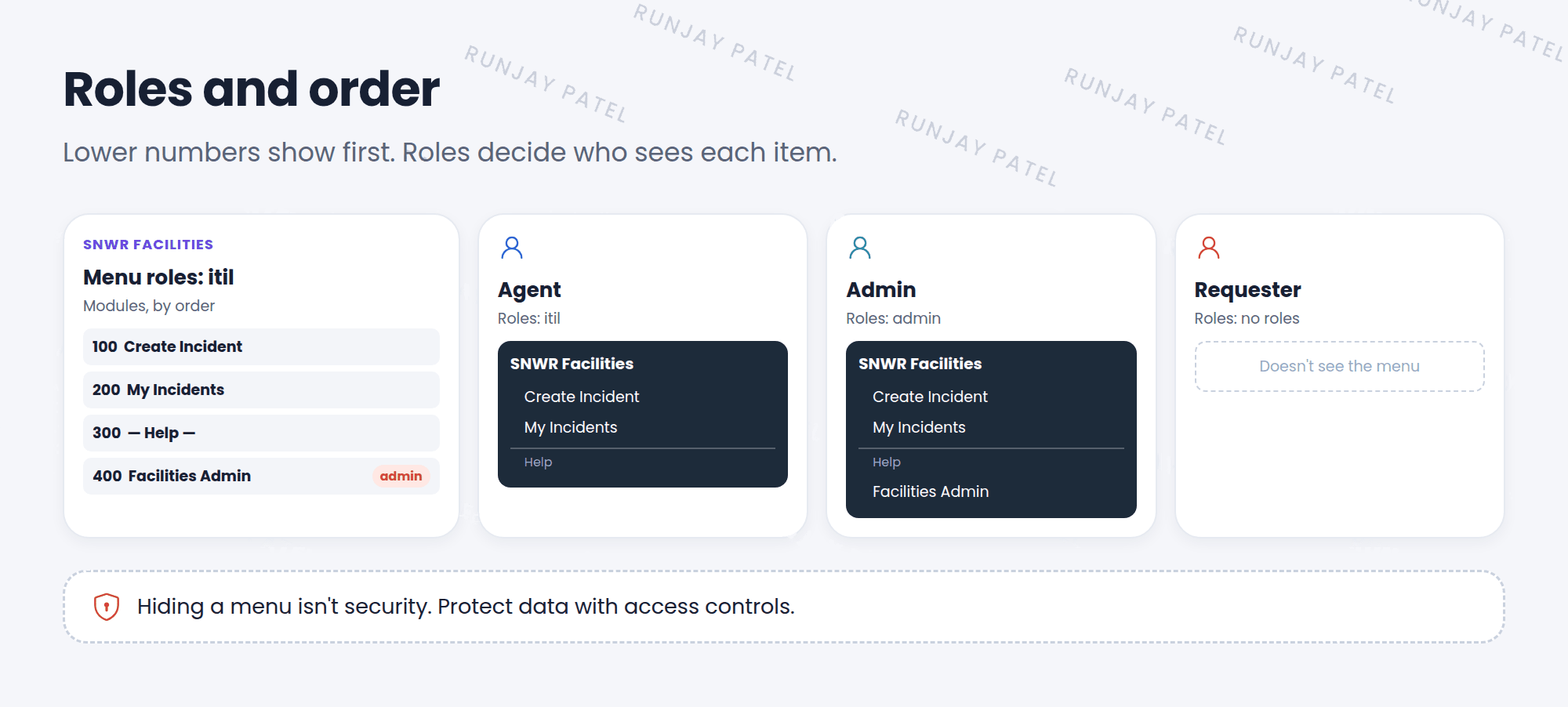
- Menu roles: if the menu has roles, only users with one of them see the menu at all.
- Module roles: a module can also have roles, to hide just that link from some users.
- A user needs to pass the menu’s roles first, then the module’s roles.
📝 Note: A module has a checkbox called Override application menu roles. When it’s checked, users can see that module even if they don’t have the menu’s roles. Use it rarely, and only on purpose.
⚠️ Heads up: Hiding a menu is not security. Someone who knows the URL, like incident_list.do, can still try to open the page. Real protection comes from access controls (Chapter 42).
2 Order
The Order field decides where each module appears inside its menu:
- Lower numbers show higher up.
- Leave gaps, like 100, 200, 300. Then you can add a module at 150 later without renumbering everything.
- Application menus use Order the same way in the All menu.
3 Showing and hiding
| You want to… | Do this |
|---|---|
| Hide a module for everyone | Uncheck Active on the module |
| Hide a whole menu | Uncheck Active on the application menu |
| Show it only to some people | Add Roles |
| Explain what a module does | Add a Hint |
⭐ Remember: Deactivate instead of delete. You might need that module again, and base modules should never be deleted.
4 Let’s try it: control your menu
- Open your SNWR Facilities menu. Add a module Facilities Admin (List of Records, Table: Incident) with Roles
adminand Order 400. - Change the order of My Incidents to 50. Refresh the All menu. Did it move to the top?
- Impersonate Riya (
itil). Which modules does she see? Is Facilities Admin there? - End impersonation. Uncheck Active on Facilities Admin. Is it gone for you too?
5 Quick recap
- Menu roles decide who sees the menu. Module roles decide who sees each link
- Override application menu roles lets a module skip the menu’s roles
- Order: lower numbers show first. Leave gaps
- Uncheck Active to hide. Don’t delete
- Hiding menus isn’t security
6 Check yourself
Think of your answer first. Then tap to check.
1 Module A has order 300 and Module B has order 100. Which shows first? Show answer
Module B. Lower numbers show first.
2 How do you hide a module from everyone without deleting it? Show answer
Uncheck its Active field.
3 A menu is hidden from Sam by roles. Can Sam still reach the page by typing its URL? Show answer
He can try. Hiding a menu isn’t security. Access controls decide if he can see the data.
Nice work! You finished this lesson. 🎉
Was this lesson helpful?
Please log in to share lesson feedback.
Have a question or doubt?
Ask here and get help from instructors and fellow learners.
Only logged-in learners can post.





