


What is ServiceNow?
On this page
In this lesson, you will learn:
- What ServiceNow is
- Why companies use it
- How to get your own free ServiceNow to practice on
1 Let’s start with a problem
Your work laptop stops working. 😩 How do you ask for help?
- You send an email, but it gets lost in the inbox.
- You call IT, but they forget to write it down.
- You walk to the IT desk, but nobody is there.
Now think about a big company with thousands of workers. This happens all day long. It gets messy fast!
👉 Companies need one place to ask for help and keep track of the work. That place is ServiceNow.
2 What is ServiceNow?
ServiceNow is an online system that companies use to get work done. With ServiceNow, people can:
- ✋ Ask for help
- 👀 Track the work
- ✅ Finish the job
Two words you will hear a lot:
Key term: Cloud
ServiceNow runs on the internet. You don’t install anything. You just open your web browser and log in.
Key term: Platform
A base that many apps are built on. Think of your phone: one phone, lots of apps.
⭐ Remember: ServiceNow = one place to ask, track, and finish work.
3 How ServiceNow fixes the laptop problem
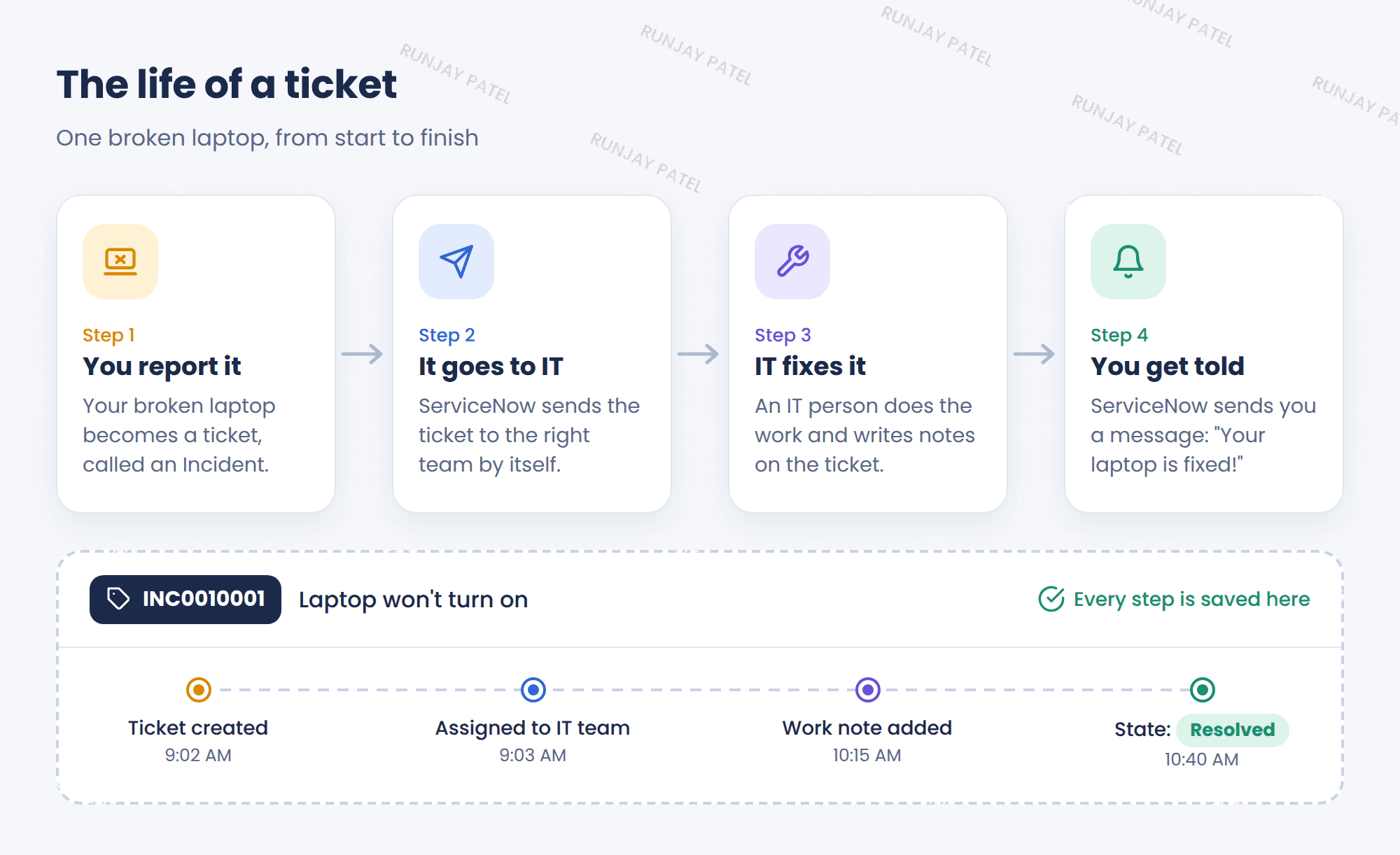
- You tell ServiceNow your laptop is broken. This makes a ticket. A ticket for a problem is called an Incident.
- ServiceNow sends the ticket to the right IT team. Nobody has to do it by hand!
- An IT person fixes it and writes notes on the ticket.
- ServiceNow tells you when it’s fixed. ✅
- Every step is saved on the ticket, so nothing gets lost.
4 Which teams use it?
ServiceNow started with IT. Now many teams use it:
| Team | What they use it for |
|---|---|
| 💻 IT | Broken laptops, passwords, new software |
| 📋 HR | New workers, time off |
| 📞 Customer Service | Helping customers |
| 🔧 Facilities | Broken chairs, lights, or AC |
| 🔒 Security | Finding and fixing risks |
📝 Note: Different teams use different apps, but it’s all one ServiceNow underneath. The IT part is called ITSM (IT Service Management).
5 Big idea: everything is saved in tables
ServiceNow saves all its information in tables. A table looks like a spreadsheet, like Excel or Google Sheets.
Key term: Table
The whole list. Example: the Incident table holds all the incident tickets.
Key term: Record
One row. Example: your broken laptop ticket.
Key term: Field
One column. Example: “Priority” or “Assigned to.”

💡 Why does this matter? All the apps share the same tables. So your name and email are saved one time, and every team sees the same info. ServiceNow calls this “one platform, one data model.”
6 What is an instance?
Key term: Instance
A company’s own copy of ServiceNow. Each instance has its own web address, like https://companyname.service-now.com
Most companies have at least 3 instances:
- 🧪 Dev
Where changes are built - 🔍 Test
Where changes are checked - 🏁 Prod
The real one that everyone uses every day

⚠️ Golden rule: Never try new things in Prod. Build in Dev, check in Test, and then move to Prod.
7 The 3 main kinds of users
- 🙋 Requester
Asks for help (you, with the broken laptop) - 🔧 Fulfiller
Does the work (the IT person) - ⚙️ Admin
Sets up ServiceNow and keeps it running
This is what you are learning to be! 💪
8 Let’s try it: get your free practice instance
Key term: PDI (Personal Developer Instance)
A free instance that ServiceNow gives you to practice on. It’s your playground. You can’t break anything important!
- Go to developer.servicenow.com
- Sign up for a free account.
- Click Request Instance and pick the newest version.
- Wait a few minutes. You will get a web address (like
https://dev12345.service-now.com), a username, and a password. - Log in and look around! 👀
💡 Good to know
- Your PDI goes to “sleep” when you don’t use it. You can wake it up on the developer website.
- If you stop using it for a long time, ServiceNow may take it back. So log in often!
- Write down your password and keep it safe.
9 Fun facts
- 🎉 Where “Glide” comes from
ServiceNow’s first company name was Glidesoft. Later in this course you will see coding tools called GlideRecord. Now you know where the name comes from! - 🏙️ City names
ServiceNow gets 2 big updates every year. Each one is named after a city, in A-B-C order.
10 Quick recap
- ServiceNow = one place to ask, track, and finish work
- It runs in the cloud, so you just open a browser
- Many teams use it, not just IT
- Data is saved in tables: one row = a record, one column = a field
- Instance = a company’s own copy (Dev → Test → Prod)
- PDI = your free practice instance
11 Check yourself
Think of your answer first. Then tap to check.
1 What does “cloud” mean? Show answer
It runs on the internet, so there’s nothing to install.
2 Your broken laptop ticket is one row in a table. Is it a record or a field? Show answer
A record.
3 Why should you never test new things in Prod? Show answer
Everyone uses Prod every day, so one mistake would affect everyone.
4 What is a PDI? Where do you get one? Show answer
A free practice instance. You get it at developer.servicenow.com.
Nice work! You finished this lesson. 🎉
Was this lesson helpful?
Please log in to share lesson feedback.
Have a question or doubt?
Ask here and get help from instructors and fellow learners.
Only logged-in learners can post.





