


UI Policy Basics
On this page
In this lesson, you will learn:
- What a UI policy is
- The key fields on a UI policy
- How to build your first one with no code
1 Forms that react
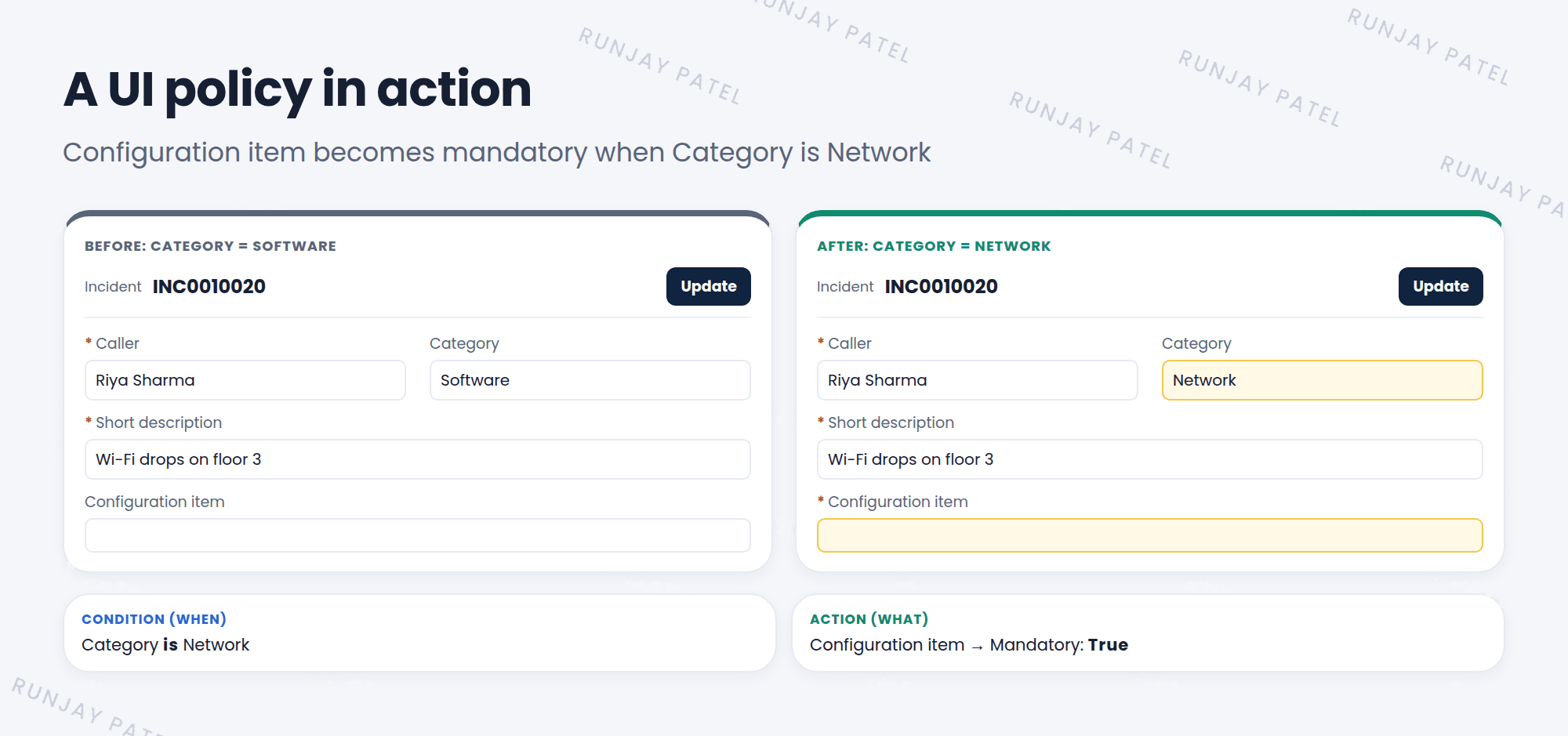
SNWR wants this rule: when an incident’s Category is Network, the Configuration item field must be filled in. The form should change as soon as the agent picks Network, without saving first. That’s a job for a UI policy. ⚡
Key term: UI policy
A rule that changes a form when a condition is true. It can make fields mandatory, visible or hidden, or read only. It runs in the browser (client side), with no code needed.
2 Key fields on a UI policy
| Field | What it does |
|---|---|
| Table | Which table’s form it runs on |
| Short description | A clear name, like “Network needs a CI” |
| Conditions | When it applies, like Category is Network. Leave it empty to always apply |
| Global | Runs on all form views. Uncheck it to pick one view |
| On load | Also checks the condition when the form first opens |
| Reverse if false | Undoes the actions when the condition is no longer true (Lesson 33.3) |
| Inherit | Also applies to tables that extend this one |
| Order | Which policy runs first when there are several (Lesson 33.3) |
📝 Note: The condition says when. The UI policy actions say what happens. You’ll look at actions in Lesson 33.2.
⚠️ Heads up: UI policies only work on forms. They don’t stop bad data from list edits, imports, or integrations. For that, you need a data policy (Chapter 34).
⭐ Remember: UI policy = client-side, no-code rule that makes fields mandatory, visible, or read only on a form.
3 Let’s try it: Network needs a CI
- Go to System UI > UI Policies and click New.
- Table: Incident. Short description: Network needs a CI.
- Conditions: Category is Network. Keep Global, On load, and Reverse if false checked.
- Right-click the header and choose Save. The UI Policy Actions related list appears.
- Click New in UI Policy Actions. Field name: Configuration item. Mandatory: True. Submit.
- Open a new incident and set Category to Network. Did Configuration item become mandatory?
4 Quick recap
- A UI policy changes a form when a condition is true
- It runs in the browser, right away, with no code
- It can make fields mandatory, visible, or read only
- Find it in System UI > UI Policies
- It only protects forms, not imports or integrations
5 Check yourself
Think of your answer first. Then tap to check.
1 Does a UI policy run on the client or the server? Show answer
The client (in the browser).
2 Which checkbox makes a UI policy run on every form view? Show answer
Global.
3 Will a UI policy stop an import from leaving a mandatory field empty? Show answer
No. UI policies only work on forms. Use a data policy for that.
Nice work! You finished this lesson. 🎉
Was this lesson helpful?
Please log in to share lesson feedback.
Have a question or doubt?
Ask here and get help from instructors and fellow learners.
Only logged-in learners can post.





