


CI Classes & Relationships
On this page
In this lesson, you will learn:
- How CI classes are organized
- How to explore classes with CI Class Manager
- How CI relationships work
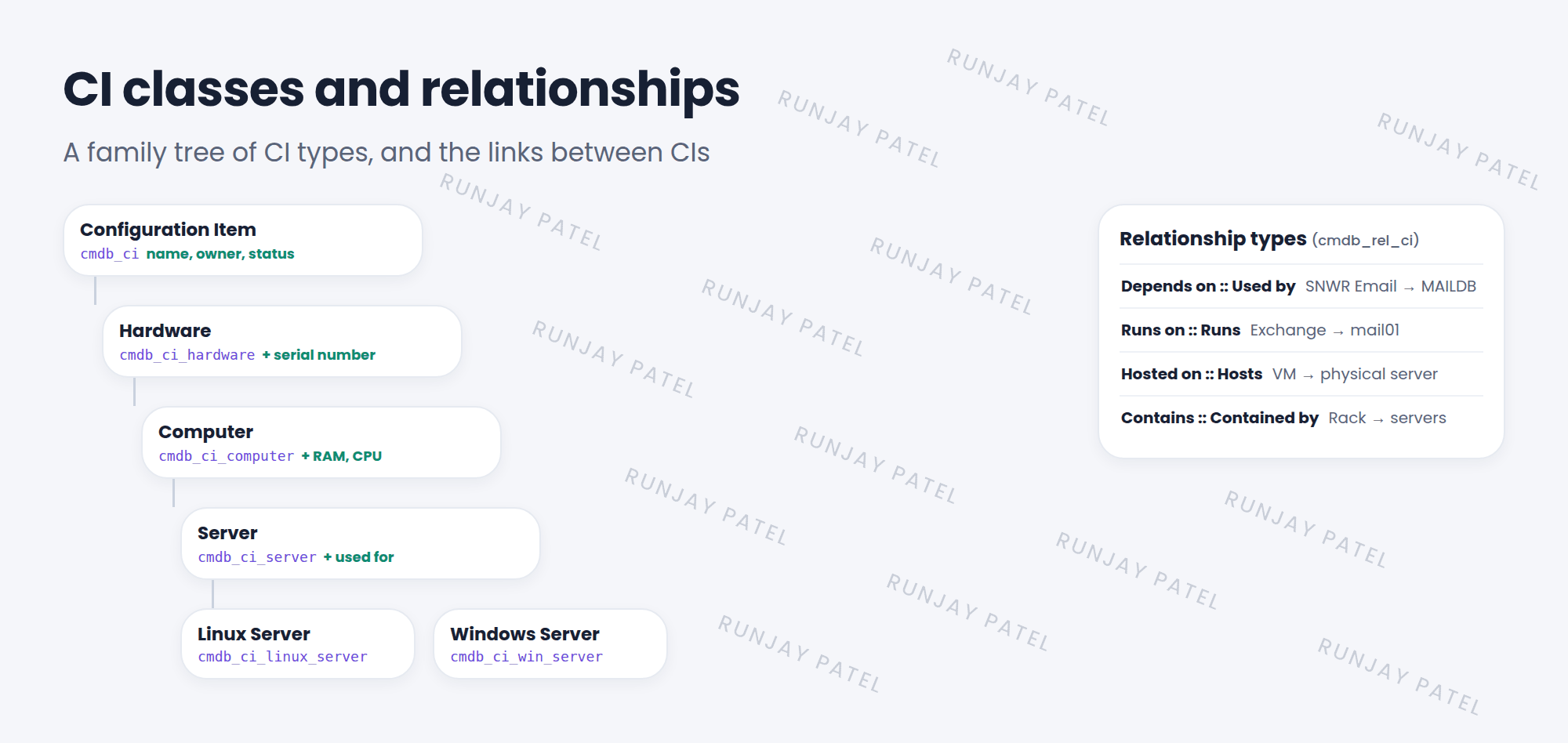
1 CI classes: a family tree
A laptop and a Linux server are both CIs, but they need different fields. So the CMDB uses classes, built with table extension, just like Task and Incident (Lesson 29.2). 🌳
Key term: CI class
A type of CI, stored as its own table, like cmdb_ci_linux_server. Child classes inherit their parent’s fields.
Explore classes in Configuration > CI Class Manager. It shows the tree, each class’s attributes, and its identification rules.
2 Relationships
CIs rarely live alone. An app runs on a server. A server depends on a database. These links are relationships, stored in cmdb_rel_ci.
| Relationship type | Example |
|---|---|
| Depends on :: Used by | SNWR Email depends on MAILDB |
| Runs on :: Runs | Exchange runs on mail01 |
| Hosted on :: Hosts | A virtual machine is hosted on a physical server |
| Contains :: Contained by | A rack contains servers |
📝 Note: Each type has two names, one for each direction. “mail01 Runs Exchange” and “Exchange Runs on mail01″ are the same link.
3 Seeing relationships
- On a CI form, the Related Items section lists its upstream and downstream CIs.
- Open the dependency view (map icon) to see them as a diagram.
- Impact is about direction: if mail01 fails, everything that depends on it may fail too.
💡 Good to know: Put new CIs in the most specific class. A Linux server belongs in Linux Server, not in the generic Server or Computer class.
⭐ Remember: Classes = CI types in a tree. Relationships = links between CIs, stored in cmdb_rel_ci.
4 Let’s try it: climb the tree
- Open Configuration > CI Class Manager. Find Linux Server in the tree.
- Click it. Look at Attributes. Which were added by Linux Server, and which were inherited?
- Open any server CI with relationships. Look at Related Items, then open the dependency view.
5 Quick recap
- CI classes form a tree, starting at
cmdb_ci - Child classes inherit fields and add their own
- CI Class Manager shows the tree and attributes
- Relationships link CIs, like Runs on or Depends on
- Use the dependency view to see impact
6 Check yourself
Think of your answer first. Then tap to check.
1 Where can you browse the CI class tree? Show answer
Configuration > CI Class Manager.
2 Which table stores CI relationships? Show answer
cmdb_rel_ci.
3 An app runs on mail01. mail01 goes down. Is the app affected? Show answer
Yes, likely. The app depends on the server it runs on.
Nice work! You finished this lesson. 🎉
Was this lesson helpful?
Please log in to share lesson feedback.
Have a question or doubt?
Ask here and get help from instructors and fellow learners.
Only logged-in learners can post.





