


System Logs
On this page
In this lesson, you will learn:
- What the system log is
- How to find warnings and errors
- Which other logs help when something goes wrong
1 The instance’s diary
Something went wrong, but nobody saw an error on screen. Where do you look? The system log. It’s the instance’s diary: scripts, jobs, and the platform write messages there all day. 📓
Key term: System log
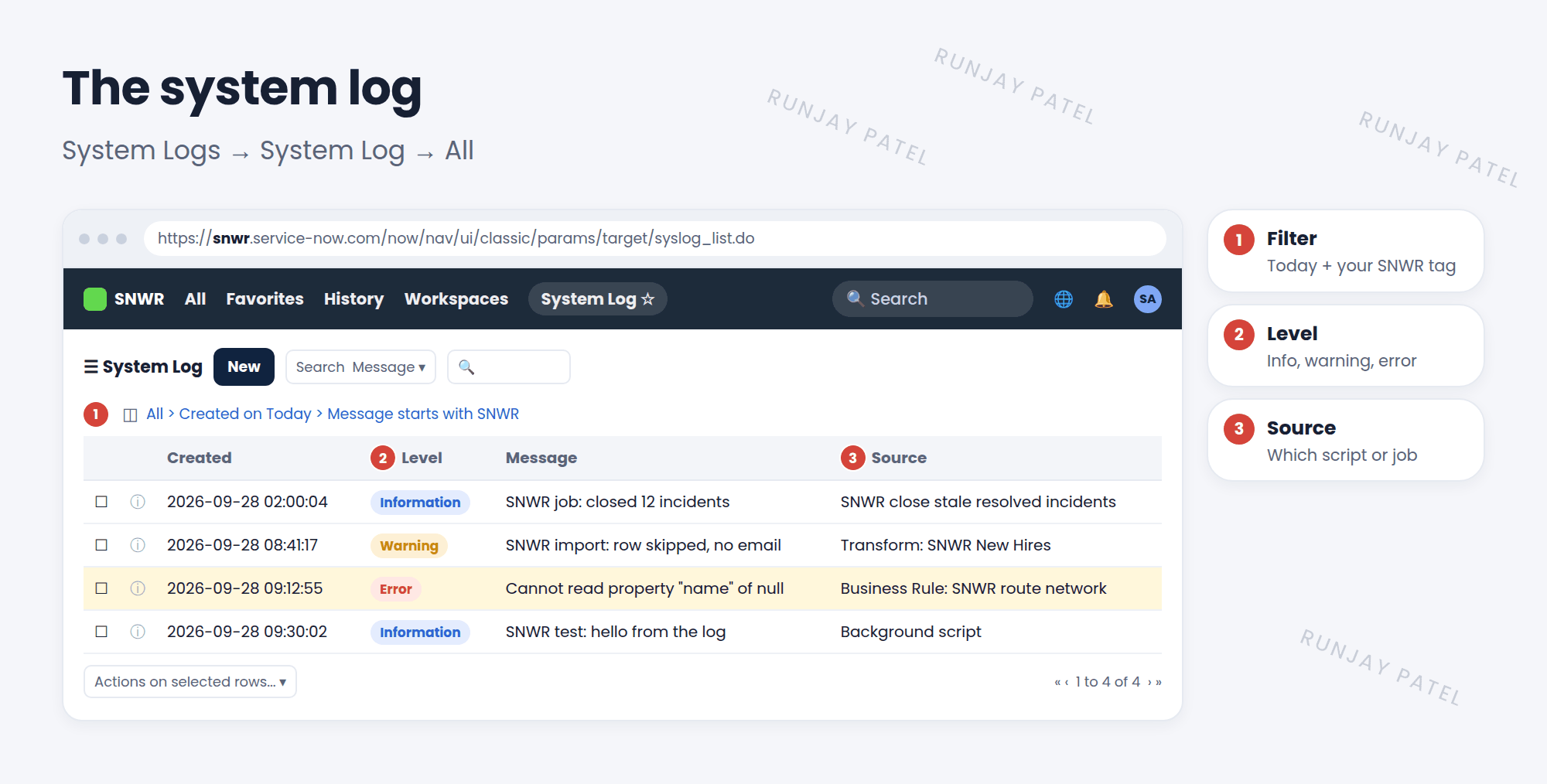
A list of messages written by the platform and by scripts, with a level like info, warning, or error. Stored in syslog. Find it in System Logs > System Log > All.
2 Writing to the log
Your server scripts can add their own messages. It’s the easiest way to see what a script is doing.
gs.info('SNWR job: closed ' + count + ' incidents');   // Information
gs.warn('SNWR import: row skipped, no email');          // Warning
gs.error('SNWR rule: caller is empty on ' + current.number); // Error
3 Other useful logs
| Log | Where | Shows |
|---|---|---|
| Warnings / Errors | System Logs > System Log > Warnings or Errors | Just the problems |
| Emails | System Logs > Emails | Emails sent and received (Lesson 24.3) |
| Events | System Policy > Events > Event Log | Events fired and processed (Lesson 41.1) |
| Transactions | System Logs > Transactions | Every page load and request, with how long it took |
| Node log files | System Logs > Utilities > Node Log File Browser | Low-level server log files |
💡 Good to know: Start every message with a tag, like SNWR job:. Then filter the log with “Message starts with SNWR” to find yours in seconds.
⚠️ Heads up: Don’t leave chatty gs.info() lines in scripts that run thousands of times. They fill the log and make real problems harder to spot.
⭐ Remember: System log = syslog. Write with gs.info(), gs.warn(), gs.error(). Filter by Level and Source.
4 Let’s try it: find your message
- Open Scripts – Background and run:
gs.warn('SNWR test: hello from the log'); - Open System Logs > System Log > Warnings. Filter Message starts with SNWR.
- Find your message. What’s its Source?
- Open System Logs > Transactions. Which pages took longest today?
5 Quick recap
- The system log (
syslog) records platform and script messages - Levels: information, warning, error
- Write with
gs.info(),gs.warn(),gs.error() - Other logs: emails, events, transactions, node log files
- Tag your messages so they’re easy to find
6 Check yourself
Think of your answer first. Then tap to check.
1 Which table stores system log messages? Show answer
syslog.
2 Which method writes an error to the log? Show answer
gs.error().
3 Users say a page is slow. Which log shows how long requests took? Show answer
The Transactions log.
Nice work! You finished this lesson. 🎉
Was this lesson helpful?
Please log in to share lesson feedback.
Have a question or doubt?
Ask here and get help from instructors and fellow learners.
Only logged-in learners can post.





