


REST API Explorer
On this page
In this lesson, you will learn:
- What the REST API Explorer is
- How the Table API works: methods and URLs
- How to build and test a request
1 A playground for APIs
Other systems talk to ServiceNow using REST APIs: web addresses they call to read or change data. The REST API Explorer lets you build and test those calls right inside your instance. 🧪
Key term: Table API
A built-in REST API that can read, create, update, and delete records in any table. Its address looks like /api/now/table/incident.
2 Methods
| Method | Does | URL |
|---|---|---|
| GET | Read records | /api/now/table/incident |
| GET | Read one record | /api/now/table/incident/{sys_id} |
| POST | Create a record | /api/now/table/incident |
| PUT / PATCH | Update a record | /api/now/table/incident/{sys_id} |
| DELETE | Delete a record | /api/now/table/incident/{sys_id} |
3 Building a request
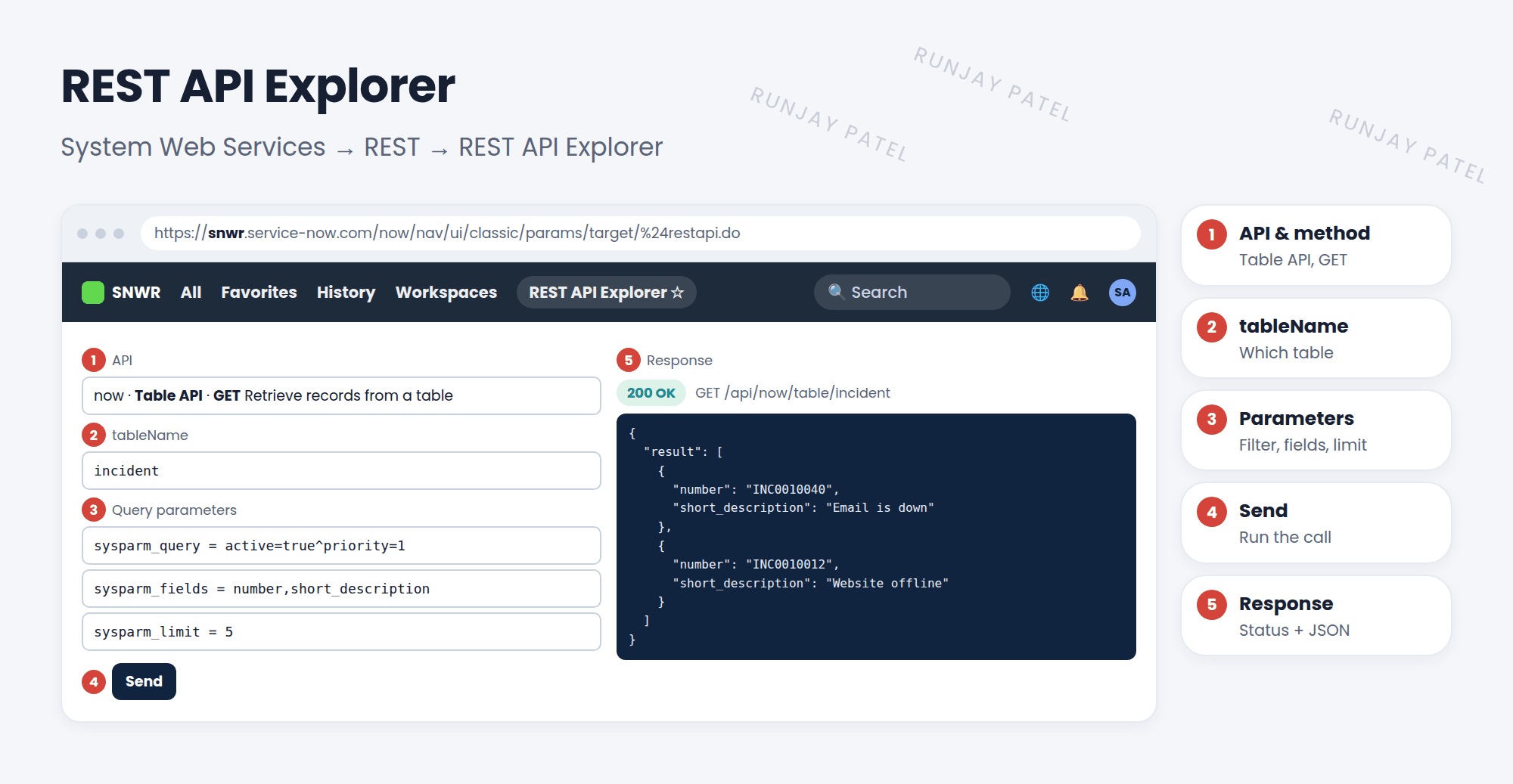
| Query parameter | Does |
|---|---|
sysparm_query |
A filter, as an encoded query: active=true^priority=1 |
sysparm_fields |
Only return these fields: number,short_description |
sysparm_limit |
How many records to return |
sysparm_display_value |
true returns names instead of sys_ids for references |
4 Reading the response
- Records come back as JSON, inside a
resultlist. - The status code tells you what happened: 200 OK, 201 Created, 401 not logged in, 403 not allowed, 404 not found.
- Scroll down for ready-made code samples (like cURL) to share with the other system’s team.
📝 Note: Find it at System Web Services > REST > REST API Explorer. You need the rest_api_explorer role (admins have it). Calls follow ACLs, so the integration user sees only what its roles allow.
💡 Good to know: Need custom logic, not just table access? Developers build Scripted REST APIs (System Web Services > Scripted Web Services).
⭐ Remember: Table API = /api/now/table/<table>. GET reads, POST creates, PUT/PATCH updates, DELETE deletes.
5 Let’s try it: read P1s with REST
- Open REST API Explorer. Choose Table API and Retrieve records from a table (GET).
- tableName: incident. sysparm_query:
active=true^priority=1. sysparm_limit: 5. - Click Send. What’s the status code? How many results came back?
- Now try Create a record (POST) with a short_description. Check the new incident exists.
6 Quick recap
- The REST API Explorer builds and tests REST calls
- The Table API works with any table
- Parameters: sysparm_query, sysparm_fields, sysparm_limit
- Responses are JSON. Status codes show success or errors
- REST calls follow ACLs
7 Check yourself
Think of your answer first. Then tap to check.
1 Which method creates a new record? Show answer
POST.
2 Which parameter limits the fields returned? Show answer
sysparm_fields.
3 A call returns 403. What does that mean? Show answer
The user is logged in but not allowed to do that (often an ACL or role issue).
Nice work! You finished this lesson. 🎉
Was this lesson helpful?
Please log in to share lesson feedback.
Have a question or doubt?
Ask here and get help from instructors and fellow learners.
Only logged-in learners can post.





