


Event Registry & Queue
On this page
In this lesson, you will learn:
- What an event is in ServiceNow
- How events are registered, fired, and queued
- How to read the event log
1 A shout-out that something happened
When someone comments on an incident, ServiceNow doesn’t send the email right away. First, it shouts: “incident.commented just happened!” 📣 That shout is an event. Other parts of the platform listen for it and react.
Key term: Event
A message that says “something happened”, like a comment or an assignment. Events are queued, then processed. Notifications and script actions can react to them.
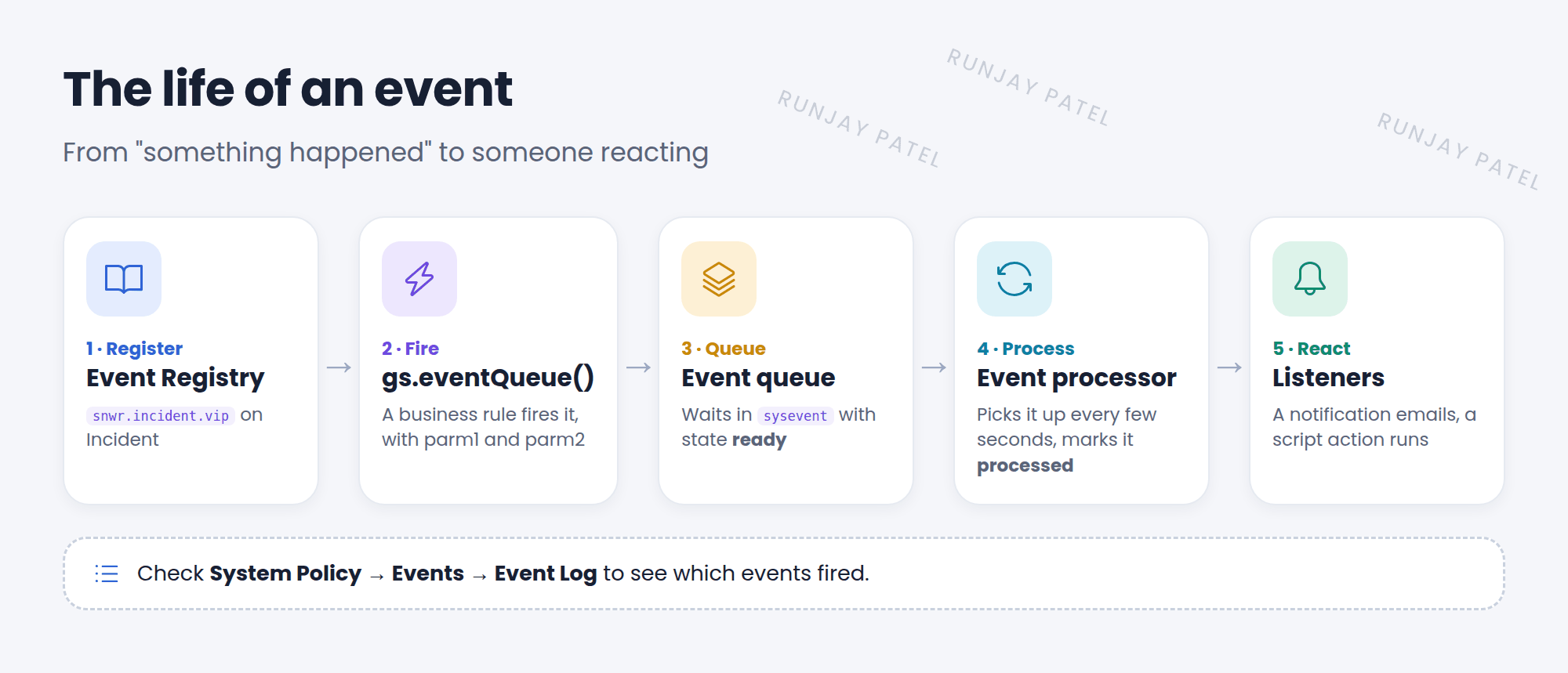
2 The event registry
Before you fire your own event, you register it. Go to System Policy > Events > Registry (sysevent_register).
| Field | Example |
|---|---|
| Event name | snwr.incident.vip |
| Table | Incident |
| Fired by | SNWR VIP business rule (just a note for people) |
| Description | A VIP caller logged an incident |
3 Firing an event
Server-side scripts fire events with gs.eventQueue():
// event name, record, parm1, parm2
gs.eventQueue('snwr.incident.vip', current,
  current.caller_id.toString(), current.assignment_group.toString());
parm1 and parm2 are two extra values you can pass along, like a user or a group.
4 The queue and the log
- Fired events go into the event queue (the
syseventtable) with state ready. - A scheduled job, the event processor, picks them up every few seconds and marks them processed.
- See them in System Policy > Events > Event Log.
💡 Good to know: Why queue events instead of acting right away? The user’s save stays fast. The emails and scripts run a moment later, in the background.
⚠️ Heads up: The event name in gs.eventQueue() must match the registry exactly. A typo means nothing listens, and nothing happens.
⭐ Remember: Register in the Registry, fire with gs.eventQueue(), check the Event Log.
5 Let’s try it: watch events happen
- Open System Policy > Events > Event Log. Sort by Created, newest first.
- In another tab, add a comment to any incident.
- Refresh the log. Do you see incident.commented? What’s its state?
- Open Events > Registry and register
snwr.incident.vipon the Incident table. You’ll use it in Lesson 41.2.
6 Quick recap
- An event says “something happened”
- Register custom events in the event registry
- Fire them with
gs.eventQueue(name, record, parm1, parm2) - Events wait in the queue, then the event processor handles them
- Check the Event Log to see what fired
7 Check yourself
Think of your answer first. Then tap to check.
1 Which method fires an event from a server script? Show answer
gs.eventQueue().
2 Where do you register a new event? Show answer
System Policy > Events > Registry.
3 What are parm1 and parm2? Show answer
Two optional extra values passed with the event, like a user or group sys_id.
Nice work! You finished this lesson. 🎉
Was this lesson helpful?
Please log in to share lesson feedback.
Have a question or doubt?
Ask here and get help from instructors and fellow learners.
Only logged-in learners can post.





