


Table & Field ACLs
On this page
In this lesson, you will learn:
- The difference between table and field ACLs
- How ACL names like incident.* work
- How ServiceNow finds the right ACL, from most to least specific
1 Two levels of protection
ACLs can protect a whole table (rows) or single fields (columns). To see a field, a user must pass both: first the table ACL, then the field ACL. 🚪🚪
| ACL name | Protects | Example use |
|---|---|---|
incident (None) |
The table: whole records | Who can read incidents at all |
incident.* |
All fields on the table | A default rule for every field |
incident.close_notes |
One field | Only itil users can write close notes |
📝 Note: On the ACL form, the table ACL shows as incident with the field set to — None —. That’s the table-level rule.
2 Most specific wins the search
When a user opens a field, ServiceNow looks for matching ACLs, starting with the most specific. It stops at the first level where it finds any ACLs.
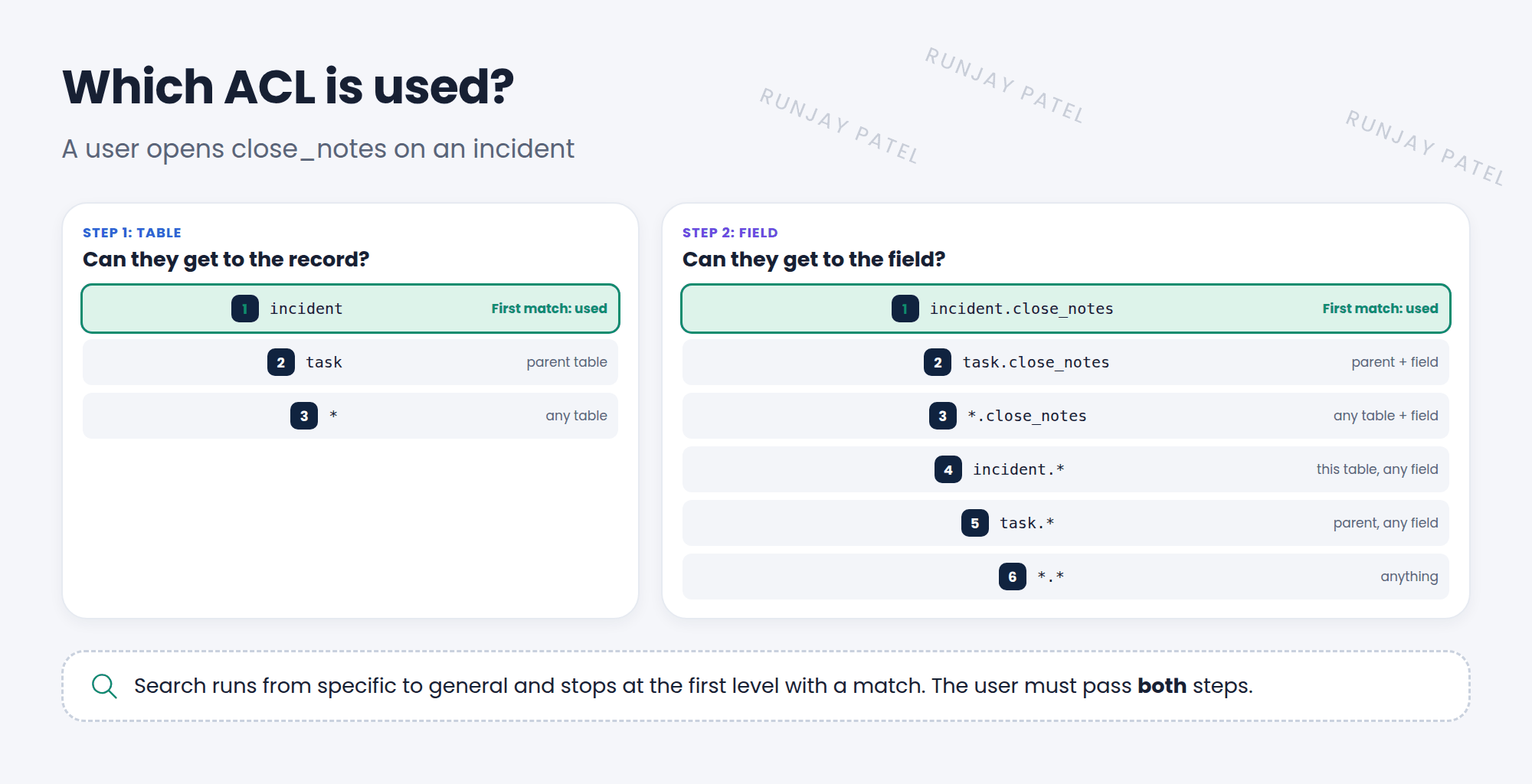
- Table rules:
incident→task(parent) →*(any table). - Field rules:
incident.close_notes→task.close_notes→*.close_notes→incident.*→task.*→*.*. - If several ACLs match at the same level, the user needs to pass just one of them.
💡 Good to know: Because child tables inherit from parents, an ACL on task also covers Incident, Problem, and Change, unless a more specific ACL exists on the child table.
⚠️ Heads up: Adding one specific ACL can change who gets in, because it replaces the more general ones for that field. Test with impersonation after every new ACL.
⭐ Remember: Pass the table ACL, then the field ACL. Most specific match is used. Same level: pass any one.
3 Let’s try it: protect close notes
- Elevate to security_admin. Open System Security > Access Control (ACL) and click New.
- Type: record. Operation: write. Name: Incident, field Resolution notes.
- Required role: itil. Submit.
- Impersonate a user without itil (like a caller) and open their incident. Can they edit Resolution notes?
4 Quick recap
- Table ACLs protect records. Field ACLs protect fields
*is a wildcard: any table or any field- ServiceNow uses the most specific matching ACL
- Users must pass both the table and field ACLs
- ACLs on a parent table cover child tables too
5 Check yourself
Think of your answer first. Then tap to check.
1 What does the ACL name incident.* protect? Show answer
Every field on the Incident table.
2 Both incident.close_notes and incident.* exist. Which one is used for close_notes? Show answer
incident.close_notes, because it’s more specific.
3 A user passes the field ACL but fails the table ACL. Can they see the field? Show answer
No. They must pass both.
Nice work! You finished this lesson. 🎉
Was this lesson helpful?
Please log in to share lesson feedback.
Have a question or doubt?
Ask here and get help from instructors and fellow learners.
Only logged-in learners can post.





