


Dictionary Overrides
On this page
In this lesson, you will learn:
- What a dictionary override is
- Which settings you can override
- How to create one for a child table
1 Same field, different rules
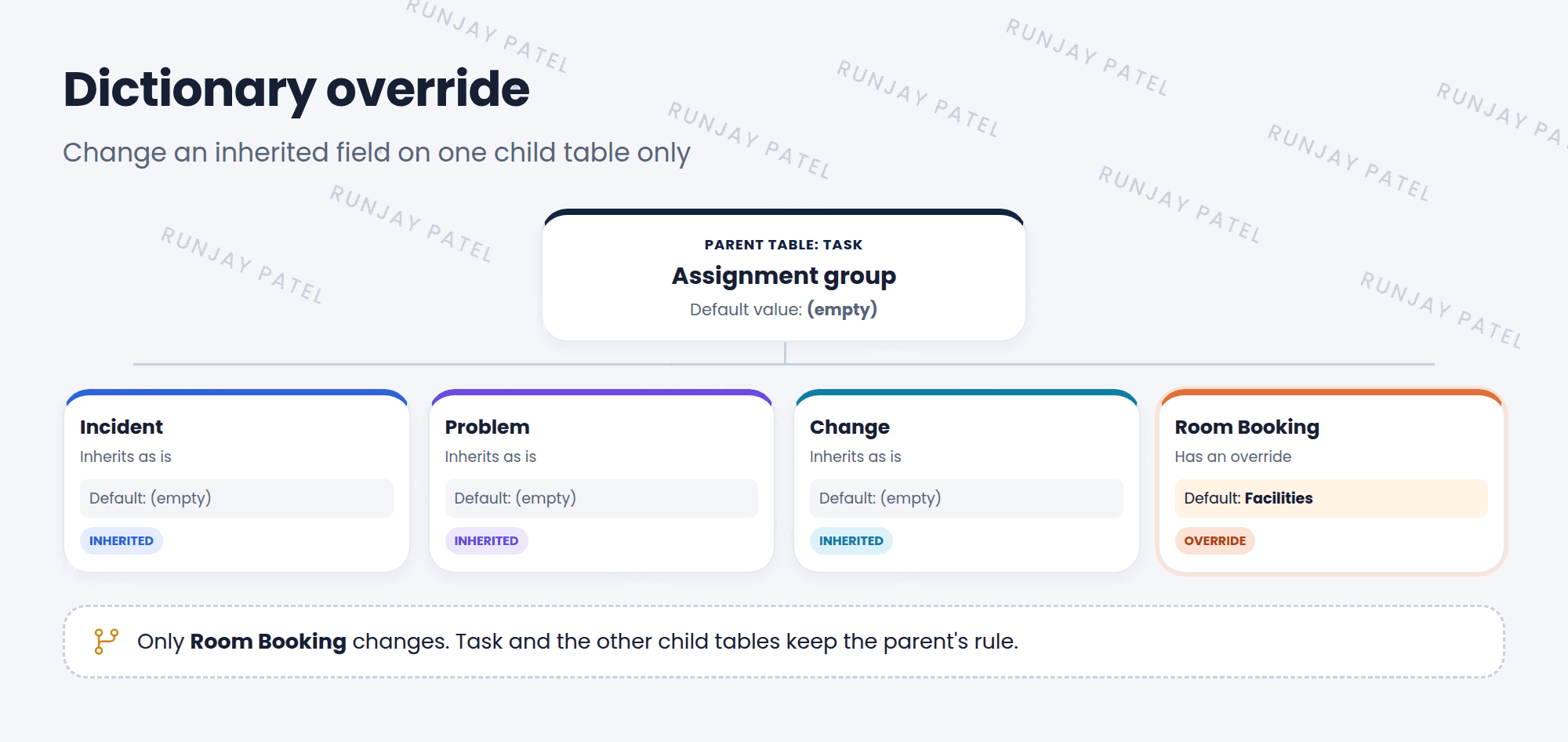
Remember that Incident, Problem, and Change all extend the Task table? They inherit Task’s fields, like Assignment group. So they also inherit the field’s settings.
But what if one child table needs a different rule? For example, SNWR wants new Room Booking records to go to the Facilities group by default, but not incidents. You can’t change the Task field, because that would change every child. 🤔
Key term: Dictionary override
A setting that changes an inherited field’s behavior on one child table only. The parent and other children stay the same. Stored in the sys_dictionary_override table.
2 What you can override
| Override | Example |
|---|---|
| Default value | Assignment group starts as Facilities on Room Booking |
| Mandatory | A field is required on one child table only |
| Read only | A field can’t be edited on one child table |
| Reference qualifier | Show only some records in a reference field’s list |
| Attributes | Use different attributes on one child table |
| Calculation and Dependent | Change how a value is calculated, or what it depends on |
📝 Note: Each override has a checkbox, like Override default value, and a matching field for the new value. The override only works when the checkbox is ticked.
3 Creating an override
- Open the parent field’s dictionary entry. For Assignment group, that’s on the Task table.
- Scroll to the Dictionary Overrides related list and click New.
- Pick the child Table, like Room Booking.
- Tick Override default value and enter the new default. Click Submit.
💡 Good to know: You can also see every override in one place: System Definition > Dictionary Overrides.
⚠️ Heads up: Overrides work only on inherited fields. If a field was created on the child table itself, just edit its own dictionary entry.
⭐ Remember: Parent field + one child table needs a different rule = dictionary override.
4 Let’s try it: override a default
- Right-click the Assignment group label on any incident and choose Configure Dictionary. Check the Table field. It says Task.
- In the Dictionary Overrides related list, click New.
- Table: Room Booking. Tick Override default value. For the default value, paste the sys_id of a Facilities group. (Open the group, right-click the form header, and choose Copy sys_id.) Submit.
- Create a new Room Booking and a new Incident. Which one starts with the Facilities group?
5 Quick recap
- Child tables inherit the parent’s fields and their settings
- A dictionary override changes an inherited field on one child table only
- You can override default value, mandatory, read only, reference qualifier, attributes, and more
- Create them from the parent field’s Dictionary Overrides related list
6 Check yourself
Think of your answer first. Then tap to check.
1 You want Short description to be mandatory on Incident but not on other Task tables. What do you use? Show answer
A dictionary override on the Incident table with Override mandatory ticked.
2 Which table stores dictionary overrides? Show answer
sys_dictionary_override.
3 A field was created directly on your custom table. Do you need an override to change it? Show answer
No. Overrides are for inherited fields. Just edit the field’s own dictionary entry.
Nice work! You finished this lesson. 🎉
Was this lesson helpful?
Please log in to share lesson feedback.
Have a question or doubt?
Ask here and get help from instructors and fellow learners.
Only logged-in learners can post.





