


Creating Custom Tables
On this page
In this lesson, you will learn:
- When to create a custom table
- How to create one, step by step
- What ServiceNow creates for you automatically
1 When you need a new table
SNWR’s Facilities team wants to track meeting room bookings. No table in ServiceNow fits. Time to create a custom table. 🏗️
Before you do, ask:
- Does a table already exist for this? (Check first!)
- Is this a kind of work? Then extend Task, so it gets assignment, states, and SLAs for free.
- Is it a thing IT manages? It may belong in the CMDB (Chapter 44).
⚠️ Heads up: Custom tables can affect your company’s license. Many ServiceNow contracts limit how many custom tables you can create. Check with your ServiceNow owner first.
2 Create a table
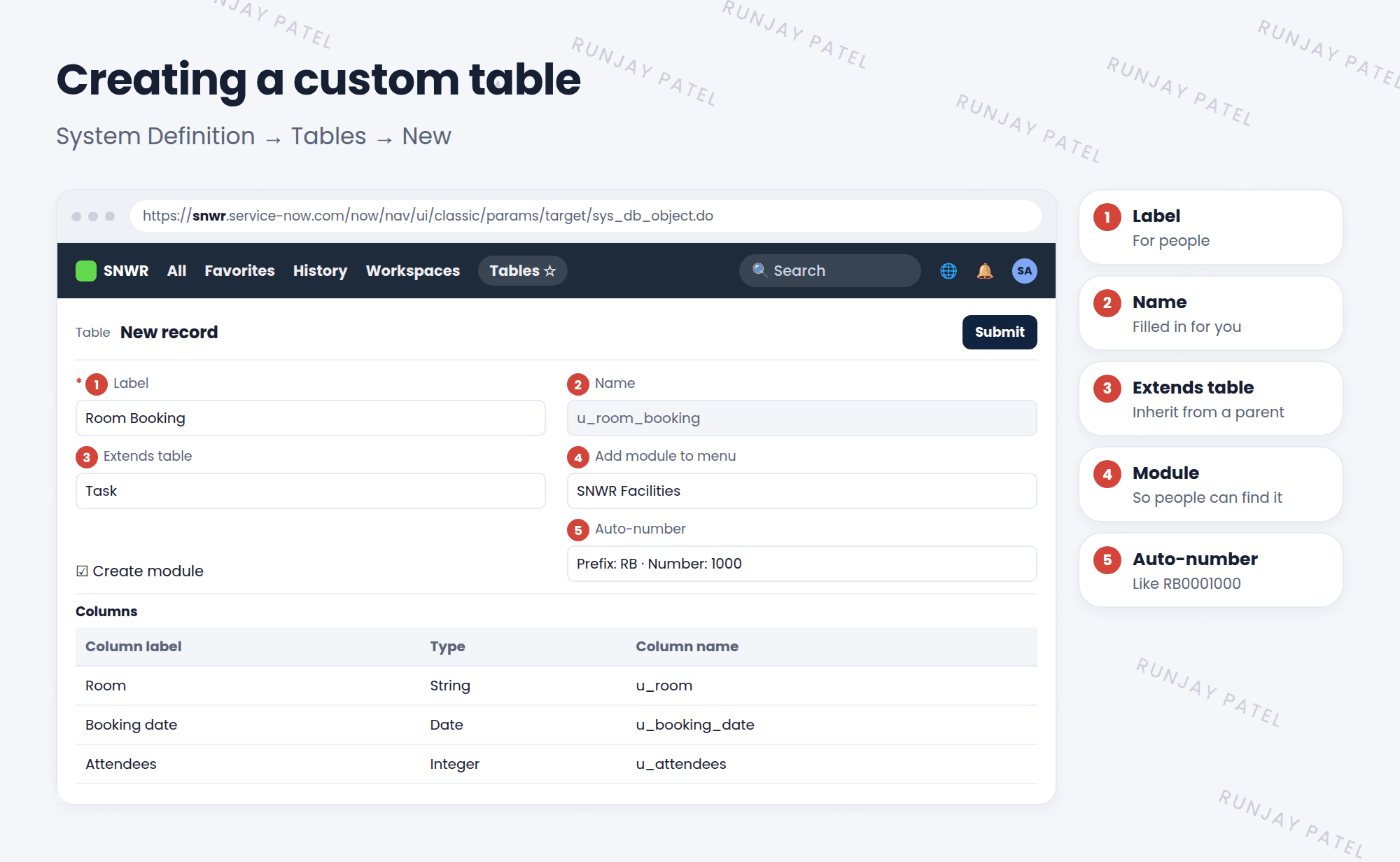
- Go to System Definition > Tables and click New.
- Type a Label, like “Room Booking”. The Name fills in by itself:
u_room_booking. - Pick Extends table if it should have a parent, like Task.
- Tick Create module and pick a menu, like SNWR Facilities, so people can find it.
- Open the Controls tab and turn on Auto-number with a prefix, like
RB(Lesson 29.4). - Add your own columns (fields) in the Columns related list.
- Click Submit. ✅
3 What ServiceNow creates for you
- 🗄️ The tablewith system fields
- 🔑 Roleslike u_room_booking_user
- 🔒 Access controlsbasic security rules
- 🧭 A moduleif you ticked it
- 📝 A form and listdefault layouts
- 🔢 Numbersif auto-number is on
💡 Good to know: Always open the new table’s form after creating it, and tidy the layout with Form Layout (Lesson 14.1).
⭐ Remember: Check for an existing table first. If it’s work, extend Task.
4 Let’s try it: Room Booking
- Create the table Room Booking, extending Task, with a module in SNWR Facilities.
- Add columns: Room (String) and Booking date (Date).
- Submit. Refresh the All menu and open your new module.
- Create a booking. Does it have Assignment group and State? (From Task!)
5 Quick recap
- Create tables in System Definition > Tables
- The name is filled in automatically with a
u_prefix in global scope - Extend Task for work, so you inherit its features
- ServiceNow creates roles, access controls, and a module for you
- Custom tables may affect licensing
6 Check yourself
Think of your answer first. Then tap to check.
1 Your new table tracks work that needs assignment and states. What should it extend? Show answer
Task.
2 Name two things ServiceNow creates automatically with a new table. Show answer
Any two of: roles, access controls, a module, default form and list layouts, system fields.
3 Why check before creating a custom table? Show answer
A table may already exist, and custom tables can affect licensing.
Nice work! You finished this lesson. 🎉
Was this lesson helpful?
Please log in to share lesson feedback.
Have a question or doubt?
Ask here and get help from instructors and fellow learners.
Only logged-in learners can post.





