


Auditing & Record History
On this page
In this lesson, you will learn:
- What auditing records
- How to turn auditing on for a table
- How to view a record’s history
1 Who changed what, and when?
“Who changed this incident’s priority from 3 to 1?” With auditing, ServiceNow can answer that. It records every change to a record’s fields: the old value, the new value, who did it, and when. 🕵️
Key term: Auditing
Tracking changes to records on a table. Each field change is saved in the sys_audit table.
2 Turning auditing on
- Auditing is set per table, on the table’s dictionary entry (the Collection entry, Lesson 30.1). Check Audit.
- Many tables are already audited, like Incident and other Task tables.
- To skip one noisy field, add the
no_auditdictionary attribute to it (Lesson 30.2).
⚠️ Heads up: Don’t audit tables that change constantly, like log or queue tables. It creates huge amounts of audit data and slows the instance.
3 Viewing history
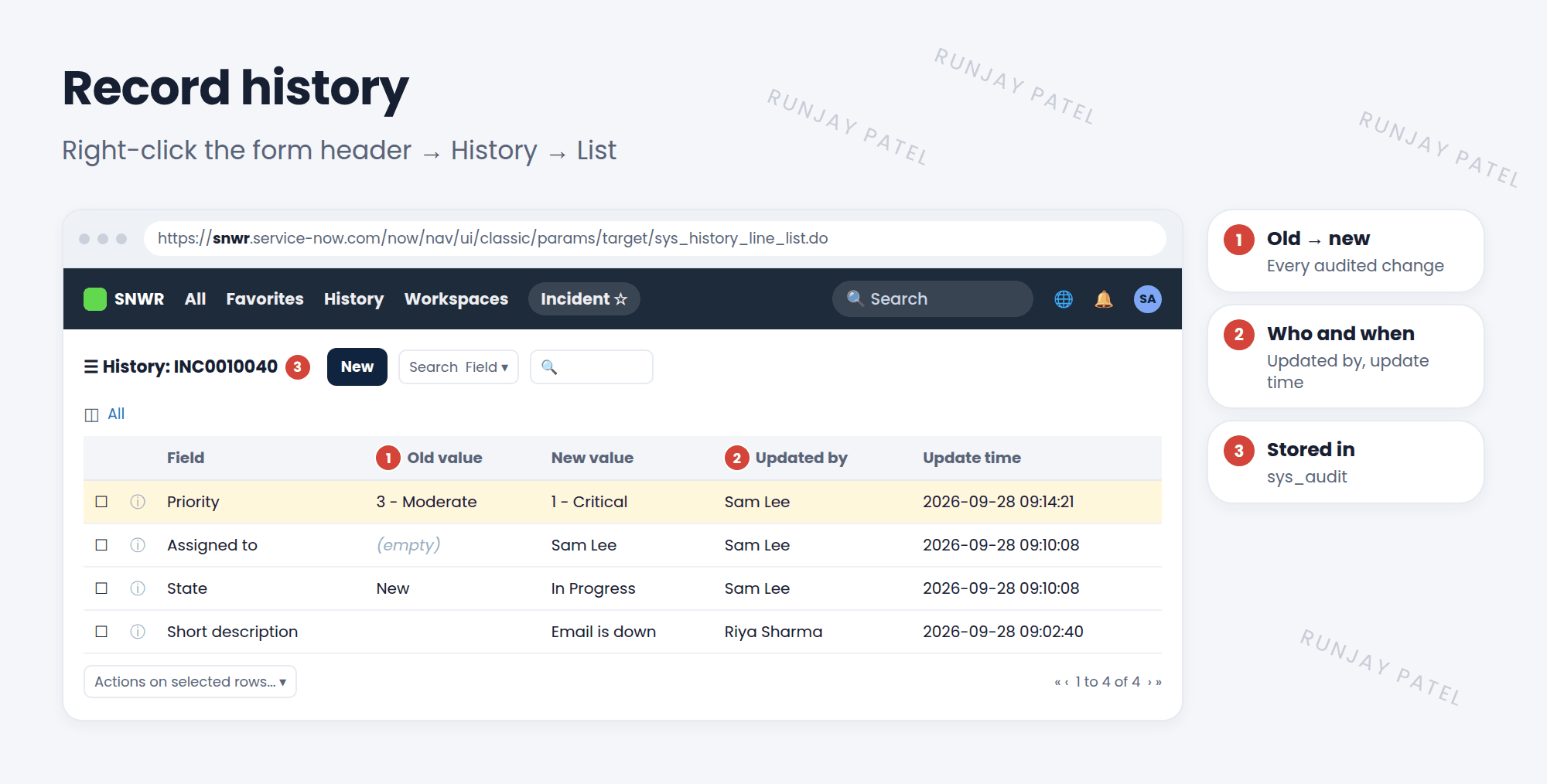
| Where | Shows |
|---|---|
| Activity stream on the form | Recent field changes, comments, and work notes, in order |
| Right-click header > History > List | Every change as a list: field, old value, new value, who, when |
| Right-click header > History > Calendar | The same changes on a timeline |
💡 Good to know: Want reports on changes, like “how many times was priority raised”? Use a metric definition instead of querying the audit table. Audit data is built for history, not for reporting.
⭐ Remember: Audit = on the table’s Collection entry. Changes go to sys_audit. View them with History > List.
4 Let’s try it: trace a change
- Open an incident. Change its Priority and Assigned to. Save.
- Right-click the form header and choose History > List. Find your changes.
- Try History > Calendar. Which view do you prefer?
- Open the Incident table’s Collection dictionary entry. Is Audit checked?
5 Quick recap
- Auditing records every field change: old, new, who, when
- Turn it on with Audit on the table’s Collection entry
- Changes are stored in
sys_audit - View them in the activity stream, History > List, or History > Calendar
- Use
no_auditto skip noisy fields
6 Check yourself
Think of your answer first. Then tap to check.
1 Which table stores audited field changes? Show answer
sys_audit.
2 Where do you turn on auditing for a table? Show answer
Check Audit on the table’s Collection dictionary entry.
3 How do you see a list of every change to one incident? Show answer
Right-click the form header and choose History > List.
Nice work! You finished this lesson. 🎉
Was this lesson helpful?
Please log in to share lesson feedback.
Have a question or doubt?
Ask here and get help from instructors and fellow learners.
Only logged-in learners can post.





