


Elevated Roles & Debugging Security
On this page
In this lesson, you will learn:
- What an elevated role is, and how to elevate
- How to debug security rules
- How to test access the right way
1 Elevated roles
Some roles are so powerful that nobody should have them switched on all the time. security_admin is the main one. You have it, but it’s “asleep” until you elevate. 🔑
Key term: Elevated role
A role you must turn on for your current session before you can use it. It turns off again when you log out.
- Click your avatar (user menu) and choose Elevate role.
- Check security_admin and click Update.
- Now you can create or change ACLs. Log out, and it’s off again.
💡 Good to know: Elevating on purpose is a safety net. You can’t change security by accident while doing everyday admin work.
2 Debugging security rules
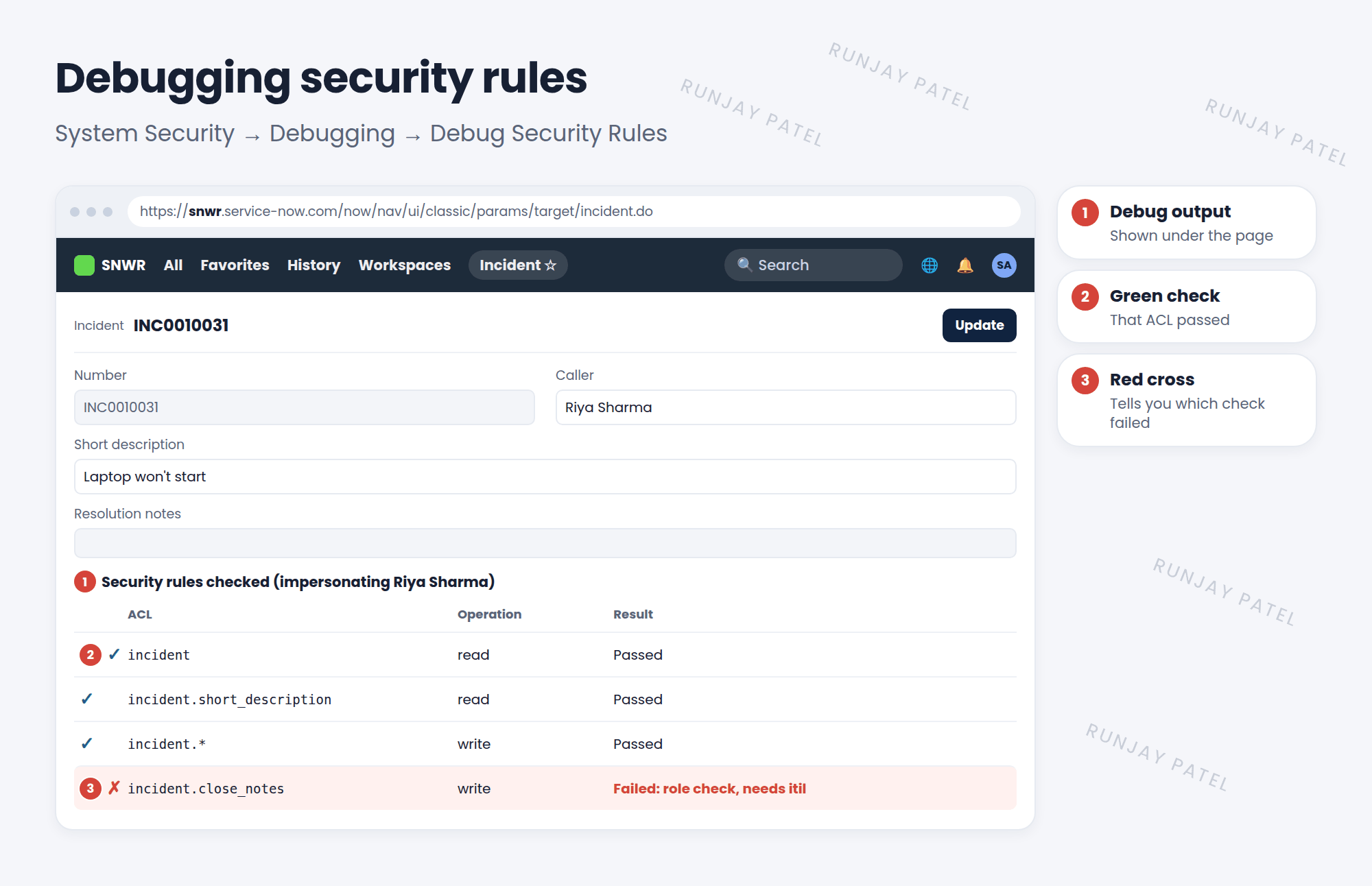
“Why can’t Riya see this field?” Don’t guess. Let ServiceNow show you.
| Tool | Where | What it shows |
|---|---|---|
| Debug Security Rules | System Security > Debugging > Debug Security Rules (also in System Diagnostics > Session Debug) | Every ACL checked on the page, pass or fail, and why |
| Access Analyzer | System Security > Access Analyzer | Pick a user and a record, and see whether they have access and which rules decided it |
| Impersonate | User menu > Impersonate user | What the user really sees (Lesson 6.4) |
📝 Note: Debugging stays on until you turn it off with Stop Debugging (or Disable All in Session Debug), or log out.
3 A good testing habit
- Test as the real user (impersonate), not as admin. Admins pass most ACLs.
- Test both sides: someone who should get access, and someone who shouldn’t.
- Check the list and the form. Hidden rows show as “rows removed by security constraints”.
⚠️ Heads up: Never test security only as an admin. You’ll see everything and miss the problem.
⭐ Remember: Elevate to security_admin to change ACLs. Use Debug Security Rules or Access Analyzer to see why. Impersonate to test.
4 Let’s try it: debug Riya’s view
- Open System Security > Debugging > Debug Security Rules.
- Impersonate Riya Sharma and open one of her incidents.
- Scroll to the bottom. Which ACLs passed? Which failed, and why?
- End the impersonation and turn debugging off.
5 Quick recap
- security_admin is an elevated role: turn it on per session
- Debug Security Rules shows every ACL checked, pass or fail
- Access Analyzer checks one user against one record
- Always test as the real user, both allowed and not allowed
6 Check yourself
Think of your answer first. Then tap to check.
1 You have security_admin but can’t edit an ACL. What did you forget? Show answer
To elevate the role for your session.
2 Which tool shows every ACL checked on the page you’re viewing? Show answer
Debug Security Rules.
3 Why shouldn’t you test ACLs only as an admin? Show answer
Admins pass most ACLs, so you won’t see what normal users see.
Nice work! You finished this lesson. 🎉
Was this lesson helpful?
Please log in to share lesson feedback.
Have a question or doubt?
Ask here and get help from instructors and fellow learners.
Only logged-in learners can post.





