


Field Styles
On this page
In this lesson, you will learn:
- What a field style is
- How to create one with a value and a style
- Where field styles show up
1 Make important things stand out
In a long incident list, a Priority 1 ticket can hide among the others. What if P1 rows were bright red? 🔴 That’s a field style.
Key term: Field style
A rule that changes how a field looks, like its color, when it has a certain value. Stored in the sys_ui_style table.
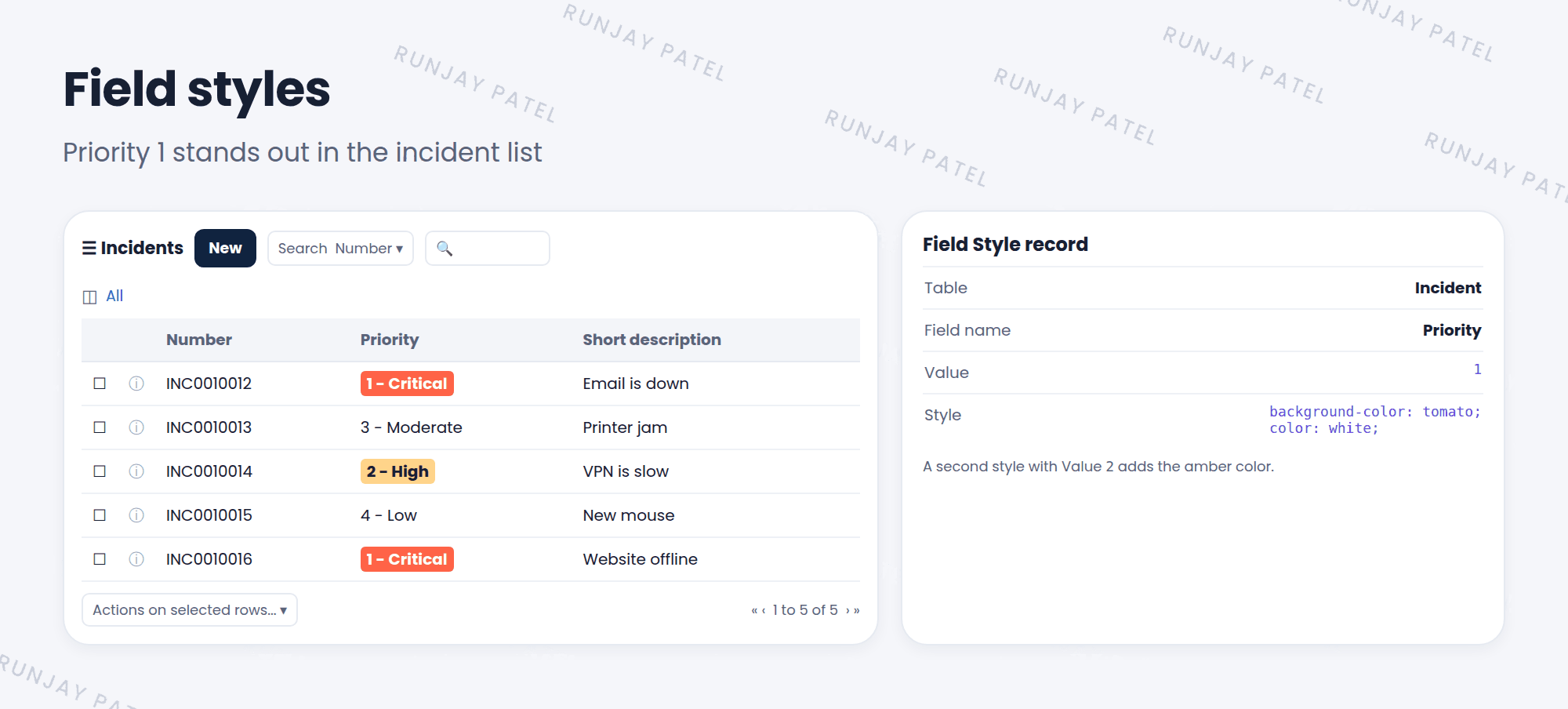
2 Parts of a field style
| Field | What it does | Example |
|---|---|---|
| Table | Which table | Incident |
| Field name | Which field gets the style | Priority |
| Value | When to apply it. A value, or javascript: for a condition |
1 |
| Style | How it looks, written in CSS | background-color: tomato; color: white; |
💡 Good to know: Use a condition when a single value isn’t enough. For example, Value javascript:current.priority <= 2 styles both P1 and P2.
3 Creating a field style
- Go to System UI > Field Styles and click New.
- Pick the Table and Field name.
- Enter the Value and the Style. Submit.
- Open a list with that field. Look for the new colors.
📝 Note: Field styles show mainly in classic lists. Workspaces use highlighted values instead, which do a similar job there.
⚠️ Heads up: Don’t color everything! If every field is bright, nothing stands out. Save styles for what really matters.
⭐ Remember: Field style = Table + Field + Value + Style. Find it in System UI > Field Styles.
4 Let’s try it: color big meetings
- Go to System UI > Field Styles and click New.
- Table: Room Booking. Field name: Attendees.
- Value:
javascript:current.u_attendees > 20. Style:background-color: gold;. Submit. - Open the Room Booking list. Are bookings with more than 20 attendees highlighted?
5 Quick recap
- A field style changes how a field looks for certain values
- Parts: Table, Field name, Value, Style
- Value can be a plain value or a
javascript:condition - Styles show mainly in classic lists
6 Check yourself
Think of your answer first. Then tap to check.
1 Where do you create a field style? Show answer
System UI > Field Styles.
2 Which part of a field style decides the color? Show answer
The Style field, written in CSS.
3 You want to style priorities 1 and 2. What could you put in Value? Show answer
A condition like javascript:current.priority <= 2
Nice work! You finished this lesson. 🎉
Was this lesson helpful?
Please log in to share lesson feedback.
Have a question or doubt?
Ask here and get help from instructors and fellow learners.
Only logged-in learners can post.





