


Schema Map
On this page
In this lesson, you will learn:
- What a schema map is
- How to open one for any table
- How to read the boxes and lines
1 A map of your tables
By now you know tables extend other tables, and reference other tables. That’s a lot to keep in your head! A schema map draws it for you. 🗺️
Key term: Schema map
A diagram that shows a table, the tables it extends or is extended by, and the tables it references or is referenced by.
2 Opening a schema map
- Go to System Definition > Tables.
- Open a table, like Incident.
- Under Related Links, click Show Schema Map.
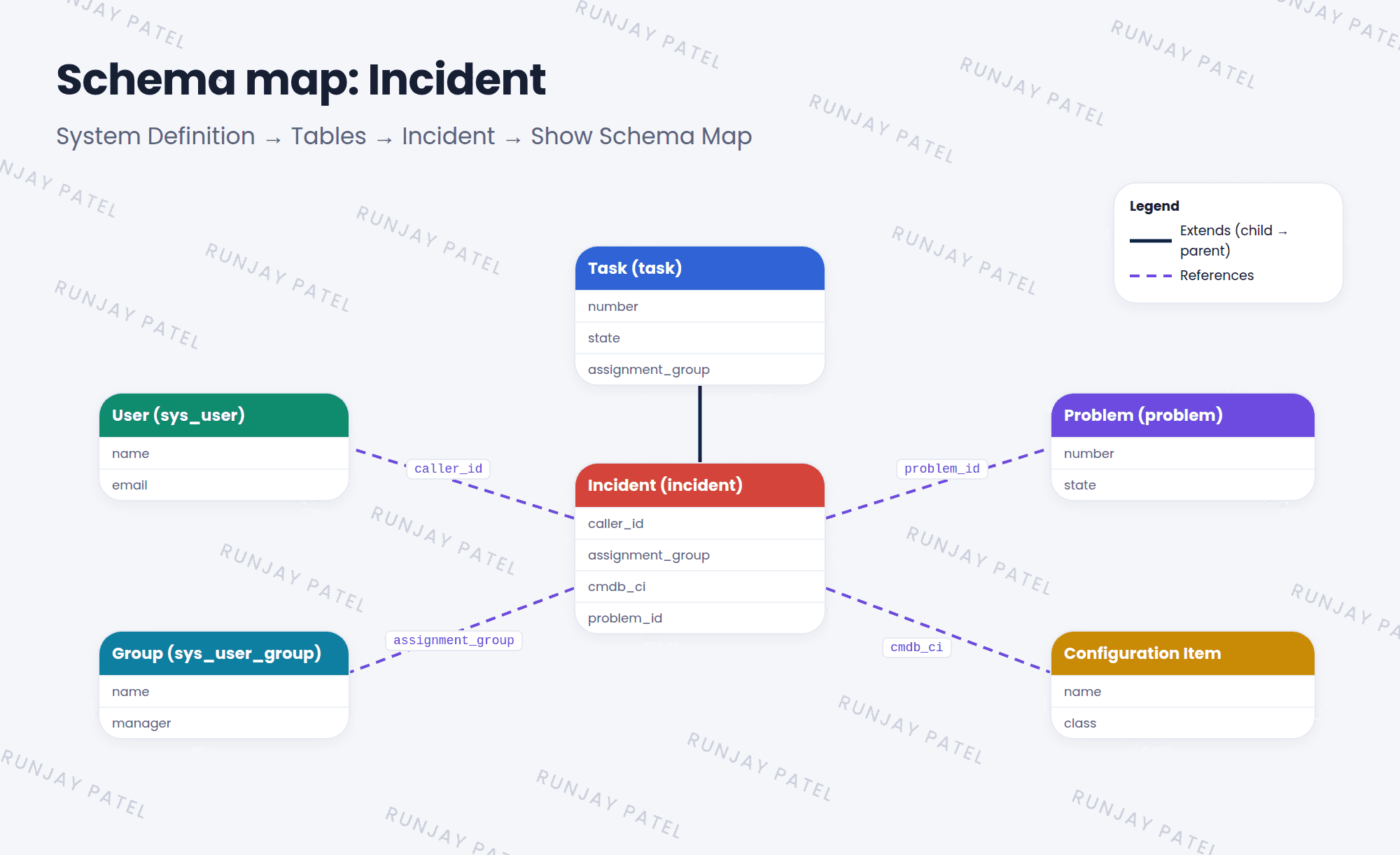
3 Reading the map
| You see | It means |
|---|---|
| Box | A table, with its fields listed inside |
| Line to a parent | This table extends the parent, like Incident extends Task |
| Line labeled with a field | A reference, like Caller pointing to User |
- Use the checkboxes on the side to show or hide extended, extending, and referenced tables.
- Drag boxes to tidy the picture. Double-click a box to open that table’s map.
💡 Good to know: Schema maps are great before you build. Check what already exists so you don’t create a table or field that’s already there.
⭐ Remember: System Definition > Tables > open a table > Show Schema Map.
4 Let’s try it: map your table
- Open the schema map for Incident. Find Task above it.
- Find the line for Caller. Which table does it point to?
- Now open the schema map for your Room Booking table from Lesson 29.3. What does it extend?
5 Quick recap
- A schema map draws a table’s connections
- It shows extends (parent and child) and references
- Open it from a table record’s Show Schema Map link
- Use it to plan before you build
6 Check yourself
Think of your answer first. Then tap to check.
1 Where do you find the Show Schema Map link? Show answer
On a table record in System Definition > Tables, under Related Links.
2 Name the two kinds of connections a schema map shows. Show answer
Extends (parent and child tables) and references.
3 On Incident’s map, which table does the Caller line point to? Show answer
User (sys_user).
Nice work! You finished this lesson. 🎉
Was this lesson helpful?
Please log in to share lesson feedback.
Have a question or doubt?
Ask here and get help from instructors and fellow learners.
Only logged-in learners can post.





