


Scheduled Jobs
On this page
In this lesson, you will learn:
- What a scheduled job is
- The main kinds of scheduled jobs
- How to create and test a scheduled script
1 Work that runs on a timer
Some work doesn’t wait for anyone to click. “Every night at 2 AM, close resolved incidents older than 7 days.” ⏰ That’s a scheduled job.
Key term: Scheduled job
Work that runs automatically at a set time or on a repeat, like daily or every hour. Find them in System Definition > Scheduled Jobs.
2 Kinds of scheduled jobs
| When you click New, pick… | What it does | Example |
|---|---|---|
| Automatically run a script of your choosing | Runs a server script | Close old resolved incidents |
| Automatically generate something from a template | Creates a record from a template | A weekly “Check the backups” task |
| Automatically generate and distribute a report | Emails a report (Lesson 22.3) | Monday P1 report to managers |
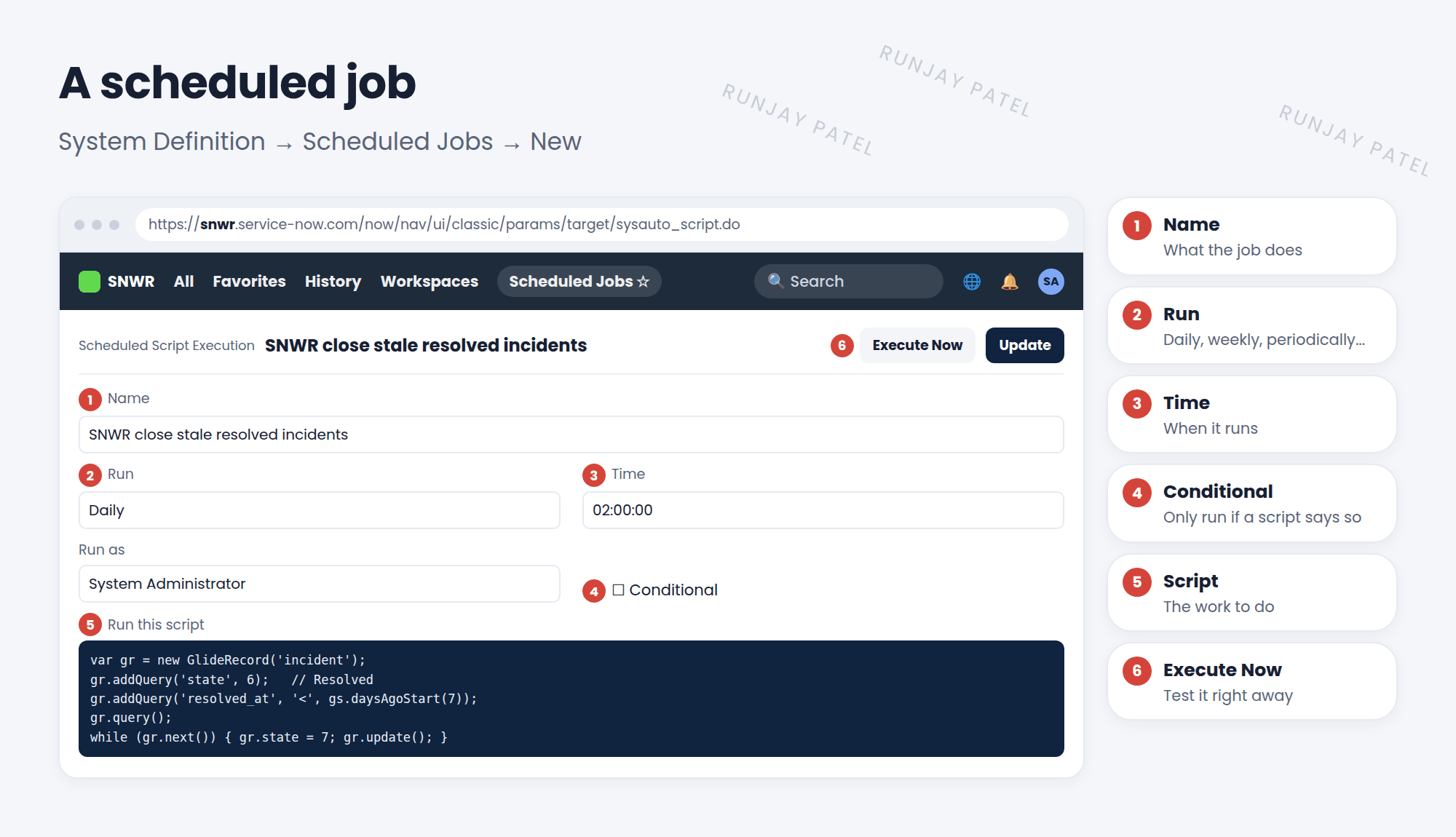
3 Key fields
- Run: Daily, Weekly, Monthly, Periodically (every X minutes or hours), Once, or On Demand.
- Time and Day: when it runs. Times follow the job’s time zone.
- Conditional: adds a condition script. The job only runs if it returns true.
- Run as: the user whose permissions the job uses.
- Execute Now: runs it once right away, great for testing.
var gr = new GlideRecord('incident');
gr.addQuery('state', 6);                                  // Resolved
gr.addQuery('resolved_at', '<', gs.daysAgoStart(7));      // older than 7 days
gr.query();
while (gr.next()) {
  gr.state = 7;                                           // Closed
  gr.update();
}
📝 Note: Many new automations use a flow with a Scheduled trigger (Lesson 28.2) instead. Both work. Scheduled jobs are still common and on the CSA exam.
⚠️ Heads up: A job that updates many records at a busy time can slow the instance. Run big jobs at quiet times, and test with Execute Now in snwrdev first.
⭐ Remember: Scheduled job = timed work. Script, template, or report. Test with Execute Now.
4 Let’s try it: nightly clean-up
- Go to System Definition > Scheduled Jobs and click New.
- Pick Automatically run a script of your choosing.
- Name: SNWR close stale resolved incidents. Run: Daily. Time: 02:00.
- Paste the script. Click Execute Now on your PDI. Did any old resolved incidents close?
5 Quick recap
- A scheduled job runs work on a timer
- Three kinds: run a script, generate from a template, send a report
- Key fields: Run, Time, Conditional, Run as
- Execute Now runs it once for testing
6 Check yourself
Think of your answer first. Then tap to check.
1 Where do you find scheduled jobs? Show answer
System Definition > Scheduled Jobs.
2 You want to create the same checklist task every Monday. Which kind of job? Show answer
Automatically generate something from a template.
3 How do you test a scheduled job without waiting? Show answer
Click Execute Now.
Nice work! You finished this lesson. 🎉
Was this lesson helpful?
Please log in to share lesson feedback.
Have a question or doubt?
Ask here and get help from instructors and fellow learners.
Only logged-in learners can post.





