


Integration Overview & IntegrationHub
On this page
In this lesson, you will learn:
- What an integration is
- Inbound vs outbound integrations
- What IntegrationHub and spokes do
1 Systems talking to systems
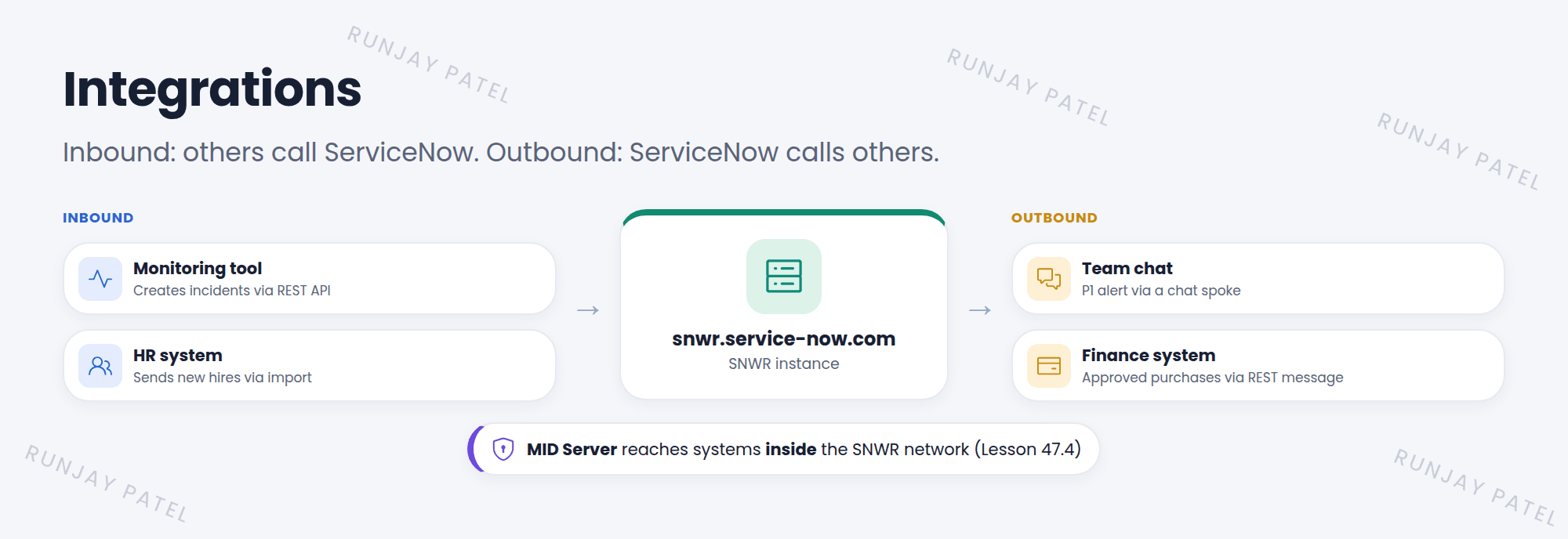
SNWR uses many tools: a chat app, an HR system, a monitoring tool. When monitoring spots a down server, it should create an incident automatically. When a P1 is opened, the team should get a chat message. That’s what integrations do. 🔌
Key term: Integration
A connection that lets ServiceNow and another system share data or trigger actions, without people copying things by hand.
2 Inbound vs outbound
| Inbound | Outbound | |
|---|---|---|
| Who starts it | The other system calls ServiceNow | ServiceNow calls the other system |
| Common tools | REST API (Table API, Scripted REST), SOAP, email, import sets | IntegrationHub spokes, REST messages, SOAP messages |
| Example | Monitoring creates an incident | Post a P1 alert to a chat channel |
3 IntegrationHub and spokes
Key term: IntegrationHub
Adds ready-made integration actions to Flow Designer (Workflow Studio). Actions are grouped into spokes, one per system, like a chat spoke or a cloud-storage spoke.
- You drag a spoke action into a flow, like Post Message, and fill in the data pills.
- Logins are stored safely in connection and credential aliases, not inside the flow.
- For a system without a spoke, use the REST step to call any web API.
📝 Note: Some spokes are free. Others need an IntegrationHub subscription, which is usually counted by the number of transactions (calls).
⚠️ Heads up: Integration accounts need only the roles they use. Never give an integration user the admin role “to make it work”.
⭐ Remember: Inbound = others call ServiceNow (APIs). Outbound = ServiceNow calls others (spokes, REST messages).
4 Let’s try it: find the spokes
- Open Workflow Studio (Flow Designer). Create a test flow and add an Action.
- Look through the list of spokes. Which systems can your PDI connect to?
- Go to Connections & Credentials > Connection & Credential Aliases. What aliases exist?
5 Quick recap
- Integrations connect ServiceNow with other systems
- Inbound: others call ServiceNow. Outbound: ServiceNow calls others
- IntegrationHub adds spoke actions to flows
- Store logins in connection and credential aliases
- Give integration users only the roles they need
6 Check yourself
Think of your answer first. Then tap to check.
1 A monitoring tool creates incidents in ServiceNow. Inbound or outbound? Show answer
Inbound.
2 What is a spoke? Show answer
A set of IntegrationHub actions for one system, used in flows.
3 Where should an integration’s password be stored? Show answer
In a connection and credential alias, not in the flow or script.
Nice work! You finished this lesson. 🎉
Was this lesson helpful?
Please log in to share lesson feedback.
Have a question or doubt?
Ask here and get help from instructors and fellow learners.
Only logged-in learners can post.





