


Glide List Fields
On this page
In this lesson, you will learn:
- What a Glide List field is
- How it stores many sys_ids in one field
- How to use the locked and unlocked views
1 One field, many records
A reference field points to one record. But sometimes you need many. For example, an incident’s Watch list can hold several people who want email updates. 👀
Key term: Glide List
A field type (shown as List in the dictionary) that holds many values in one field. It usually references a table, like User.
2 How it’s stored
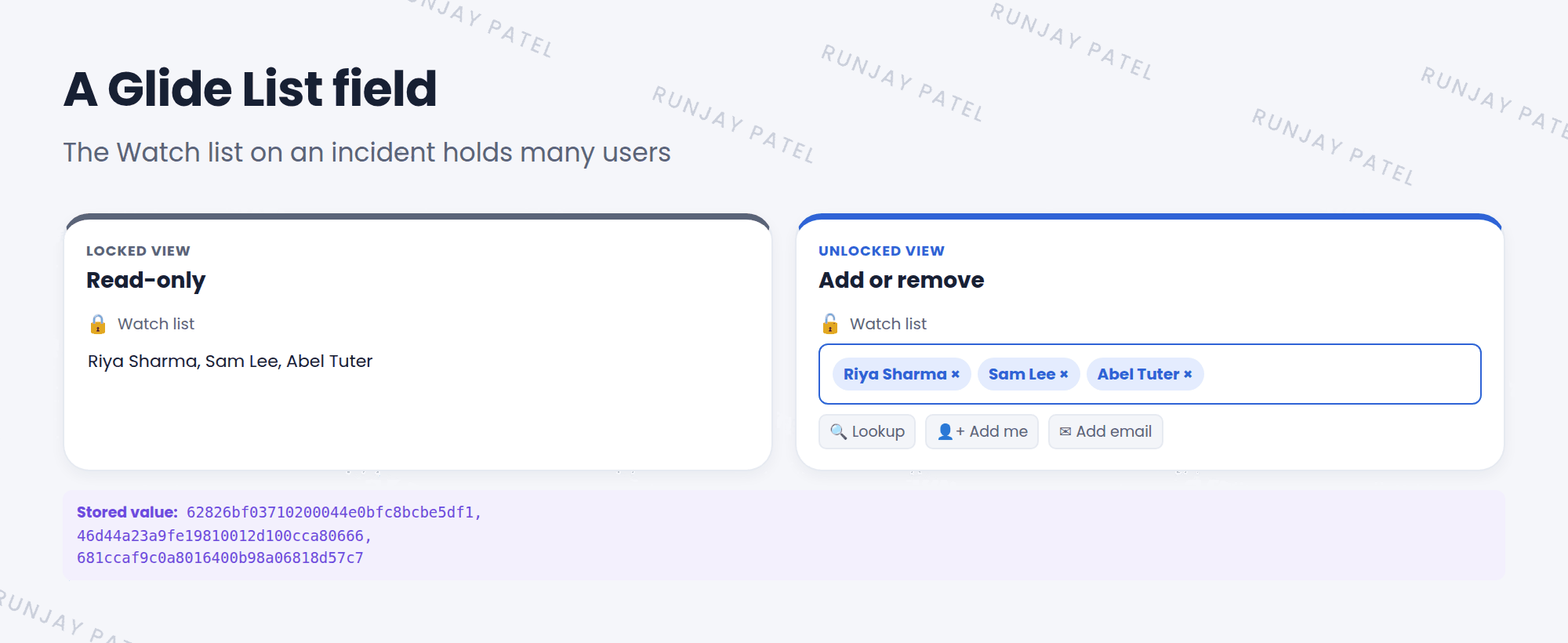
A Glide List stores a comma-separated list of sys_ids. On the form, you see the display values instead, like names.
| Field type | Holds | Stores | Example |
|---|---|---|---|
| Reference | One record | One sys_id | Caller |
| Glide List | Many records | Many sys_ids, separated by commas | Watch list |
3 Locked and unlocked views
- Locked 🔒: shows the list as read-only text. This is how it looks when the form opens.
- Unlocked 🔓: click the lock icon to add or remove entries. Use the lookup to search, or the add me icon to add yourself.
- Some Glide Lists also let you type an email address, like the Watch list, so people without a user record can be added.
⚠️ Heads up: Glide Lists are handy, but harder to report on and filter than normal references. If you need to track details about each link, like a role or a date, use a related table instead.
⭐ Remember: Reference = one sys_id. Glide List = many sys_ids, separated by commas.
4 Let’s try it: add watchers
- Open an incident. Find the Watch list field.
- Click the lock icon to unlock it. Add Sam Lee with the lookup, then click the add me icon.
- Click the lock again, then Save. Who is on the list now?
- Right-click the Watch list label and choose Configure Dictionary. What’s the Type? Which table does it reference?
5 Quick recap
- A Glide List holds many records in one field
- It stores sys_ids separated by commas
- Click the lock to switch between locked and unlocked views
- Watch list and Work notes list are common examples
6 Check yourself
Think of your answer first. Then tap to check.
1 What’s stored in a Glide List field? Show answer
A comma-separated list of sys_ids.
2 How do you add people to a locked Watch list? Show answer
Click the lock icon to unlock it, then add them.
3 Caller holds one person. Watch list holds many. Which field type is each? Show answer
Caller is a Reference. Watch list is a Glide List.
Nice work! You finished this lesson. 🎉
Was this lesson helpful?
Please log in to share lesson feedback.
Have a question or doubt?
Ask here and get help from instructors and fellow learners.
Only logged-in learners can post.





