


MID Server Basics
On this page
In this lesson, you will learn:
- What a MID Server is, and why it’s needed
- How it talks to the instance through the ECC queue
- How to check a MID Server’s status
1 Reaching inside the company network
Your ServiceNow instance lives in the cloud. But SNWR’s servers, databases, and directory are inside the company network, behind a firewall. How does ServiceNow reach them? With a MID Server. 🌉
Key term: MID Server
Management, Instrumentation, and Discovery Server. A small Java app installed on a computer inside the company network. It does work for the instance there, and sends back the results.
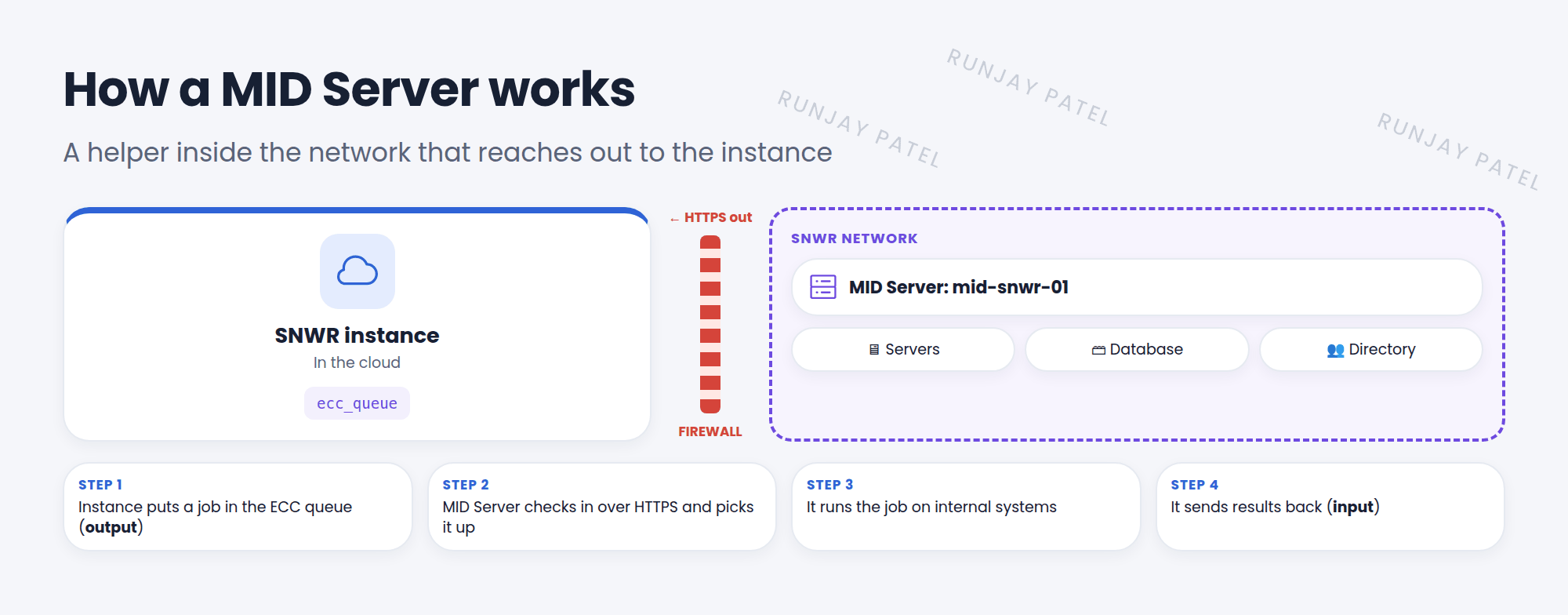
2 How it talks: the ECC queue
- The instance puts work in the ECC queue (
ecc_queue) as output records. - The MID Server checks in over HTTPS, picks up the work, and does it.
- It sends the results back as input records.
- Because the MID Server always starts the connection, no inbound firewall ports are needed.
3 What uses a MID Server
| Feature | Why it needs a MID Server |
|---|---|
| Discovery | Scans internal servers and devices to find CIs (Lesson 44.1) |
| JDBC and LDAP imports | Reads internal databases and directories (Lesson 43.1) |
| IntegrationHub and Orchestration | Runs actions on internal systems |
| Service Mapping | Maps how internal apps connect |
4 Setting one up (overview)
- Create a user for the MID Server with the mid_server role.
- Download the installer from MID Server > Downloads and install it on a Windows or Linux computer inside the network.
- Enter the instance URL and the MID user’s login during setup.
- In MID Server > Servers, wait for status Up, then click Validate.
⚠️ Heads up: A MID Server that is Down or not Validated can’t do work. Discovery and imports that use it will wait or fail. Check its status first when something isn’t running.
⭐ Remember: MID Server = helper inside the network. Talks through the ECC queue, outbound HTTPS only. Must be Up and Validated.
5 Let’s try it: look around
- Open MID Server > Servers. Does your PDI have one? (Most PDIs don’t, and that’s fine.)
- Open MID Server > Downloads. Which operating systems are offered?
- Type
ecc_queue.listin the filter navigator. Look at the Queue column: input or output?
6 Quick recap
- A MID Server works inside the company network for the instance
- It uses the ECC queue: output = work to do, input = results
- It connects outbound over HTTPS, so no inbound ports are needed
- Used by Discovery, JDBC/LDAP imports, IntegrationHub, and more
- It must be Up and Validated
7 Check yourself
Think of your answer first. Then tap to check.
1 What does MID stand for? Show answer
Management, Instrumentation, and Discovery.
2 Which table carries work between the instance and the MID Server? Show answer
The ECC queue (ecc_queue).
3 Why don’t you need to open inbound firewall ports for a MID Server? Show answer
The MID Server starts the connection to the instance, outbound over HTTPS.
Nice work! You finished this lesson. 🎉
Was this lesson helpful?
Please log in to share lesson feedback.
Have a question or doubt?
Ask here and get help from instructors and fellow learners.
Only logged-in learners can post.





