


Conditions & Roles
On this page
In this lesson, you will learn:
- How the Condition field decides when an action shows
- How to limit an action to certain roles
- Common condition examples
1 Show it only when it makes sense
An Assign to me button on a closed incident? Or on an incident already assigned to you? That’s confusing. 😕 A condition hides a UI action when it doesn’t make sense.
Key term: UI action condition
A server-side line of script that must be true for the action to appear. If it’s false, the button or link is hidden.
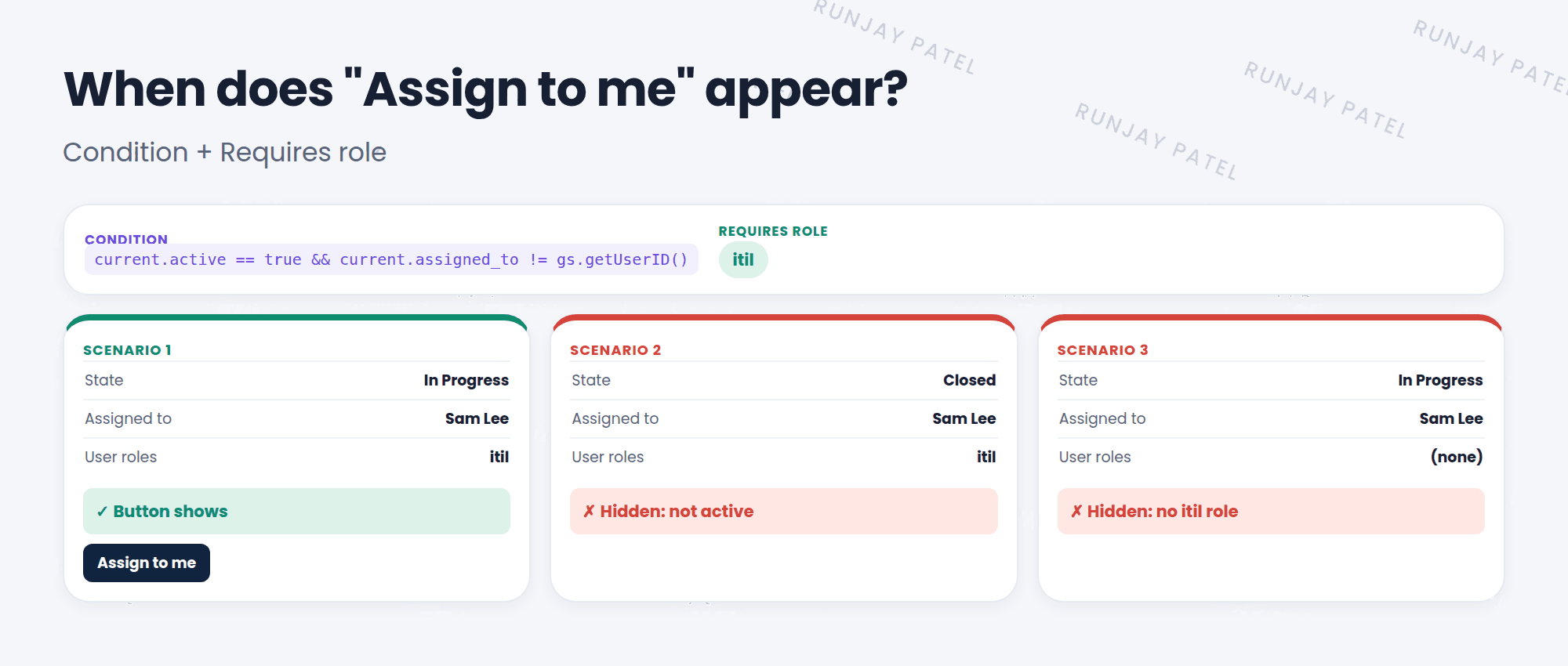
2 Writing conditions
Conditions use current (the record) and gs (system helpers). Join checks with && (and) or || (or).
current.active == true && current.assigned_to != gs.getUserID()| Condition | Shows the action when… |
|---|---|
current.active == true |
The record is active |
current.state == 6 |
The incident is Resolved |
current.isNewRecord() |
The record isn’t saved yet |
gs.hasRole('itil') |
The user has the itil role |
current.canWrite() |
The user is allowed to edit the record |
📝 Note: An empty condition means the action always shows (on the places and records you picked).
3 Limiting by role
- Requires role: use the UI action’s Requires role related list to add roles. Only users with one of those roles see the action.
- In the condition: add
gs.hasRole('itil'). This is handy when you need role checks mixed with other checks.
⚠️ Heads up: Hiding a button isn’t security. A user could still change the record another way. Protect data with ACLs (Chapter 42), and use conditions to keep the screen tidy.
⭐ Remember: Condition true + right role = action shows. Empty condition = always shows.
4 Let’s try it: hide the button when it’s useless
- Open your Assign to me UI action.
- Condition:
current.active == true && current.assigned_to != gs.getUserID(). Update. - Open an incident assigned to you. Is the button gone? Open one assigned to Sam Lee. Is it back?
- In the Requires role related list, add itil. Impersonate a user without itil (Lesson 6.4). Can they see it?
5 Quick recap
- The Condition must be true for the action to appear
- Use
currentandgsin conditions - Limit by role with Requires role or
gs.hasRole() - Hiding a button isn’t security. Use ACLs for that
6 Check yourself
Think of your answer first. Then tap to check.
1 Write a condition that shows an action only for active records. Show answer
current.active == true
2 The Condition field is empty. When does the action show? Show answer
Always (in the places and on the records you picked).
3 Is hiding a Delete button enough to stop people deleting records? Show answer
No. Use ACLs to secure the data.
Nice work! You finished this lesson. 🎉
Was this lesson helpful?
Please log in to share lesson feedback.
Have a question or doubt?
Ask here and get help from instructors and fellow learners.
Only logged-in learners can post.





