


Data Policy Basics
On this page
In this lesson, you will learn:
- What a data policy is
- Where data policies are enforced
- How to create one with data policy rules
1 Data doesn’t only come from forms
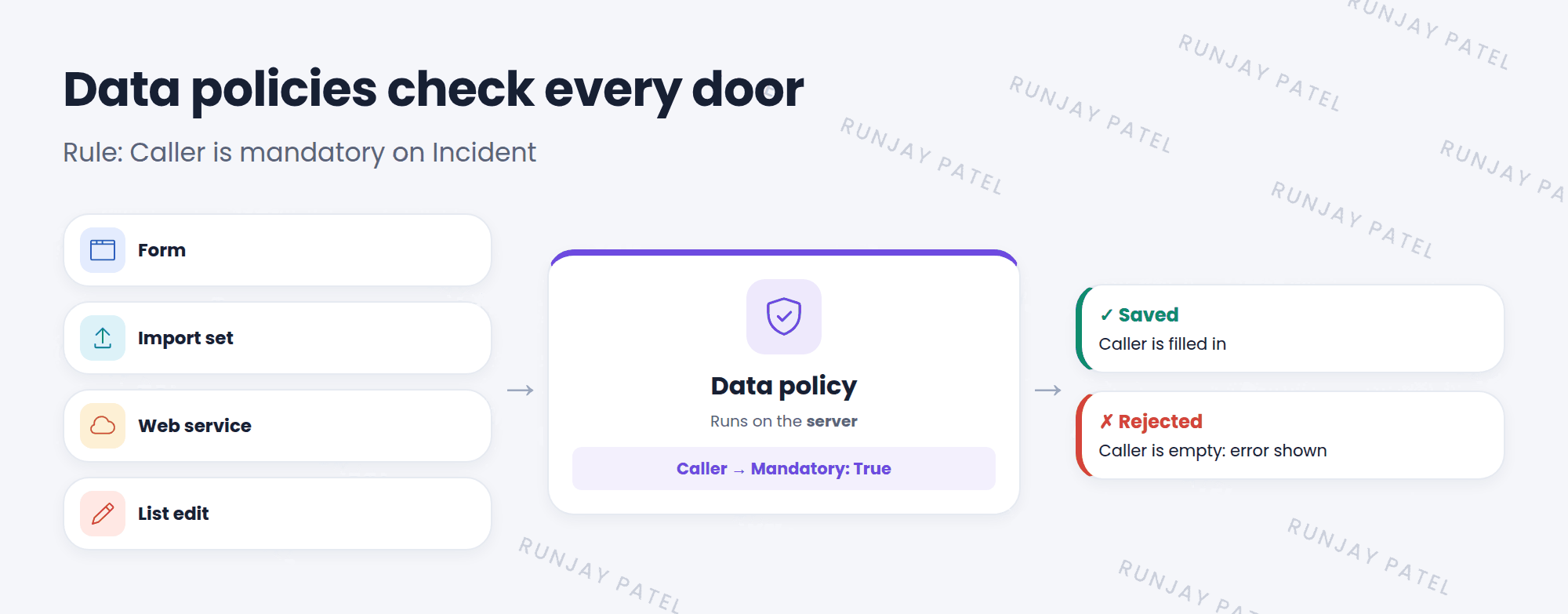
A UI policy protects the form. But data also comes in through imports, web services, email, and list editing. A UI policy can’t see any of those. 🚪
SNWR needs every incident to have a Caller, no matter how it’s created. That’s a data policy.
Key term: Data policy
A rule that makes fields mandatory or read only on the server. It checks data from every source before it’s saved.
2 Key fields on a data policy
| Field | What it does |
|---|---|
| Table and Conditions | Which records it checks, and when |
| Apply to import sets | Checks data loaded with import sets |
| Apply to SOAP | Checks data coming in through SOAP web services |
| Use as UI Policy on client | Also acts like a UI policy on forms, so users see the rule right away |
| Reverse if false and Inherit | Same idea as on UI policies |
3 Data policy rules
The what goes in the Data Policy Rules related list. Each rule has a Field name, plus Mandatory and Read only (True / False / Leave alone).
📝 Note: There’s no Visible option. Hiding a field only makes sense on a form, and data policies care about the data.
⭐ Remember: Data policy = server-side, all sources, mandatory or read only. Found in System Policy > Rules > Data Policies.
4 Let’s try it: every incident needs a caller
- Go to System Policy > Rules > Data Policies and click New.
- Table: Incident. Short description: Caller is always required. Leave Conditions empty.
- Check Apply to import sets and Use as UI Policy on client. Save.
- In Data Policy Rules, click New. Field name: Caller. Mandatory: True. Submit.
- In an incident list, find one with a caller. Double-click the Caller cell and clear it. Can you save it?
5 Quick recap
- A data policy makes fields mandatory or read only on the server
- It checks data from forms, imports, web services, and list edits
- Rules go in the Data Policy Rules related list
- No Visible option, because data policies are about data
6 Check yourself
Think of your answer first. Then tap to check.
1 Where do data policies run: client or server? Show answer
Server.
2 Can a data policy hide a field? Show answer
No. It can only set mandatory and read only.
3 Which checkbox makes a data policy also work like a UI policy on forms? Show answer
Use as UI Policy on client.
Nice work! You finished this lesson. 🎉
Was this lesson helpful?
Please log in to share lesson feedback.
Have a question or doubt?
Ask here and get help from instructors and fellow learners.
Only logged-in learners can post.





