


Default Values
On this page
In this lesson, you will learn:
- What a default value is
- How to set a fixed default and a script default
- When default values are applied
1 A head start on every form
When you open a new incident, some fields are already filled in: State is New, Opened is right now, and Opened by is you. That’s because they have default values. They save time and reduce mistakes. ⏱️
Key term: Default value
The value a field starts with on a new record. It’s set in the Default value field of the dictionary entry.
2 Two kinds of defaults
| Kind | What you enter | Example |
|---|---|---|
| Fixed | A plain value | 3 for Impact = 3 – Low |
| Script | Starts with javascript: |
javascript:gs.getUserID() for the current user |
3 Handy script defaults
| Default value | Gives you |
|---|---|
javascript:gs.getUserID() |
The sys_id of the logged-in user (for reference fields to User) |
javascript:gs.nowDateTime() |
The current date and time (for Date/Time fields) |
javascript:gs.now() |
Today’s date (for Date fields) |
💡 Good to know: For a reference field with a fixed default, like a group, enter the group’s sys_id, not its name.
4 When defaults apply
- When a new form opens, the default is filled in. The user can still change it.
- When a record is inserted by a script or import and the field is empty, the default is used.
- Defaults never change existing records.
📝 Note: Need a different default on one child table? Use a dictionary override (Lesson 30.3).
⭐ Remember: Default value = starting value for new records. Plain value or javascript:.
5 Let’s try it: set two defaults
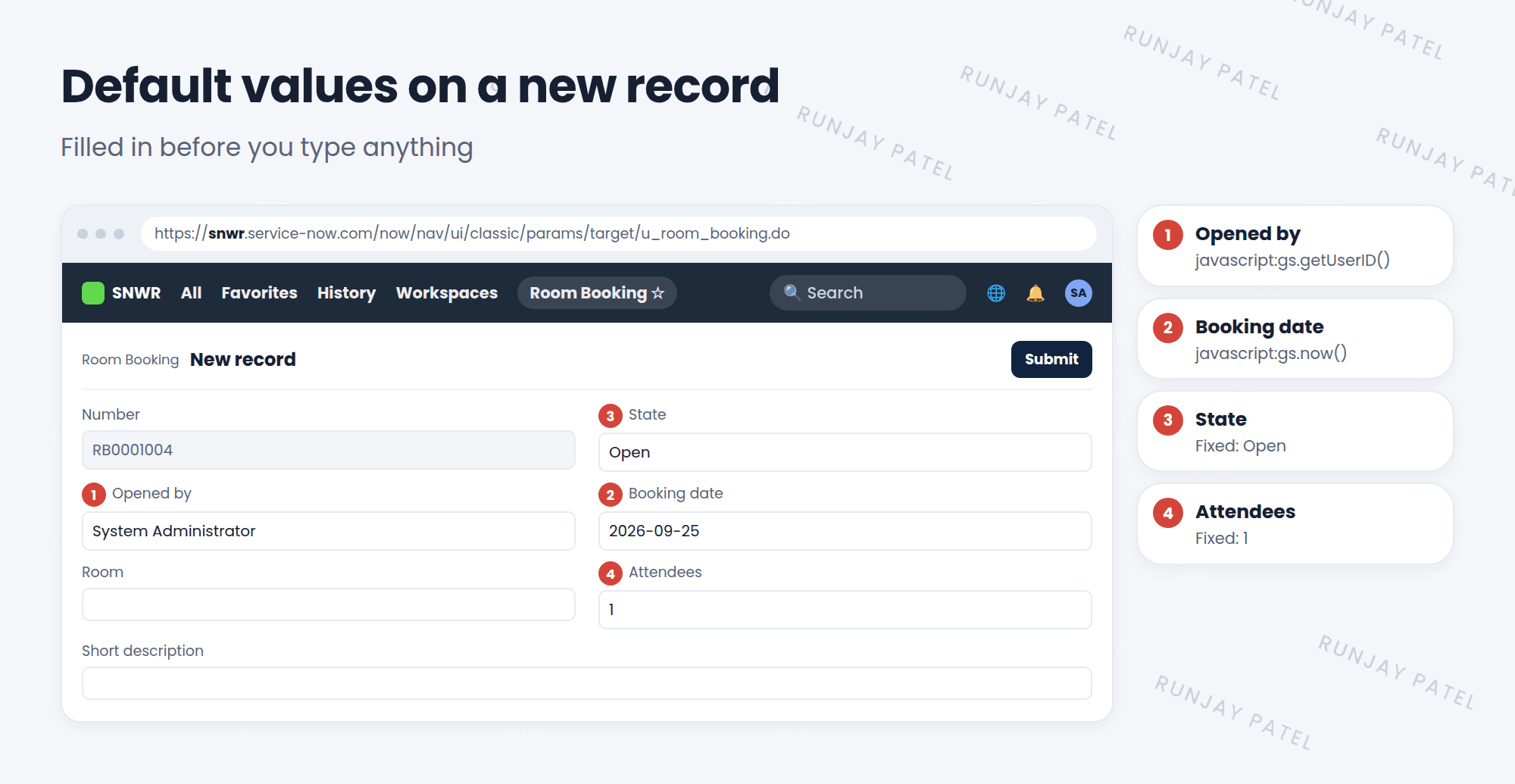
- Open a Room Booking. Right-click Attendees and choose Configure Dictionary. Set Default value to
1. Update. - Right-click Booking date, open its dictionary, and set Default value to
javascript:gs.now(). Update. - Create a new Room Booking. Are Attendees and Booking date filled in?
- Open an old Room Booking. Did its values change? (They shouldn’t!)
6 Quick recap
- A default value fills in a field on new records
- It can be a fixed value or a
javascript:script gs.getUserID()gives the current user.gs.now()andgs.nowDateTime()give today and now- Defaults never change existing records
7 Check yourself
Think of your answer first. Then tap to check.
1 Where do you set a field’s default value? Show answer
In the Default value field of its dictionary entry.
2 Which default fills a User reference field with the logged-in user? Show answer
javascript:gs.getUserID()
3 You add a default to a field. Do old records get it? Show answer
No. Defaults only apply to new records.
Nice work! You finished this lesson. 🎉
Was this lesson helpful?
Please log in to share lesson feedback.
Have a question or doubt?
Ask here and get help from instructors and fellow learners.
Only logged-in learners can post.





