


Calling Script Includes
On this page
In this lesson, you will learn:
- How to call a class-style script include
- Where you can call script includes from
- How to call one from another scope
1 The calling pattern
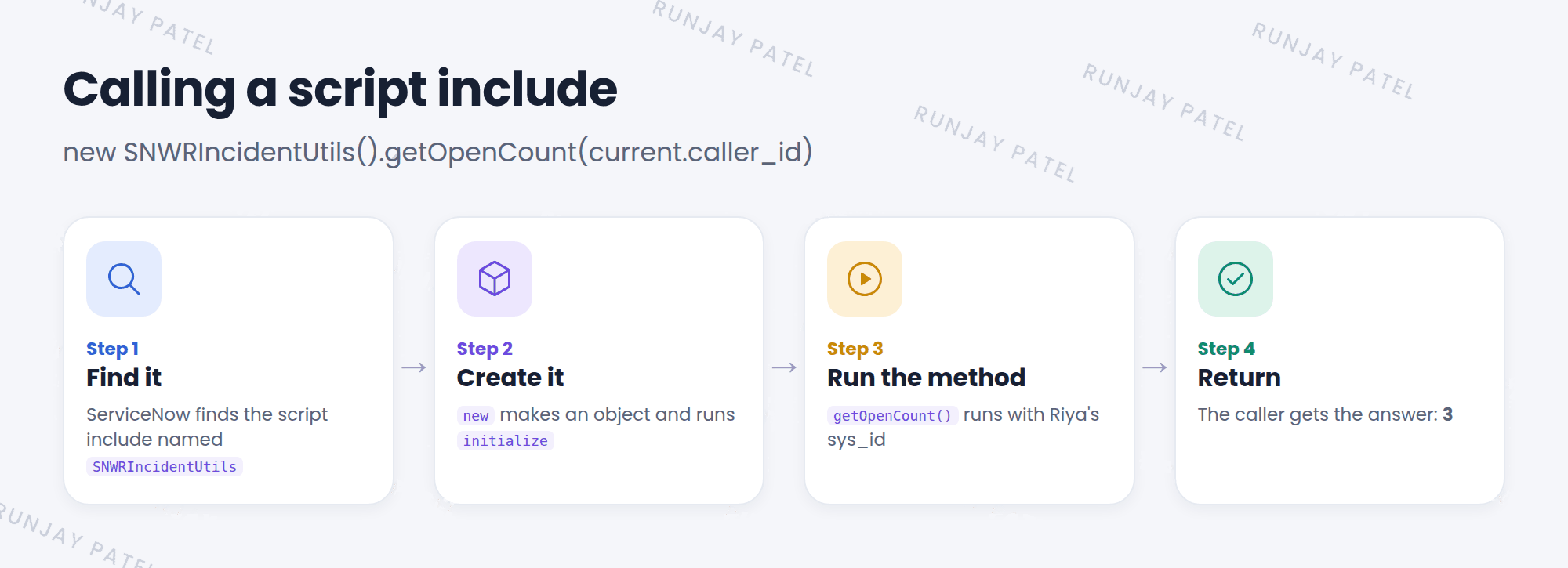
To use a class-style script include, you create a new copy with new, then call a method with a dot. 📞
var utils = new SNWRIncidentUtils();
var count = utils.getOpenCount(current.caller_id);

// or in one line:
var count2 = new SNWRIncidentUtils().getOpenCount(current.caller_id);
A single-function script include is called like any function: snwrIsWeekend(current.opened_at).
2 Where you can call it from
| Place | Example |
|---|---|
| Business rule | var n = new SNWRIncidentUtils().getOpenCount(current.caller_id); |
| UI action condition | new SNWRIncidentUtils().getOpenCount(current.caller_id) < 5 |
| Reference qualifier | javascript:new SNWRRefQuals().activeInSameDept(current) |
| Default value | javascript:new SNWRDefaults().defaultGroup() |
| Scheduled job, flow script, Scripts – Background | Same pattern: new ...().method() |
📝 Note: Client scripts can’t call a script include directly, because it runs on the server. They use GlideAjax (Lesson 40.3).
3 Calling across scopes
A script include in a scoped app has a prefix in its API Name, like x_snwr_rooms.RoomUtils. From another scope, use the full API Name:
var free = new x_snwr_rooms.RoomUtils().isRoomFree('Room 301');⚠️ Heads up: This only works if Accessible from is set to All application scopes. Otherwise the call fails. (More on scopes in Chapter 46.)
⭐ Remember: new ClassName().method(args). Other scopes need the full API Name.
4 Let’s try it: use your toolbox
- Open Scripts – Background.
- Run:
gs.info(new SNWRIncidentUtils().getOpenCount(gs.getUserID()));How many open incidents are you the caller on? - Now use it in a business rule: before insert on Incident, and if the caller has 5 or more open incidents, add a message “This caller has many open incidents.”
- Test it by creating an incident for a busy caller.
5 Quick recap
- Call a class with
new ClassName().method() - Call a function-style include like a normal function
- Use them in business rules, conditions, qualifiers, defaults, jobs, and more
- Across scopes, use the full API Name and set Accessible from to All application scopes
6 Check yourself
Think of your answer first. Then tap to check.
1 Write the call to method getVipCount on class SNWRUserUtils. Show answer
new SNWRUserUtils().getVipCount()
2 Can a client script call a script include directly? Show answer
No. It must use GlideAjax.
3 A scoped script include can’t be called from global. What should you check? Show answer
That Accessible from is All application scopes, and that you’re using the full API Name.
Nice work! You finished this lesson. 🎉
Was this lesson helpful?
Please log in to share lesson feedback.
Have a question or doubt?
Ask here and get help from instructors and fellow learners.
Only logged-in learners can post.





