


CMDB & Configuration Items
On this page
In this lesson, you will learn:
- What the CMDB is and why it matters
- What a configuration item (CI) is
- How CIs get into the CMDB
1 A map of everything IT runs
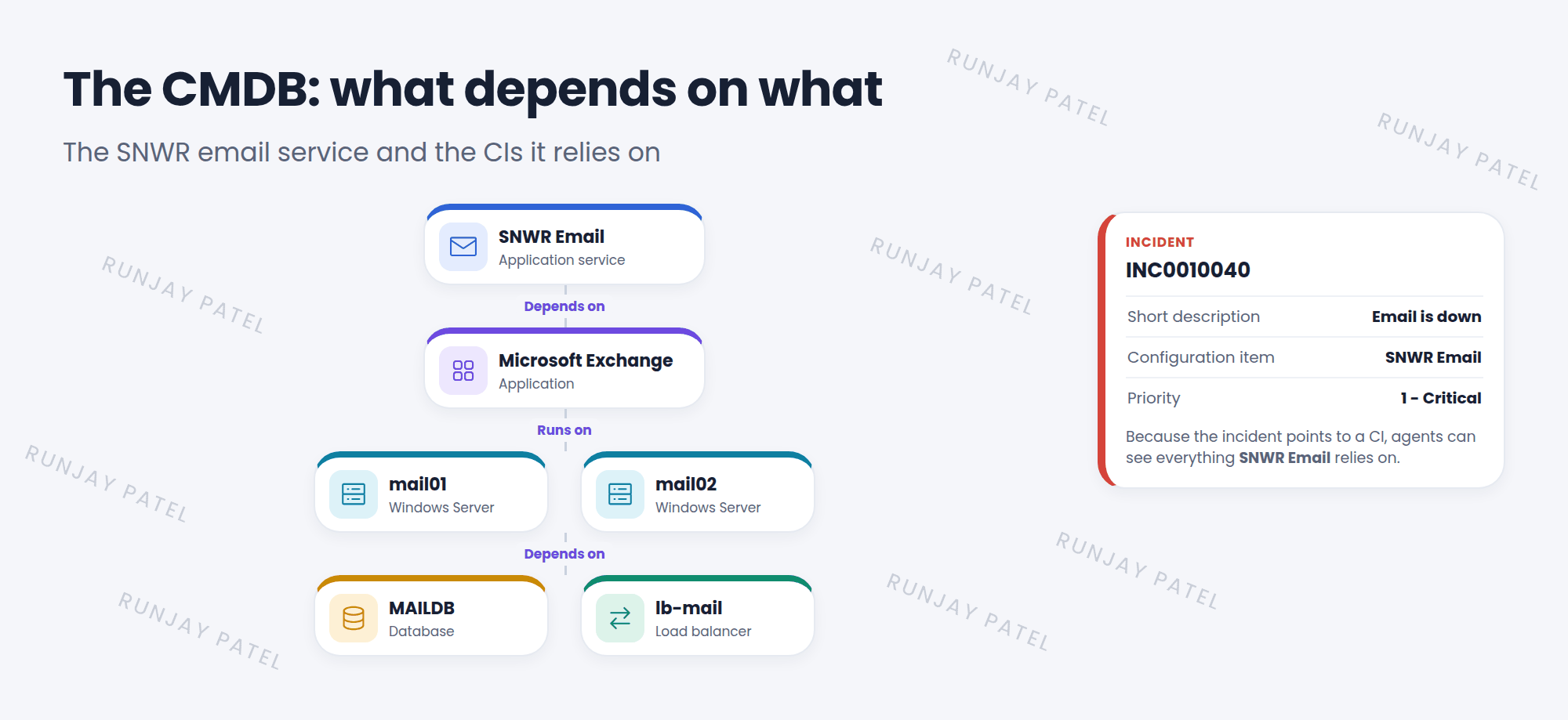
When the SNWR email service goes down, the first question is: “What does email run on?” Which servers? Which database? Who owns them? The CMDB answers that. 🗺️
Key term: CMDB
Configuration Management Database. The part of ServiceNow that stores the IT things a company runs, and how they connect.
Key term: Configuration item (CI)
One thing tracked in the CMDB, like a server, laptop, database, application, or network switch. All CIs extend the base table cmdb_ci.
2 Why the CMDB matters
| Process | How it uses the CMDB |
|---|---|
| Incident | The Configuration item field shows what’s broken, and what else might be affected |
| Change | See what a change could impact before you approve it |
| Problem | Spot one CI causing many incidents |
| Assets and costs | Know what you own and who owns it |
3 How CIs get in
- Discovery: scans the network (through a MID Server) and creates CIs automatically.
- Service Graph Connectors: bring CIs in from other tools, like cloud or endpoint management systems.
- Import sets: load CIs from a spreadsheet (Chapter 43).
- Manually: create a CI by hand. Fine for a few, not for thousands.
📝 Note: Explore CIs in Configuration > Servers, Configuration > Computers, and more, or use the CMDB Workspace for a modern view.
⚠️ Heads up: A CMDB is only useful if it’s correct. Old or duplicate CIs lead people to wrong answers. Chapter 44.4 covers keeping it healthy.
⭐ Remember: CMDB = the IT things you run + how they connect. Each thing is a CI, built on cmdb_ci.
4 Let’s try it: explore CIs
- Go to Configuration > Servers > All. Open any server. What fields do you see?
- Open an incident and look at its Configuration item field. Click the preview icon.
- Type
cmdb_ci.listin the filter navigator. How many CIs are there in total?
5 Quick recap
- The CMDB stores IT things and how they connect
- Each thing is a configuration item (CI)
- All CIs extend
cmdb_ci - CIs come from Discovery, Service Graph Connectors, imports, or by hand
- Incident, change, and problem all use the CMDB
6 Check yourself
Think of your answer first. Then tap to check.
1 What does CMDB stand for? Show answer
Configuration Management Database.
2 Which base table do all CIs extend? Show answer
cmdb_ci.
3 Which ServiceNow feature scans the network to find CIs? Show answer
Discovery.
Nice work! You finished this lesson. 🎉
Was this lesson helpful?
Please log in to share lesson feedback.
Have a question or doubt?
Ask here and get help from instructors and fellow learners.
Only logged-in learners can post.





