


Data Sources
On this page
In this lesson, you will learn:
- The big picture of importing data
- What a data source is
- The main data source types
1 Getting data in
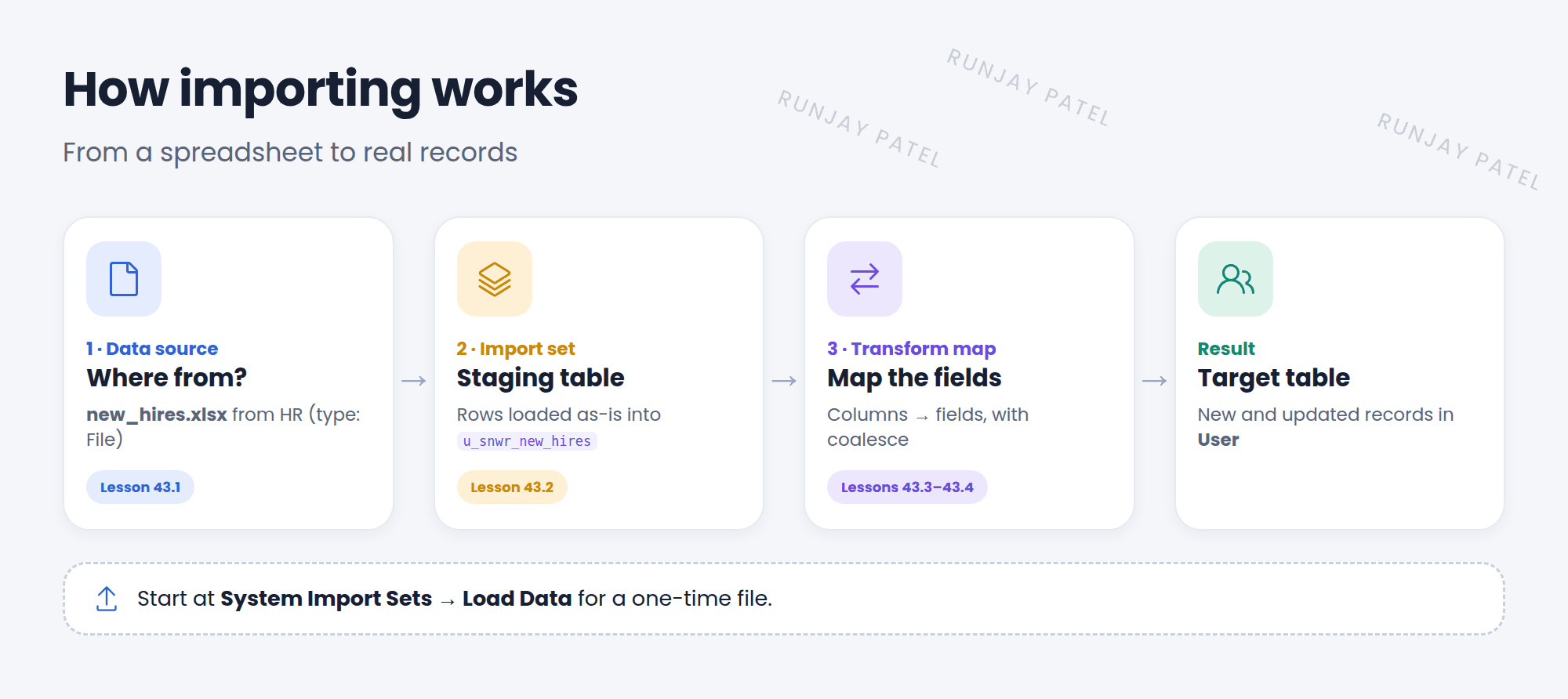
SNWR just hired 40 people. HR sends a spreadsheet. Typing 40 users by hand? No thanks! 😅 ServiceNow can import the file for you, in three stages.
2 Data sources
Key term: Data source
A record that says where the data comes from and how to read it. Find them in System Import Sets > Administration > Data Sources.
| Type | Reads from | Example |
|---|---|---|
| File | An attached or remote file: CSV, Excel, XML, JSON | new_hires.xlsx from HR |
| JDBC | A database, usually through a MID Server | The payroll database |
| LDAP | A directory, like Active Directory | Company user accounts |
| REST (IntegrationHub) | A web API | A cloud HR system |
| Custom (Load by Script) | Anything a script can read | A special format |
3 The quick way: Load Data
For a one-time file, use System Import Sets > Load Data. It creates the data source and staging table for you.
- Choose Create table and give the import set table a name, like SNWR New Hires.
- Choose File and pick your Excel or CSV file.
- Set the Header row (usually 1) and Sheet number for Excel.
- Click Submit. The rows load into the staging table.
💡 Good to know: On a saved data source, Test Load 20 Records tries just 20 rows. Great for checking the columns before you load thousands.
⚠️ Heads up: Clean your file first: one header row, no merged cells, no blank columns, and the same format in every row. Messy files make messy data.
⭐ Remember: Import = data source → import set (staging) → transform map → target table.
4 Let’s try it: load a small file
- Make a CSV with columns: First name, Last name, Email, Department. Add 3 made-up SNWR people.
- Go to System Import Sets > Load Data. Create a table named SNWR New Hires. Upload your file.
- Submit. Then click Loaded data to see the rows in the staging table.
- Check Administration > Data Sources. Is there a new data source?
5 Quick recap
- Importing has three stages: data source, import set, transform map
- A data source says where the data is and how to read it
- Types: File, JDBC, LDAP, REST, Custom
- Load Data is the quick way for one file
- Clean your file before you load it
6 Check yourself
Think of your answer first. Then tap to check.
1 Put these in order: transform map, data source, import set. Show answer
Data source, import set, transform map.
2 Which data source type reads user accounts from Active Directory? Show answer
LDAP.
3 How can you try a data source on just a few rows? Show answer
Use Test Load 20 Records.
Nice work! You finished this lesson. 🎉
Was this lesson helpful?
Please log in to share lesson feedback.
Have a question or doubt?
Ask here and get help from instructors and fellow learners.
Only logged-in learners can post.





