


Transform Maps
On this page
In this lesson, you will learn:
- What a transform map does
- How to map staging columns to target fields
- The key options on a transform map
1 From staging to the real table
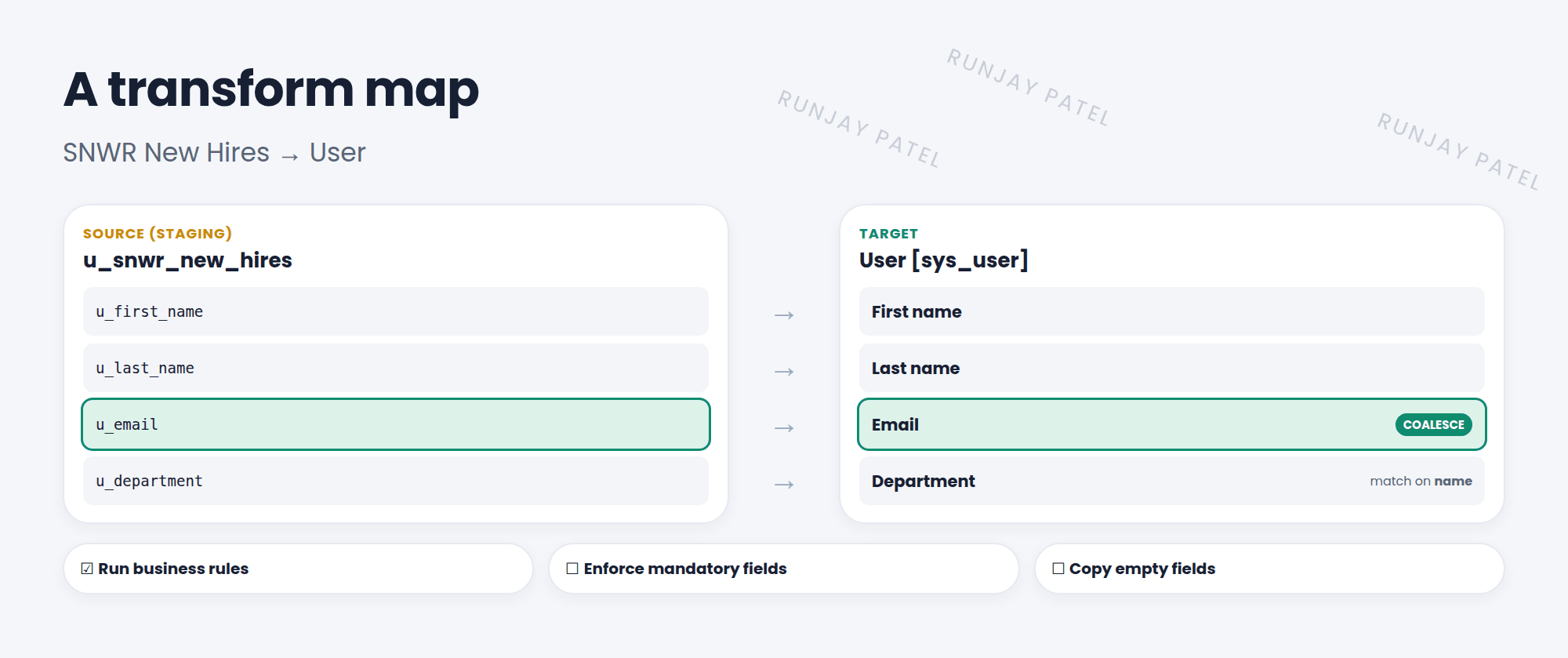
Your new hires are sitting in the staging table. Now they need to move into the User table. A transform map is the set of directions: “this column goes into that field”. 🗺️
Key term: Transform map
Rules that copy data from a source table (the staging table) to a target table, using field maps. Find them in System Import Sets > Administration > Transform Maps.
2 Building a transform map
- Create a new transform map. Source table: your staging table. Target table: User. Save.
- Click Auto Map Matching Fields to map columns with the same names.
- Use Mapping Assist to drag the rest together, like
u_email→ Email. - Open your staging import set and click Transform (or use Run Transform).
3 Key options
| Option | What it does |
|---|---|
| Run business rules | Runs the target table’s business rules on each record. Usually leave it on |
| Enforce mandatory fields | Rejects rows that leave mandatory target fields empty |
| Copy empty fields | Copies blank values over existing values. Off by default, so blanks don’t wipe data |
| Order | Which map runs first, if one source has several maps |
4 Reference and choice fields
- Reference fields (like Department): the file has a name, like “Sales”. The field map’s Referenced value field name tells ServiceNow which field to match on, like
name. - Choice fields: the Choice action decides what happens to values not in the list: create a new choice, ignore the field, or reject the row.
⚠️ Heads up: Without a coalesce field, every transform inserts new records. Load the same file twice, and you get duplicate users! You’ll fix that in Lesson 43.4.
⭐ Remember: Transform map = source (staging) + target + field maps. Try Auto Map, then Mapping Assist.
5 Let’s try it: create the users
- Create a transform map from SNWR New Hires to User.
- Map First name, Last name, and Email. Map Department with Referenced value field name
name. - Run the transform. Check the Transform History. How many were inserted?
- Open User Administration > Users and find your new people.
6 Quick recap
- A transform map copies staging rows into a target table
- Field maps connect columns to fields
- Auto Map and Mapping Assist make mapping quick
- Reference fields match on a field, like
name - No coalesce = always insert
7 Check yourself
Think of your answer first. Then tap to check.
1 In a transform map, what is the source table? Show answer
The import set (staging) table.
2 Your file has department names, but Department is a reference field. What do you set? Show answer
Referenced value field name, like name.
3 Which option stops blank values from wiping existing data? Show answer
Leave Copy empty fields unchecked (the default).
Nice work! You finished this lesson. 🎉
Was this lesson helpful?
Please log in to share lesson feedback.
Have a question or doubt?
Ask here and get help from instructors and fellow learners.
Only logged-in learners can post.





